5 Essential Checklist Items Before Launching a wadiz Project: Story, AI Review, and Complete Documentation
Updated: June 26, 2026
What this article covers
- 3 must-have items in your story
- Prepare documents before project opening: Required documents vary by type
- AI Pre-Review Before Open, How to Check Story Pre-Review
- Based on rewards categories that require adult authentication
- Rewards options that you must check if you are a preorder
5 Key Checklists Before Funding Opens
| Check Items | Key Content Summary | Application Type | Mandatory before opening |
| Story Required | Rewards introduction, maker introduction, funding reasons, and funding plans | Funding/Freedomer Common | Essential |
| Preorder Conditions | Includes special benefits for Wadiz supporters only | Free order | Essential |
| AI Pre-screening | Up to 5 times before opening, 3 to 15 minutes to receive results | Funding/Freedomer Common | Select (Recommended) |
| Adult Authentication Settings | Restricted rewards for minors, such as alcohol, cigarettes, and adult products, must be set up with a check box | Applicable category only | Required if applicable |
| Preparation of screening documents | Different documents by project type and reward category | Funding/Freedomer Common | Need to check schedule by item |
1. 3 must-have items in your story
In order for supporters to trust and participate in the project, the project story must include the reward key points and introduction, the maker introduction, the reason for the funding opening, and the plan to use the funding.
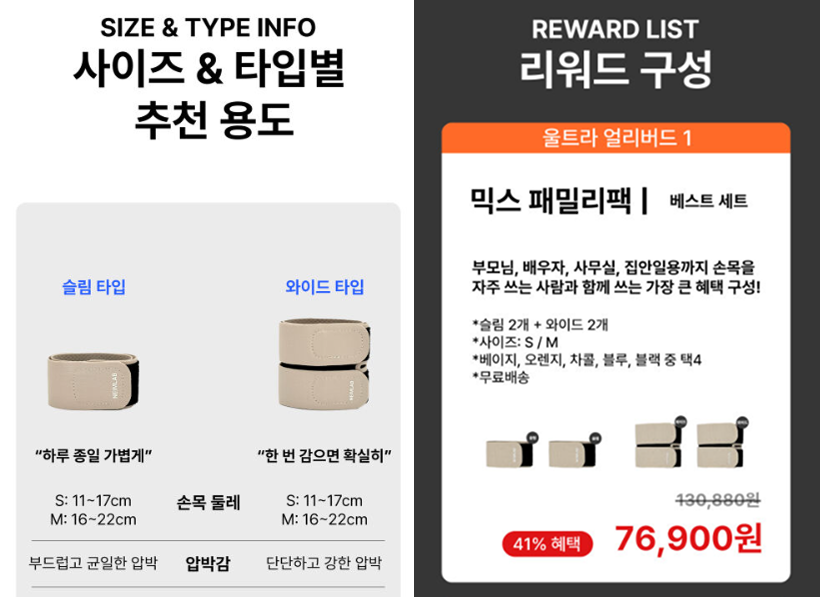
1) Rewards Key Points and Introduction
Please fill out the reward information specifically so that you can understand at a glance what supporters are receiving.
- What to write: Rewards Photo, Rewards Configuration, Price and Option Information
- example
2) Maker Introduction
Introducing authentic makers is an important factor in determining participation in funding by moving the hearts of supporters. Due to the nature of funding, which takes longer to receive rewards than regular purchases, the more honest you write about what kind of person the maker is and why you started the project, the better the authenticity of the story is delivered.
- What you write: Maker physical photos, expertise and experience in areas related to funding, and issues you want to solve
- example

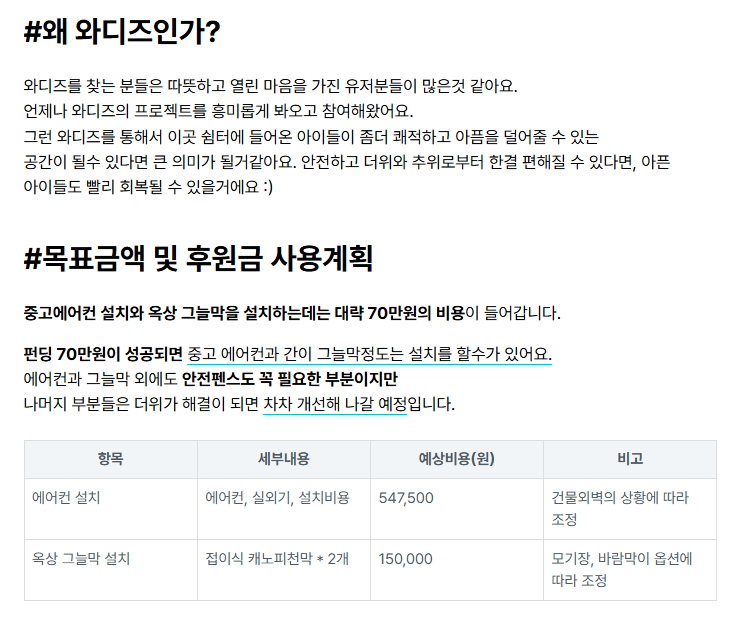
3) Reasons for Funding Open and Planning to Use Funding
If you write specifically why you started the project and how you will spend the funding, your supporters can trust you more.
- What You Write: Why You Are Funding at Wadiz, Changes You Want To Make With Funding, and Plans To Use Funding
- example
2. Prepare documents before project opening: Required documents vary by type
I need to prepare the necessary documents according to the type of project and the time of submission.
| Check it out first | Why do I need to check? |
| Project Type | It depends on whether you are funding or preordering. |
| the time of filing a document | Not all documents are submitted before opening. Some documents can be submitted before the reward is sent. |
In addition, the most common questions when manufacturers prepare are 'whether they really need an actual photo' and 'whether they need an advertisement review certificate like health functional foods or medical devices'. You can find more information in Top7 questions that makers have the most when preparing.
3. AI Pre-Review Before Open, How to Check Story Pre-Review
In the Maker Studio's story writing menu, you can get an AI pre-screening before the project opens.It can be used for free up to five times, and Wadiz monitors advertising deliberation standards through AI even after the project is opened, so if you check it in advance, you can reduce the situation where you have to modify the story after the opening.
1) How can I get the AI pre-screening? (Step 3)
STEP1. Creating a Story Item
- Maker Studio > Creating a Story
- Enter all representative image, title, body, and reward information
STEP2. Select Category
- Project Information > Review Documents > Select Category
- AI screening criteria vary by category
STEP3. Application for AI screening and confirmation of results
- Click the [AI Review] button on the toolbar to the right of the screen
- Receive Kakao Talk notification in about 3 to 15 minutes
- If you point out anything, you can re-apply after revising it (up to 5 times)
2) AI Pre-screening FAQs
|
Question
|
Answer
|
| Will it cost you anything? | No, it's free of charge. |
| How many times can I get it? | It's up to five times. |
| Can the results of the AI pre-examination and post-opening examination be different? | Yes, the criteria may vary in part. |
| Can I still receive it after submitting it? | No, it's only available before submission. |
| Do I have to get it? | It's optional, but I recommend it to reduce the request for modifications after opening. |
3) 4 Items That AI Automatically Monitors Since Open
When the project is opened, the post-examination will begin automatically. AI checks the following four items quickly and accurately.
- False advertising and false patents or certifications
- Brand impersonation or not
- External Platform Redundancy
- Does it contain policy violations in the story
If anything needs to be corrected is found, Wadiz will inform you separately, and depending on the seriousness of the content, it can lead to a project suspension or cancellation, not just a request for correction. That's why pre-opening story checks are important.
4. Based on rewards categories that require adult authentication
Rewards that cannot be provided to minors, such as alcohol, cigarettes, and adult products, or that are considered harmful to adolescents, must be set up for adult authentication. In addition, even after setting, the title and representative image are exposed to all users and must comply with all age standards.
|
Sortation
|
Examples of corresponding rewards
|
| legally restricted items | Liquor (beer, soju, wine), tobacco (annual, mucocotin smoking cessation supplements), adult products, some medicines |
| a judgment of the harmfulness of juveniles | Violent and selective content, Wadiz judgment criteria harmful content |
How to set up adult authentication
- Maker Studio > Project Information > Check Adult Certification
5. Rewards options that you must check if you are a preorder
The preorder project must include a special reward option for Wadiz supporters only. As it is a pre-purchase service that adds special value to existing products, it can be opened only when it corresponds to at least one of domestic alone, special composition, and limited edition.
On the other hand, it is not recognized as a pre-order simply because of fast delivery or some improvements to existing products. Also, please make sure to fill out the relevant information at the top of the story (just below the representative image) so that supporters can check this reward option right away. Check the table below to see if my reward fits the preorder conditions.
※ This is a checklist that only applies to preorder projects, not funding.
|
type
|
example
|
Whether it's possible or not
|
| domestic alone | Wadiz-only configurations that are not on other platforms | possibility |
| Special Configuration | Special Edition, Limited Package | possibility |
| a limited edition | Limited quantity, special offer for a limited time | possibility |
| Quick delivery | Delivery faster than regular delivery | impossible |
| simple improvement | Slightly improved version of existing product |
impossible
|
What additional things should I check in the preorder?
In addition to the special benefit conditions, we also need to check the basic requirements, legal requirements, and whether we write essential items in the story before opening. Some sensitive items are advertised together, so there may be additional things to prepare depending on the reward category. Please refer to the three things you need to check before opening the preorder project.
Frequently Asked Questions (FAQ)
Q. Can I open the project right away?
A. Yes, it's possible. After all projects are completed, you can open them on the desired date and time through the Open Book button.
Q. Do I have to undergo AI pre-screening before opening?
A. It's not a must, but I recommend it. There are three advantages of AI screening.
- You can reduce unnecessary modification requests by more than 90% after opening.
- It's free and can be used up to five times.
- You can get the results in 3 to 15 minutes.
After all, a successful project starts with meticulously preparing the required checklist before opening. Wadiz will help you with your ideas so that you can meet your supporters quickly. Finalize my project with this checklist right now, and reliably open up your first start!
It starts with Wadiz, Just Start on Wadiz
From funding preparation to success, the actual guide will be provided at the Wadiz Maker Center