How to Use Guarantee Insurance to Increase Ad Postpaid Payment Limit (Individual Business Owner)
*Starting June 24, 2025, the term 'Postpaid Money' has been changed to 'Postpaid Payment'
What is increasing the ad postpaid payment limit using guarantee insurance?
If you are already able to use postpaid payments, but want to increase beyond the basic limit and performance-linked limit amount,
you can increase it through guarantee insurance subscription and insurance certificate submission.
What is the postpaid payment limit increase amount when using guarantee insurance?
When submitting a guarantee insurance certificate, you can additionally increase by the amount of the guarantee insurance.
(Example: Basic limit 5 million won + Guarantee insurance 10 million won → Postpaid payment limit increased to 15 million won)
How to increase postpaid payment limit through guarantee insurance subscription
1. Complete the application form for guarantee insurance subscription (▶Apply)
- If you complete the application form at the link above, we will send you a contract for guarantee insurance subscription to your email within 2 business days.
- The guarantee insurance contract can be issued after the project is finally approved and you confirm the project schedule.
- The guarantee insurance subscription period must include from the project's scheduled opening date (or project start date if the scheduled opening is not proceeding) to 3 months after the project end date.
2. Guarantee Insurance Subscription
The following procedures apply to individual business owners. For corporate business owners, please check here.
※ Guarantee insurance coverage approval and subscription amount are determined based on your credit rating and other information.
Typically, about 5% of total guarantee insurance requests are rejected,
so please contact SGI Seoul Guarantee Seongnam Branch Jonggak Central Agency (031-701-9002) or check the nearest branch through their homepage before proceeding with guarantee insurance subscription for postpaid payment limit increase.
① Access the SGI Seoul Guarantee homepage (www.sgic.co.kr).
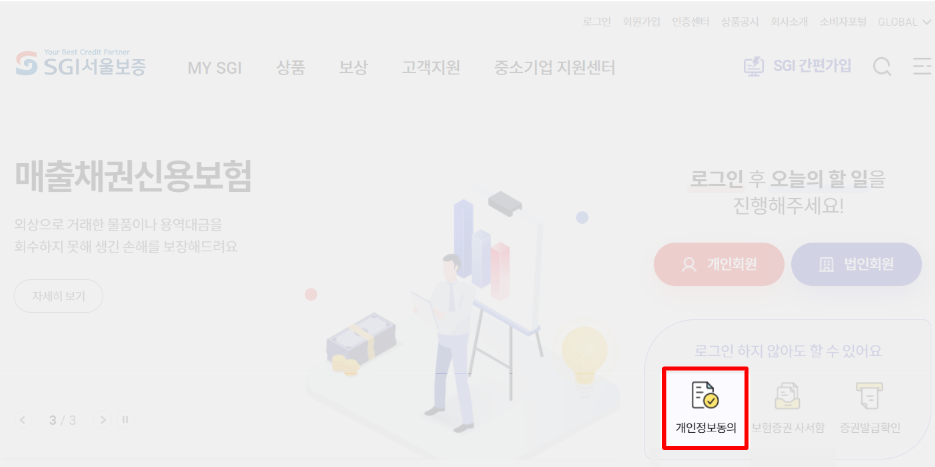
② Click [Personal Information Agreement] on the SGI Seoul Guarantee homepage main screen.
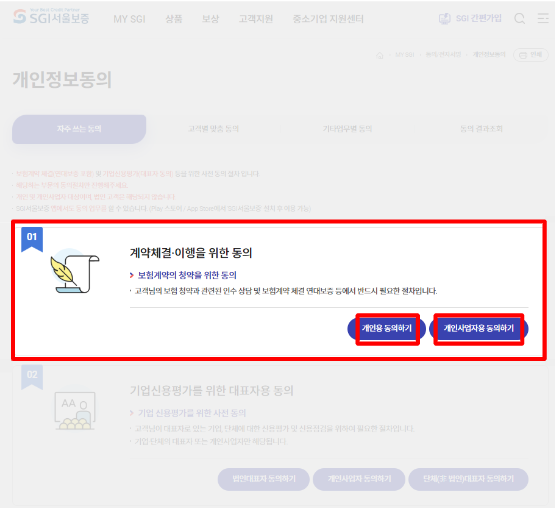
③ Click 'Agree for Individual Business Owner' in the agreement for contract execution.
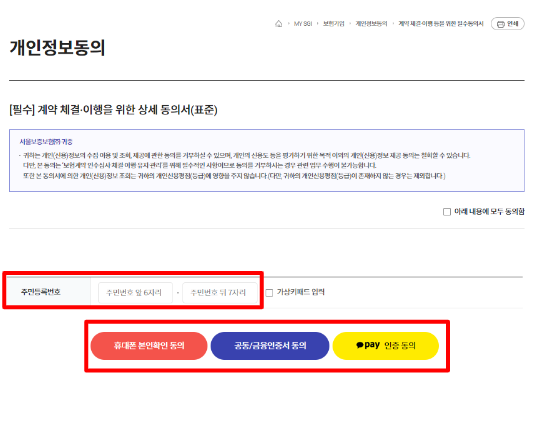
④ Verify the detailed contents of the personal information agreement form, check 'Agree', enter resident registration number, and complete the agreement process by selecting mobile authentication, joint/financial certificate, or Kakao Pay authentication.
⑤ After confirming the nearest branch through SGI Seoul Guarantee Seongnam Branch Jonggak Central Agency (031-701-9002) or homepage, contact them to proceed with approval review for subscription eligibility, and then verify the required documents according to the subscription amount.
⑥ When insurance subscription review is completed, a KakaoTalk notification requesting electronic signature will be sent. Upon receiving the notification, log in to the SGI Seoul Guarantee website (www.sgic.co.kr) > Joint Certificate Login.
*If logging in with a method other than joint certificate, there may be restrictions on insurance subscription services.
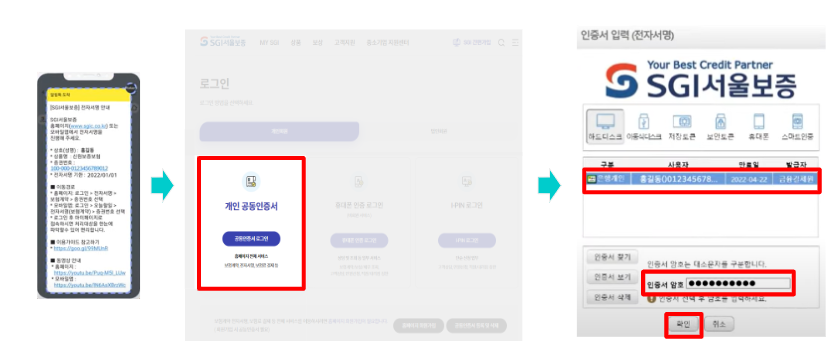
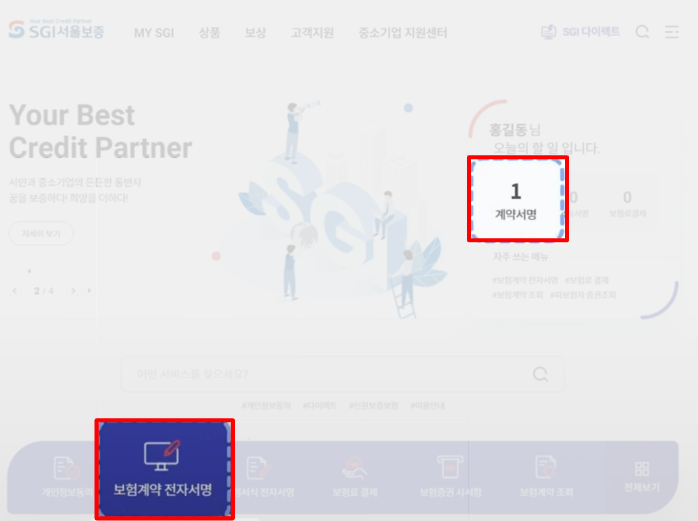
⑦ After logging in, click [Insurance Contract Electronic Signature] at the bottom of the screen.
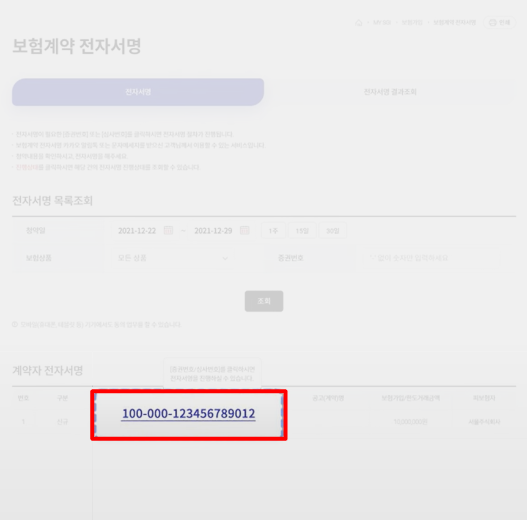
⑧ Click the certificate number of the insurance you wish to subscribe to in Contract Holder Electronic Signature.
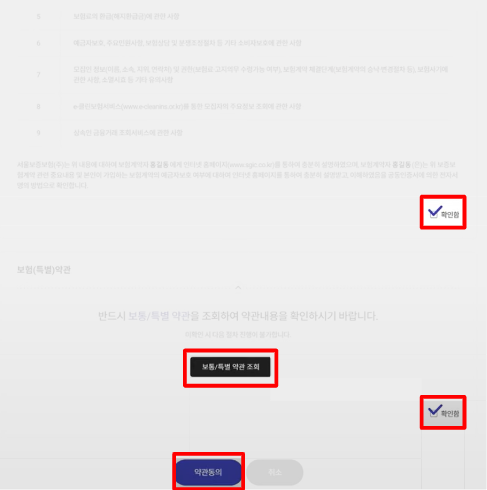
⑨ After reviewing all proposal details, check the confirmation checkbox, agree to the terms, and click electronic signature.
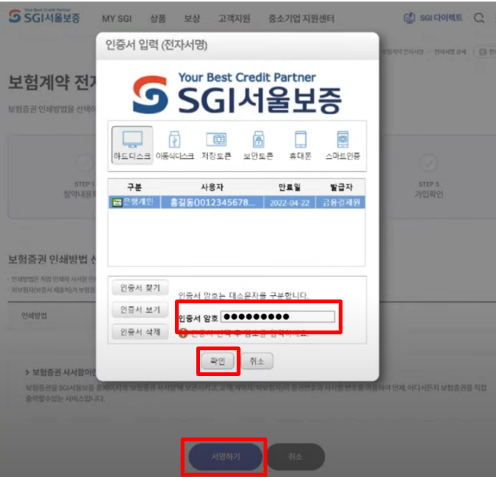
⑩ Click [Sign] and enter the certificate password to complete the signature process.
⑪ Click [Insurance Premium Payment] on the SGI Seoul Guarantee homepage.
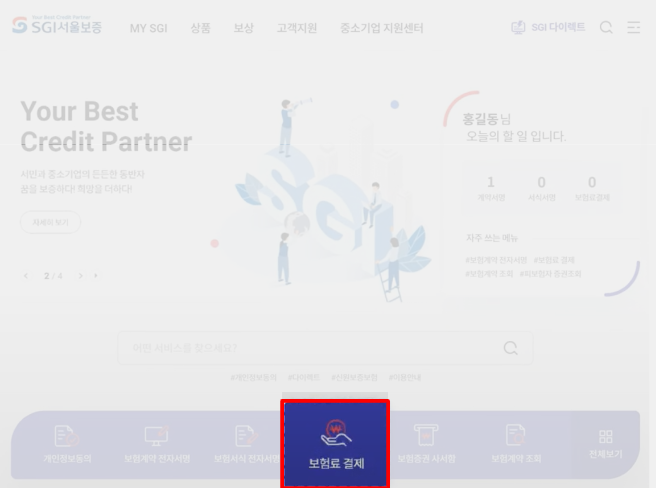
⑫ Click [Certificate Number] among the payment targets to verify the payment target, check [Selection Box], and click [Move to Next Step].
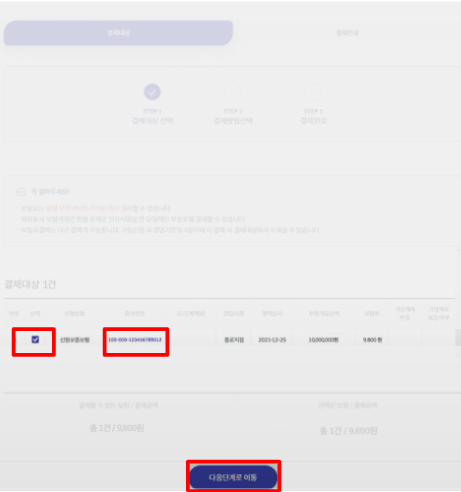
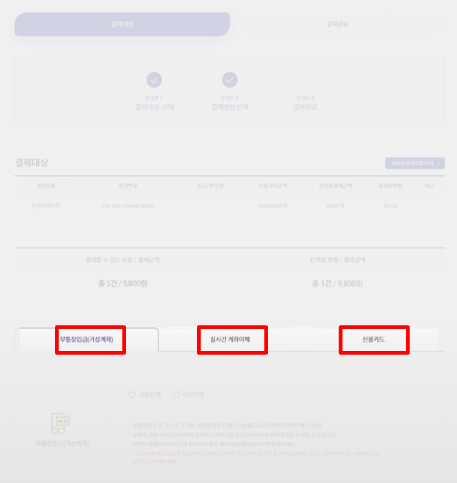
⑬ Payment is available from 09:00 to 17:30 on weekdays. Select a payment method from bank transfer, real-time account transfer, or credit card to proceed.
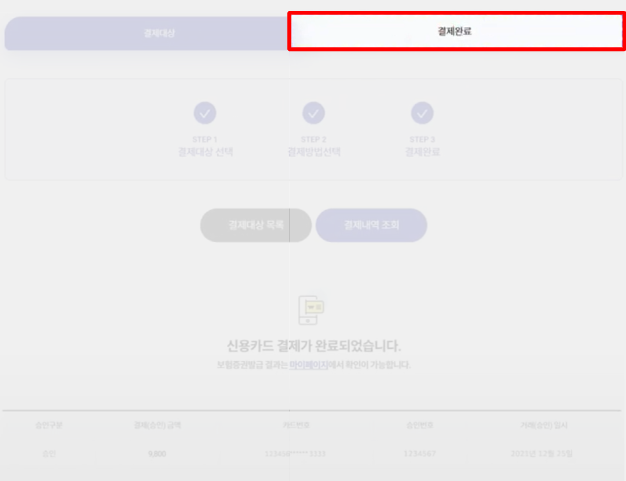
⑭ Once insurance premium payment is completed, you can verify the payment details in the [Payment Complete] tab.
⑮ Verify the certificate number and insurance certificate mailbox number through the KakaoTalk notification or receipt sent in the insurer's name, and move to [Insurance Certificate Mailbox] on the SGI Seoul Guarantee homepage.
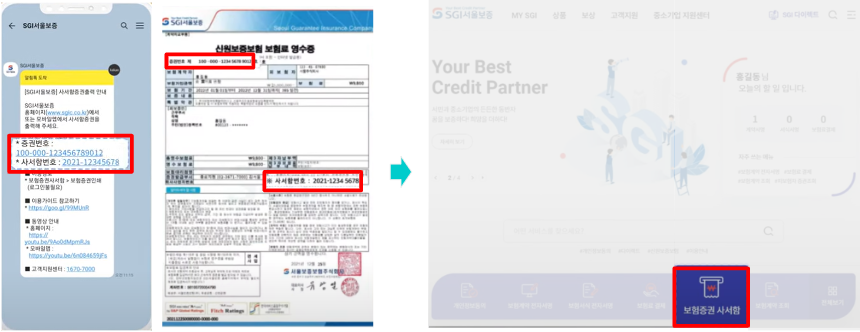
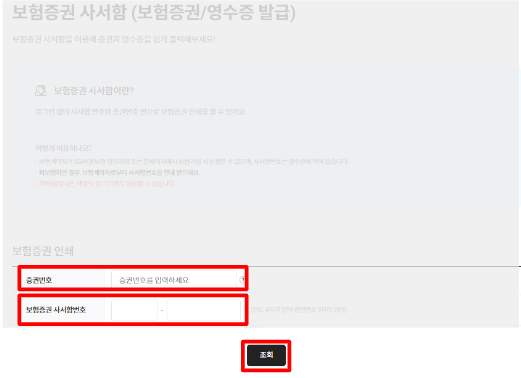
⑯ In the insurance certificate mailbox, enter [Certificate Number] and [Insurance Certificate Mailbox Number] and click [Search] button.
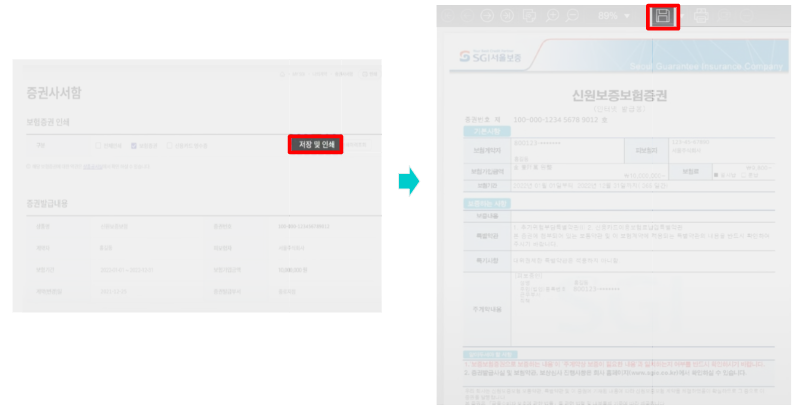
⑰ Click [Save and Print] button and click [Save] icon to download the file.
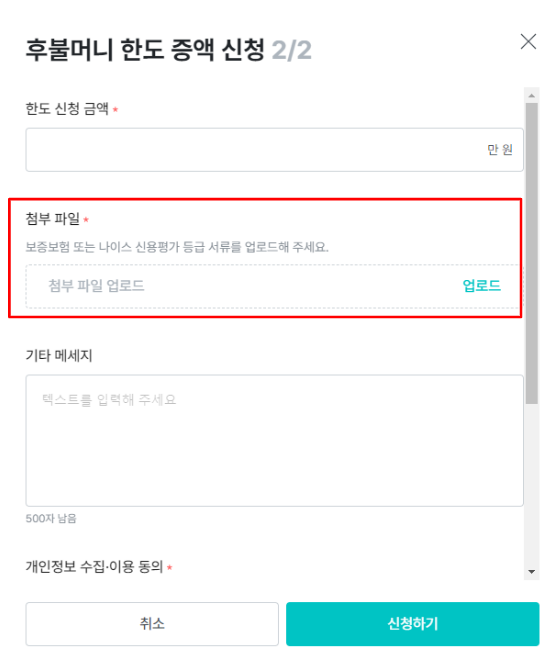
⑱ After purchasing guarantee insurance, click [Limit Increase Application] button in Ad Center > Payment Management > Postpaid Payment with the issued insurance certificate.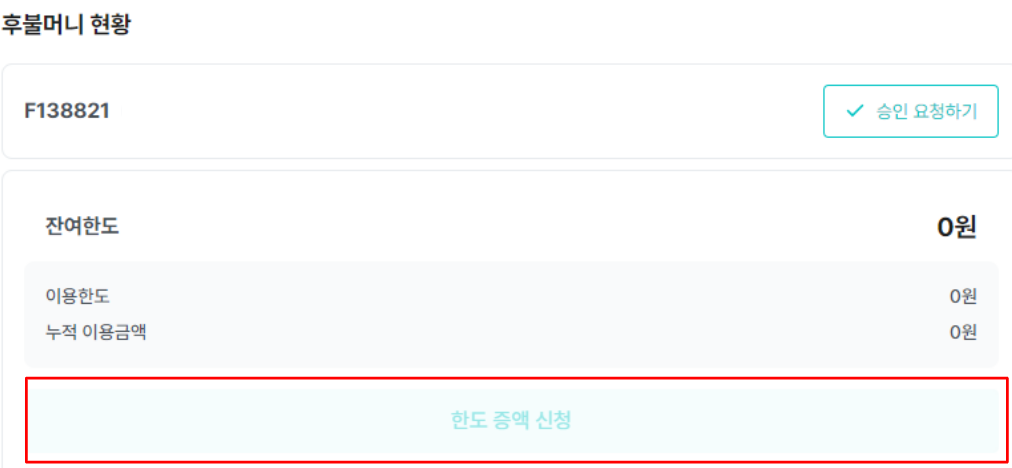
⑲ Complete the application in the postpaid payment limit increase request by attaching the guarantee insurance certificate as an attachment.
⑳ Your postpaid payment guarantee insurance limit will be increased. (Up to +3 business days from the date the insurance certificate is sent)