How do global makers pay for advertising?
Yes. Global makers can run ads on Wadiz. Simply top up your Biz Money, and you can use every ad product in the Ad Center and Biz Center just like a Korean maker.
What is Biz Money? A prepaid balance used to pay for ad products in Wadiz Ad Center and Biz Center. It is managed by business registration number and can be used for Funding, Pre-order, and Store projects.
Global maker: a maker whose registered business address is outside of Korea.
1. Two ways to top up
|
Card
|
Bank transfer
|
|
| Payment method | Credit/debit card enabled for international payments | International wire transfer |
| Currency | KRW | USD, CNH, HKD |
How to Request |
Directly in Ad Center / Biz Center | Contact customer support first |
| Reflected | Immediately | After payment is confirmed (business days) |
| Best for | Smaller amounts, immediate launch | Large top-ups exceeding your card limit |
| Receipt | Invoice available | Invoice available |
Please note
- Global makers can pay for ads using Biz Money only. Deferred payment (deduction from settlement) is not available.
- Bank transfers are supported in USD, CNH, and HKD only. CNY and KRW transfers are not supported.
- We issue an invoice instead of a Korean tax invoice.
2. Topping up with a credit/debit card
- Log in to Ad Center or Biz Center.
- Select “Charge Biz Money.”
- Enter the amount in KRW and pay with a card enabled for international transactions.
- The balance is updated immediately, so you can submit your ad right away.
Installment payments are not supported. If your card limit is too low for the amount you need, please use the bank transfer method below.
3. Topping up via bank transfer
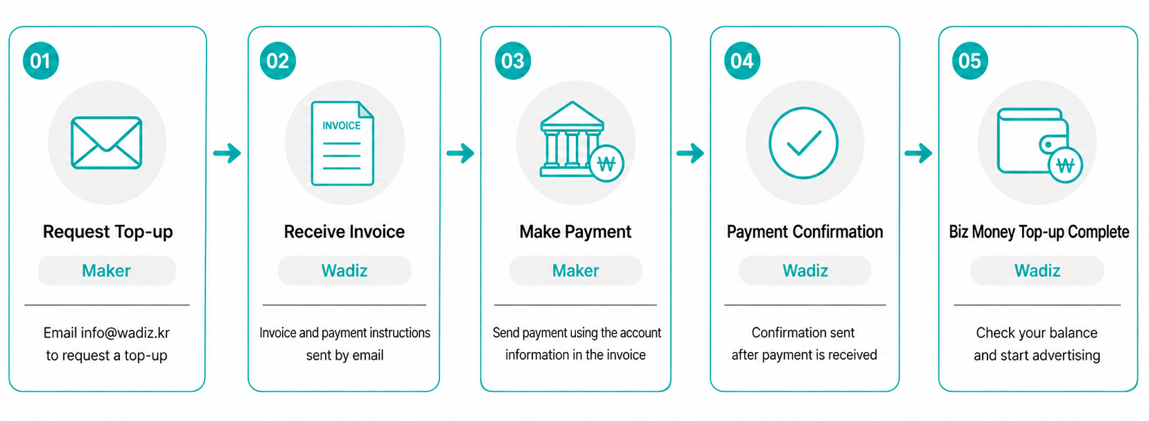
STEP 1. Contact customer support Email info@wadiz.kr with the following information. Providing complete details allows us to issue the invoice more quickly.
[Biz Money – Bank Transfer Top-Up Request]
1. Company name:
2. Country of business registration / registration number:
3. Wadiz Maker account email:
4. Top-up amount (in KRW):
5. Preferred remittance currency (USD / CNH / HKD):
6. Email address to receive the invoice:
7. Contact person / phone:
STEP 2. Receivethe invoice The Wadiz ad team reviews your request and emails you the invoice along with remittance instructions.
STEP 3. Send the payment Please wire exactly the amount and currency stated on the invoice. A mismatched amount requires additional verification and delays the process.
STEP 4. Wadiz confirms receipt Once payment is confirmed, your manager will notify you. Processing occurs on business days, and confirmation times may vary depending on the remitting bank and currency.
STEP 5. Checkyour balance and launch Check your credited balance in Ad Center / Biz Center and submit your ad.
4. FAQ
Q. Can I use deferred payment?
No. Global creators can only use Biz Money (prepaid).
Q. Can I make a payment in CNY?
No. Only USD, CNH, and HKD are supported. KRW transfers are not supported either—for KRW, please pay by card.
Q. Can I get a Korean tax invoice?
We issue an invoice instead.
Q. Can I get a refund for my Biz Money?
You may request a refund after all ad campaigns have ended and settlement is complete. Remittance fees and foreign exchange differences are non-refundable.
The payment link isn’t on a wadiz.kr domain—is it safe?
We send payment links through a global payment service, so the domain may differ.
However, Wadiz sends invoices and remittance instructions only from an @wadiz.kr email address or your official Wadiz manager.
Never make a payment to an account or via a link received through any other channel—please verify with info@wadiz.kr first.
Contact: info@wadiz.kr