How do overseas creators get paid for ads?
Overseas creators can also run ads on Wadiz. Simply top up your Biz Money balance to access all advertising products in the Ad Center and Business Center, just like Korean creators.
What is Biz Money? It is a prepaid payment method used to purchase advertising products in the Wadiz Advertising Center and Business Center. It is managed by business license number and can be used for crowdfunding, presales, and marketplace projects.
Overseas Creators: Creators whose business license registration address on file is outside of South Korea.
1. Two Top-Up Methods
|
Bank Card Top-up
|
Bank Transfer
|
|
| Payment Methods | Credit or debit cards that support international payments | Cross-border bank transfer |
| Supported Currencies | KRW (South Korean Won) | USD, CNH, HKD |
| How to Apply | Top up directly in the Ad Center / Business Center |
Contact customer service first |
| Funds Availability | Instant | After confirmation of receipt (processed on business days) |
| Applicable Cases | Small amounts requiring immediate deployment | Large top-ups exceeding bank card limits |
| Documentation | Invoices can be issued | Invoice can be issued |
Please Note
- Overseas creators can only use Biz Money to pay advertising fees; the “pay later” (settlement deduction) method is not available.
- Bank transfers are supported only in USD, CNH, and HKD; CNY and KRW are not supported.
- We issue invoices but do not provide Korean tax calculation statements.
2. Credit/Debit Card Top-up (Instant Credit)
- Log in to the Ad Center or Business Center.
- Select [Top Up Biz Money].
- Enter the recharge amount (KRW) and complete the payment using a bank card that supports international transactions.
- The balance will be credited instantly, and you can apply for ads immediately.
Installment payments are not supported. If your credit card’s single-transaction limit is insufficient, please use the bank transfer method below.
3. Bank Transfer Top-Up
[Flowchart Insertion Point]
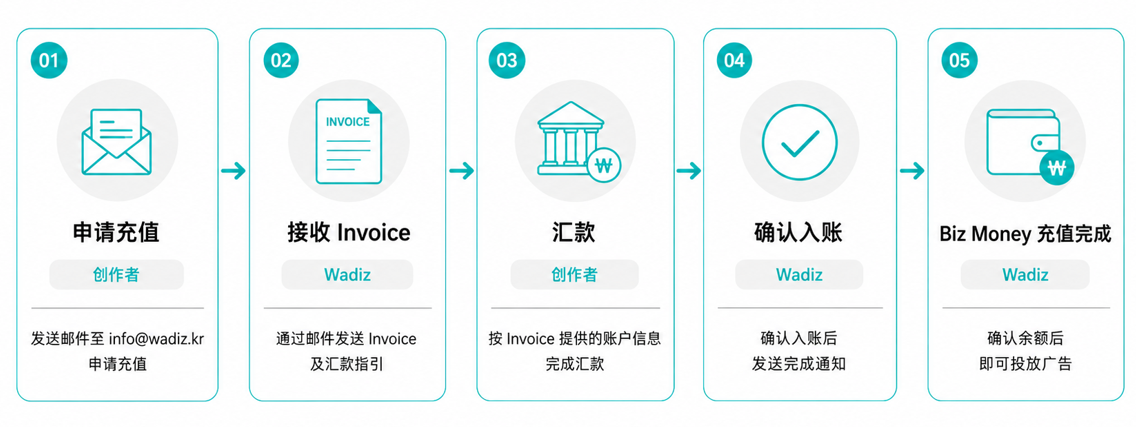
STEP 1. Contact Customer Service Please send the following information to info@wadiz.kr. Providing complete information will speed up the invoice issuance process.
[Biz Money Bank Transfer Top-Up Request]
1. Company Name (as listed on the Business License):
2. Country of Business License Registration / License Number:
3. Wadiz Creator Account Email:
4. Desired Top-Up Amount (in KRW):
5. Desired currency for the transfer (USD / CNH / HKD):
6. Email address to receive the invoice:
7. Name and contact information of the person in charge:
STEP 2. Receive the Invoice Once the Wadiz advertising team confirms your application, they will send you an invoice and payment instructions via email.
STEP 3. Make the Payment Please transfer the exact amount and currency specified on the invoice. If the amount does not match, additional verification will be required, which may extend the processing time.
STEP 4. Wadiz Confirms Receipt of Payment: Once the payment is confirmed, the contact person will notify you. Processing takes place on business days, and the specific confirmation time varies depending on the sending bank and currency.
STEP 5. Check Your Balance and Run Ads Once you’ve confirmed your available balance in the Ad Center or Business Center, you can apply to run ads.
4. Frequently Asked Questions
Can I use post-payment?
No. Overseas creators can only use the Biz Money (prepaid) method.
Can I make a transfer in CNY?
No. Only USD, CNH, and HKD are supported. You cannot make transfers in KRW either; if you need to pay in KRW, please top up your account using a bank card.
Can you issue a Korean tax invoice?
We have switched to issuing invoices.
Can I get a refund for Biz Money I’ve added to my account?
You can request a refund once all advertising campaigns have ended and settlement is complete. Transfer fees and exchange rate differences are not included in the refund.
The payment link I received isn’t from the wadiz.kr domain—is it safe?
We send payment links through a global payment service, so the domain name may differ.
However, Wadiz invoices and payment instructions are sent exclusively through @wadiz.kr email addresses or your dedicated account manager’s official channels.
Please do not transfer funds to accounts or links obtained through other channels. If you have any questions, please email info@wadiz.kr first to verify.
Inquiries: info@wadiz.kr