[Content Director’s Column #2] Page Order: I’ll Just Set It for You.
This content is
<Content Director’s Column>
series.
Be sure to check this out!
- I’ll explain how to modify your wadiz product detail page when posting it on other platforms.
- I’ll outline the standard structure for product detail pages that applies across all platforms.
- I’ll explain the basic concepts of product detail pages in an easy-to-understand way.
Can I just copy the product description page from wadiz
elsewhere?
It’s half true and half false.
There are platforms where long product pages, like those on wadiz, work well, and others where they don’t. It’s a fundamental rule that your product detail page should be tailored to the specific platform you’re using—even if the product itself is the same. For example, on Coupang, where fast delivery is a top priority, customers aren’t likely to bother reading a long product description. What matters most to them is, “So, when will it arrive?”
Conversely, Naver Smart Store is a bit different. Customers know that if they need fast shipping, they can simply open the Coupang app, select “Rocket Delivery,” and place their order—but the fact that they’ve come to Naver Smart Store means there must be a reason.
- It could be that customers enjoy the shopping experience itself—comparing brands and products as they browse product pages—
- or they may simply prefer to purchase reliable products from verified brands and sellers with a unique identity—even if it takes an extra day or two—rather than opting for faster shipping.
Therefore, a product detail page that works well on wadiz might not work just as well elsewhere. Eventually, every maker will reach a point where they need to revise their page, and I’ve found that the hardest part for most is condensing a long wadiz product detail page into a shorter one.
The structure of high-performing product pages is actually the same.
While the items, photos, and descriptions may differ, it’s a relief that the structure remains similar.
- Analyze the structure of product detail pages on top-selling online stores or Smart Store listings,
- and apply them to your own products.
Once you’ve createdyour brand’s own product page templateby benchmarking these examples, all you’ll need to do is update the product information as it changes. Does that make you feel a little more at ease?

Examples of Using Product Detail Page Templates
A single product page template can cover your brand’s diverse product lines
Let’s start by understanding the concept of a product detail page template
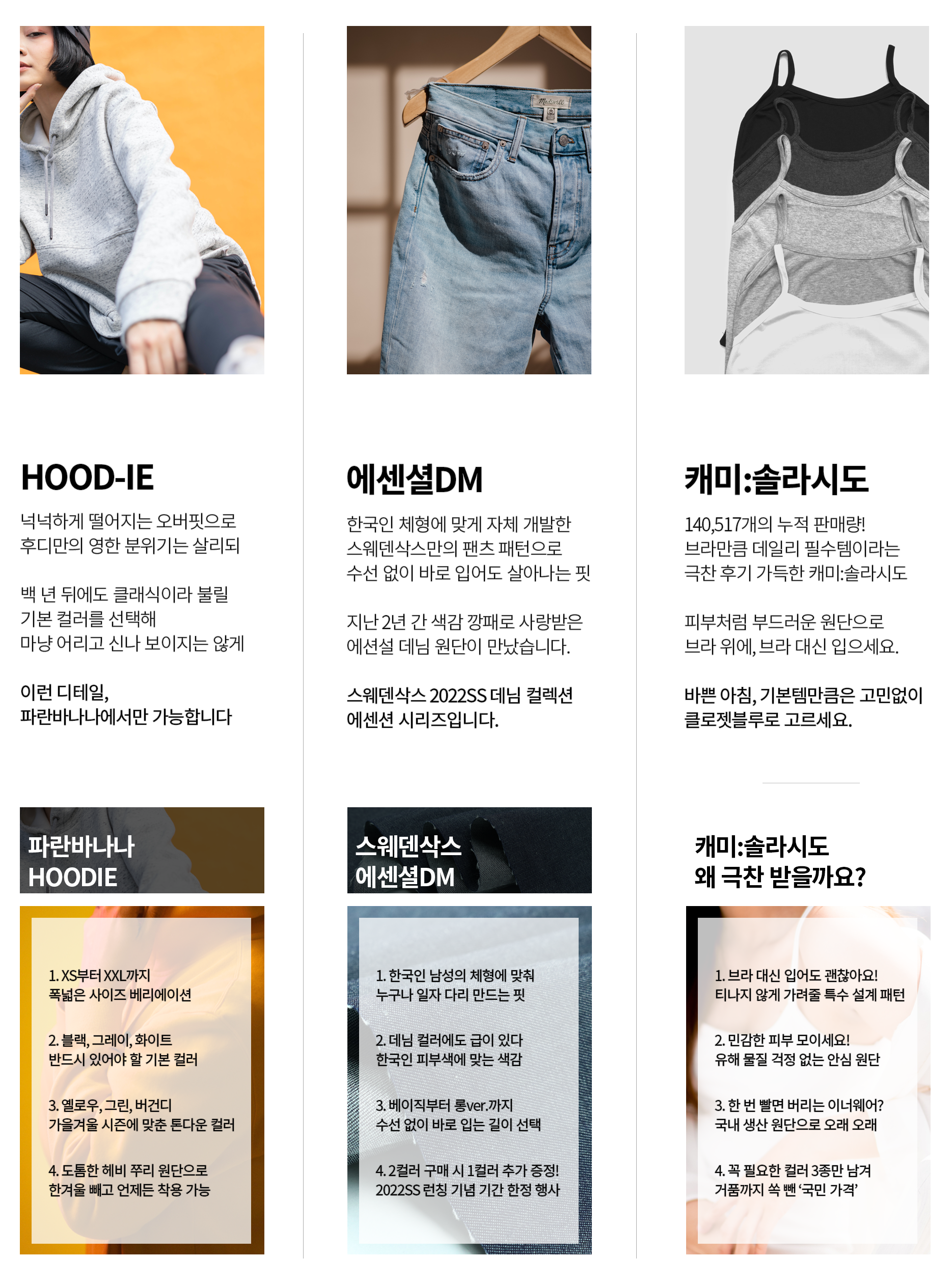
It refers to the framework of a product detail page, where the placement of content and the general order are predetermined. The examples shown above were created using a template. Even though they are product detail pages for different items—a hoodie, denim, and a camisole—their structure is identical when you break them down.

Having just one such template means you can create product detail pages much more easily—whether you’re selling hoodies, denim, camisoles, or even shoes and outerwear.
This also has a very positive impact on the customer experience. No matter which of our products a customer clicks on, they’ll see a detail page with the same layout, providing a consistent brand experience. Since they have a general idea of where to find specific information, their understanding of the detail page also improves.
Here’s the order for a high-performing template.
As a content director, I review hundreds of product detail pages on online shopping malls and Smart Store every day and analyze thousands of “blockbuster funding” Stories on wadiz. This is the basic template I’ve developed based on those insights. No matter which platform you use—even outside of wadiz—you’ll be able to complete your product detail page in no time.

The Structure of a High-Converting Product Page
Just understanding the concepts is half the battle
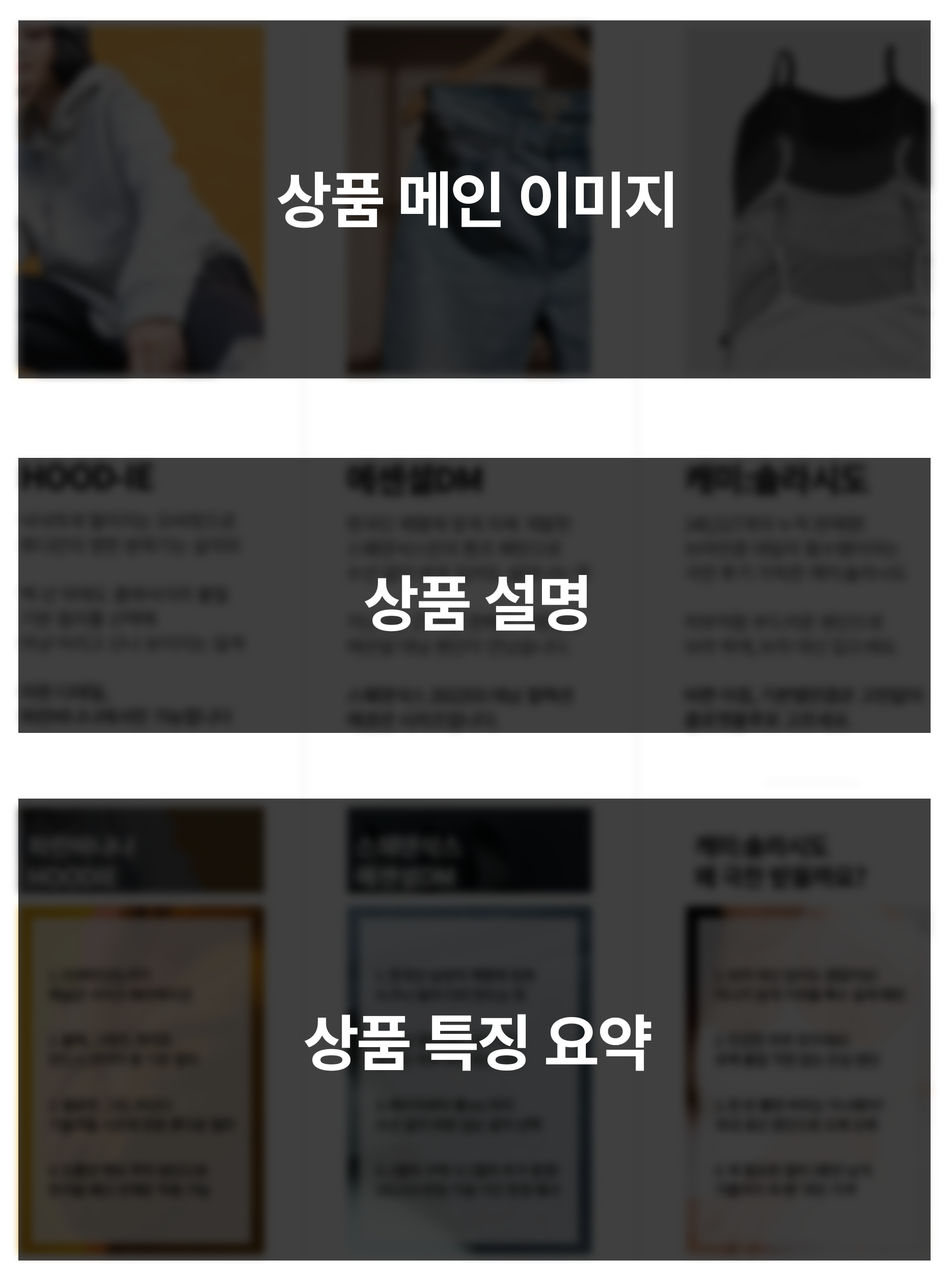
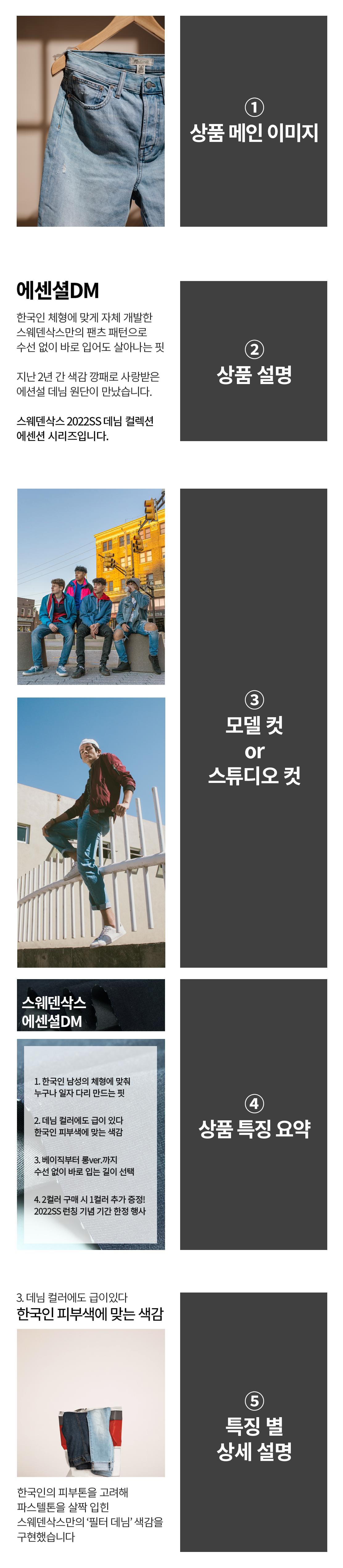
I’ll explain each concept one by one using a fashion brand as an example. The order listed here corresponds to the conceptual sequence of the product detail page shown in the image above.
1. Main Product Image
- You should include photos that show your product in its best light. High-resolution images are best.
- This is where customers form their first impression of your product, so it shouldn’t give off a dull or dreary vibe.
It doesn’t necessarily have to be a photo taken under bright studio lighting, but if possible, images taken under bright, natural lightare preferred. - I recommend avoiding text overlays in the images as much as possible.
If text is included in the image, it will be too prominent on mobile devices—where most purchases are made—causing customers stress because they can’t read it, and further stress because the product photo itself is obscured. That’s a failed first impression right from the start.
2. Product Description
- Just provide the three sentences that answer the question, “If you had to describe this product in exactly three sentences, what would they be?” It’s easy if you write it as if you’re summarizing the entire product detail page.
- It’s important not to come across as too stiff. Customers have just encountered your product for the first time, so they’re viewing it with a skeptical eye, their mental barriers firmly shut, as they begin to browse the product page. If you come across as stiff at this point, it’s no different from declaring, “I’m not here to sell,”so try using a slightly softer, more emotional tone.
- Instead of simply saying, “These are well-fitting jeans,” it’s better to add specific details before and after the statement, such as, “A fit that looks great right out of the box, no alterations needed.”
3. Model shots or studio shots
- If the main product image is the one that showcases the item best, it’s best to includea photo that effectively conveys the product’s “vibe.”
- Are you a fashion brand? People tend to gauge “vibe” from external elements like facial expressions and poses, soimages of a model actually wearing the product are generallymore effective than standalone product shots taken against a backdrop of props.
- For example, with denim, rather than showing a photo of the product itself, you could showcase a model shot that’s somehow irresistible—one where the model pulls off that “looks great right out of the package” fit to perfection. This conveys that when customers wear your denim, they too can exude that same irresistible vibe as the model.
4. Summary of Product Features
- Please summarize the key features of our product into about five points.Just because a product hasmany featuresdoesn’t automatically mean people will buy it(otherwise, MacGyver knives would sell tens of thousands a day, right?), so there’s absolutely no need to list every single one.
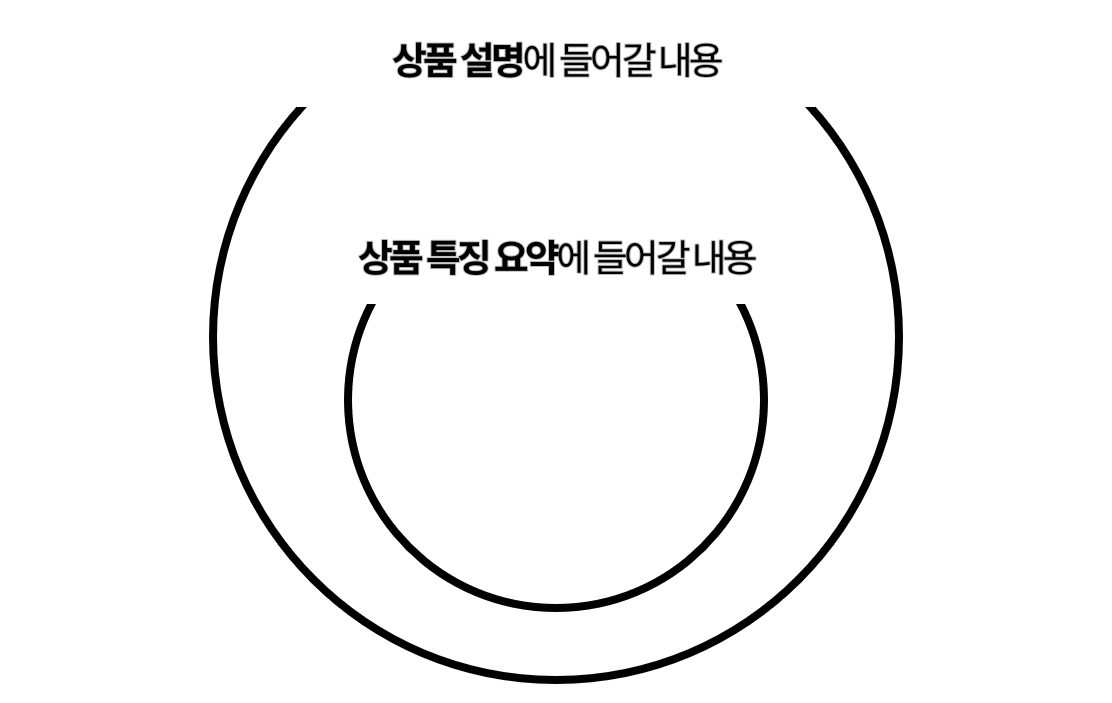
- “2. Product Description” is where you summarize the entire product detail page. If elements like the vibe of our product or details about ongoing promotions can be included in “2. Product Description,” the summary of product features should focus on the characteristics of the product itself.

5. Detailed Explanation by Feature
- This is where you expand on the features you briefly summarized earlier. For example, if you mentioned “colors suited to Korean skin tones” in “4. Summary of Product Features,” this is the time to include details on the product page—such as what specific denim colors are available, how many options there are, and how those colors can be styled.
- As I mentioned earlier, summarizing about five features is sufficient . However, if you listed 12 features in “4. Product Feature Summary,” that means you’ll need a total of 12 detailed explanations for each feature.Once you’ve mentioned a feature, be sure to provide a detailed explanation before moving on.
- Remember that excessively long product pages cause visitors to leave without even reading them, so keep in mind that having more features or a longer product page doesn’t necessarily lead to a purchase.
Apply these steps to our product in order, and
you’ll have a complete product detail page.
The first time you do this, it may take a few hours—or even a few days. However, since it’s a template with a set sequence, once you’ve created a few, you’ll pick up the pace, and eventually, your fingers—not your brain—will be completing the product detail page.
You should benchmark the sequence,
but you must not copy the content.
There’s nothing wrong with analyzing the structure of high-performing product detail pages and applying it to your own products. However, copying the content verbatim is a major problem. Once people realize you’ve copied from somewhere else, no matter how much you develop your own original products, you won’t be able to avoid inquiries like, “Is this just a copy of that product?” Since there’s practically nothing new in this world, even if you develop something entirely on your own, there will inevitably be similar products out there.
When it comes to the content that fills a product detail page,
is where purchases are made.
Ultimately, this leads to the conclusion that product detail page content must be “original”—in other words, it must stand out. Since the structure of product detail pages tends to be similar, customers are more likely to make a purchase when they find content there that they can’t find anywhere else.In the next article, we’ll take a deeper dive into how to apply the five product detail page template components we reviewed today to our own products.
<Content Director’s Column> Series
- [Content Director’s Column #1] Why You Should Write Product Detail Pages in “Detail”
- [Content Director’s Column #2] The Order of a Product Detail Page: I’ll Just Set It for You.
- [Content Director’s Column #3] Step-by-Step Guide to Launching a Product Detail Page
- [Content Director Column #4] There’s No Such Thing as a “Women in Their 20s” Target Audience.
- [Content Director’s Column #5] Why You Should Write the Product Detail Page Even Before You’ve Taken Product Photos
- [Content Director Column #6] How to Write a Product Page Summary in 3 Minutes
- [Content Director Column #7] 3 Ways to Boost Sales by Adding Just One More Line
- [Content Director Column #8] How to Instantly Improve Your Product Page Copy by Changing Just a Few Words
- [Content Director Column #9] How to Write Product Detail Pages That Let You Charge the Right Price Amid Price Competition
- [Content Director's Column #10] How to Write Ad Copy in 10 Minutes Using ChatGPT
Makers, check out the services you need!
- Learn How to Get Started with Wadiz Projects
- Check Out [Maker Events] You Can Sign Up For Now
- Sign Up for [wadiz Funding Courses] Taught by Funding Experts
-
Text/Photos/Editing: Choi Hong-hee
This article is an excerpt from “Knowing the Order of E-commerce ‘Product Detail Pages’ Alone Is Half the Battle,”originally published on Fashion Post on February 22, 2021.
※ If you share or use any content (text, images, videos, graphics, data, etc.) posted on the wadiz maker center externally, please be sure to cite the source.