Can I maintain an "Out of Stock" status without managing store inventory?
If all options of a product being sold have continuously been out of stock, it may be subject to sales suspension measures.
Wadiz Store is a service that allows makers recognized by supporters through funding and pre-orders to continuously sell products on a regular basis,
For a better service experience we periodically check projects in the store where all product options are out of stock.
1. Check if your product is subject to stock-out confirmation
- Makers who are subject to the out-of-stock product check will receive a separate email notification. Please update your inventory quantity according to the schedule mentioned in the email and this guide.
- If there is no response within 3 business days after the email is sent, or if the inventory quantity is not updated, store projects will be considered as not wishing further operation, andsales suspension measures will proceed.
2. How to Change Inventory Quantity
1) Log in to Store Maker Studio.
- Go to Maker Home (link)
- Wadiz Login > [Maker Home] > [My Projects] > [Store] > [Ship Products] > Access Store Maker Studio
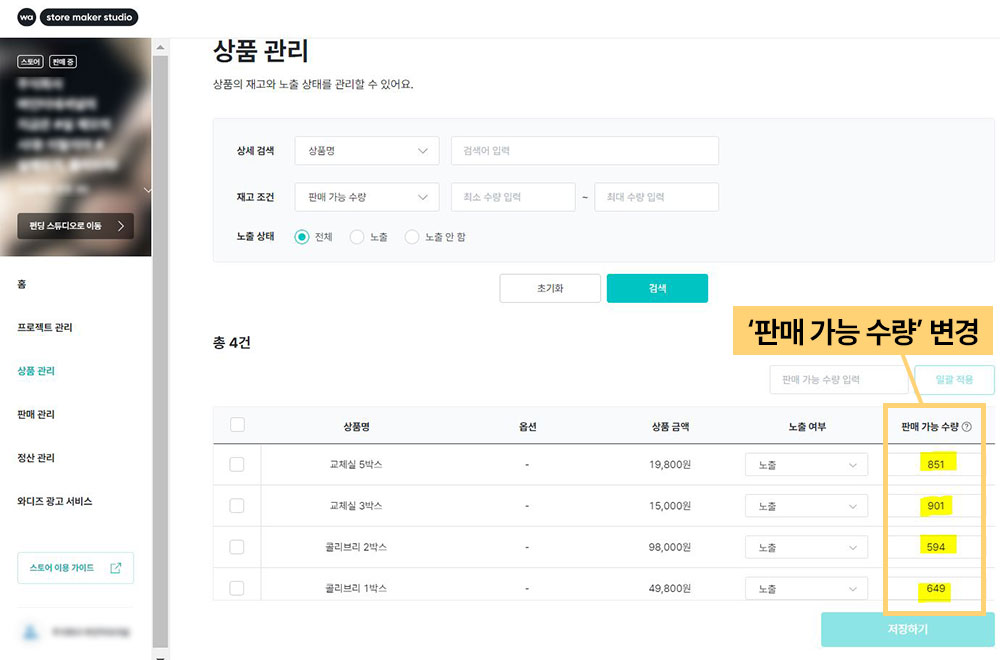
2) In the [Product Management] menu, you can manage inventory and visibility status for each product option.
3) If the available quantity is set to '0', it will automatically be marked as out of stock. Please change the available quantity.
4) After changing the quantity, please make sure to click the [Save] button.
3. How to Stop/Resume Store Sales
Do you want to stop selling products from the store, or restart selling products that have been suspended? Please apply to stop/resume store sales through the link below.
▶How do I stop/resume store sales?
Do you have any other questions?
- Related Inquiry: Wadiz Inquiry Registration (Click)