Policy
What is an export declaration and how do I file one?
If you are shipping rewards overseas through a Global project, you must file an export declaration.
- Wadiz Global projects are not general B2B exports; they follow a B2C cross-border direct-to-consumer structure in which products are shipped in small quantities directly to individual supporters.
- In most cases, you can file conveniently using the 'Simplified Export Declaration' method.
1. What is an export declaration?
- In the broad sense, Wadiz Global projects constitute an export and are therefore subject to domestic customs law.
- When shipping products from Korea to overseas, the procedure of reporting information about the exported goods to the Korea Customs Service is called an export declaration.
- Export declarations are divided into several types depending on the goods, method, and amount to be exported. The main types are General Export Declaration, Simplified Export Declaration, and List Customs Clearance.
- A business registration number is required to file either a General Export Declaration or a Simplified Export Declaration.
The method of export declaration varies depending on the FOB price.
- The FOB (Free On Board) price is the sum of all costs incurred up to the point of delivery on board (i.e., until the goods are loaded onto the vessel at the port of shipment), and refers to the selling price of the goods (rewards) excluding freight and insurance.
- FOB is calculated based on the price per order. In other words, it refers to the total order amount paid by a single supporter.
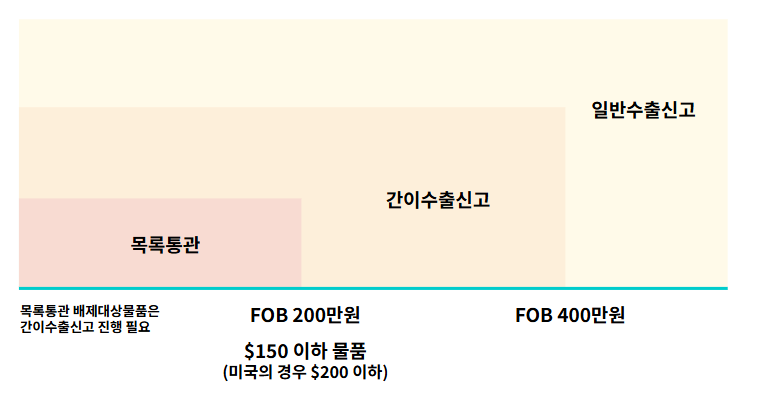
If the reward falls under a specific category of goods,
depending on whether the FOB price is 'at or below' or 'above' KRW 4,000,000,
the applicable export declaration method for you will differ.
- If the FOB price exceeds KRW 4,000,000, a formal export declaration becomes mandatory.
- If it is KRW 4,000,000 or below, we recommend filing a Simplified Export Declaration, which allows your export performance to be officially recognized.
- Simplified Export Declaration is a system designed to encourage export declarations for e-commerce transactions.
- Although it involves a simpler procedure than a General Export Declaration, it is treated the same way in terms of recognized export performance and eligibility for benefits such as customs duty refunds.
| List Customs Clearance | Simplified Export Declaration | General Export Declaration | |
|---|---|---|---|
| Filing Party | Maker (Exporter), Export Declaration Agency (Customs Broker), or Shipping Company contracted by the Maker | ||
| Criteria |
|
|
|
| ※ When the FOB price is above KRW 2,000,000 and up to KRW 4,000,000, either a formal export declaration or a simplified export declaration may be chosen. | |||
| Benefits |
|
|
|
If the reward falls under goods excluded from List Customs Clearance, List Customs Clearance processing will not be available
- Food products, functional cosmetics (sunscreen, etc.), pharmaceuticals, health functional foods, quarantine-subject goods, etc.
- Even if the FOB price is KRW 2,000,000 or below, if the reward falls under goods excluded from List Customs Clearance, please proceed with either a Simplified Export Declaration or a formal export declaration.
- We strongly recommend confirming in advance with your contracted shipping company whether List Customs Clearance is actually available.
Example
| Supporter | Reward Unit Price | Total Quantity Purchased | Total FOB Price | Simplified Export Declaration Available | Description |
|---|---|---|---|---|---|
| A | Reward A (KRW 200,000) | 5 units | KRW 1,000,000 | ⭕ Available | FOB below KRW 4,000,000 → Simplified Export Declaration available |
| B | Reward B (KRW 1,000,000) | 5 units | KRW 5,000,000 | ❌ Not available | FOB exceeds KRW 4,000,000 → Subject to General Export Declaration |
| D | Reward C (KRW 5,000,000) | 1 unit | KRW 5,000,000 | ❌ Not available | Single reward exceeds KRW 4,000,000 → Subject to General Export Declaration |
| C | Reward A, 1 unit (KRW 200,000) Reward B, 1 unit (KRW 100,000) |
2 units | KRW 120,000 | ⭕ Available | 2 items, but total FOB amount is below KRW 4,000,000 → Simplified Export Declaration available |
2. Why do I need to file an export declaration?
- It is an essential procedure for businesses venturing into overseas markets.
- You must have your export performance recognized through an export declaration in order to receive benefits such as trade finance, export insurance, and duty refunds.
- Export performance is often required to participate in various government-supported programs for overseas expansion.
- In addition, it enables you to prove your revenue, which greatly helps improve your corporate credit rating and credibility with overseas buyers.
3. When do I need to file an export declaration?
- It must be filed before the goods are loaded onto the means of transport such as a ship or aircraft.
- The goods must be loaded within 30 days from the date the export declaration is accepted.
4. How do I file an export declaration?
Type 1) If you are using a Wadiz officially partnered shipping company
STEP 1. UNI-PASS > Pre-preparation for export declaration > Apply for / obtain a customs unique code
- ↗️Korea Customs Service Electronic System UNI-PASS as part of the pre-preparation process for export declaration to obtain a customs unique code and a declarant code.
- What is a customs unique code? It refers to a code assigned by the Korea Customs Service code management system in accordance with the unique code system, to identify importers/exporters or individuals and to ensure the appropriateness of customs clearance procedures.
- This is different from the personal customs clearance code used by individuals for personal imports; you must obtain a customs unique code to be able to file import/export declarations.
- On the UNI-PASS main screen, 'Customs Unique Code Inquiry/Application' menu to apply for a customs unique code; once approved by the customs office in charge, the customs unique code will be issued.
Type 2) If you are filing the export declaration yourself
STEP 1. UNI-PASS > Pre-preparation for export declaration > Apply for / obtain a customs unique code
- ↗️Korea Customs Service Electronic System UNI-PASS as part of the pre-preparation process for export declaration to obtain a customs unique code and a declarant code.
- What is a customs unique code? It refers to a code assigned by the Korea Customs Service code management system in accordance with the unique code system, to identify importers/exporters or individuals and to ensure the appropriateness of customs clearance procedures.
- This is different from the personal customs clearance code used by individuals for personal imports; you must obtain a customs unique code to be able to file import/export declarations.
- On the UNI-PASS main screen, 'Customs Unique Code Inquiry/Application' menu to apply for a customs unique code; once approved by the customs office in charge, the customs unique code will be issued.
STEP 2. UNI-PASS > Pre-preparation for export declaration > Apply for a declarant code
- What is a declarant code? It is a code created to allow easy application for customs duty refunds and export declarations.
- On the UNI-PASS main screen, go to Customer Center > User Registration > 'User Registration' and sign up as 'Company and Representative' to register company employees.
- We recommend that the company representative register directly.
Declarant Application Process
- Select member type > Agree to terms and verify identity > Confirm business registration number > Enter user information > Apply for codes and services > Select SMS notification
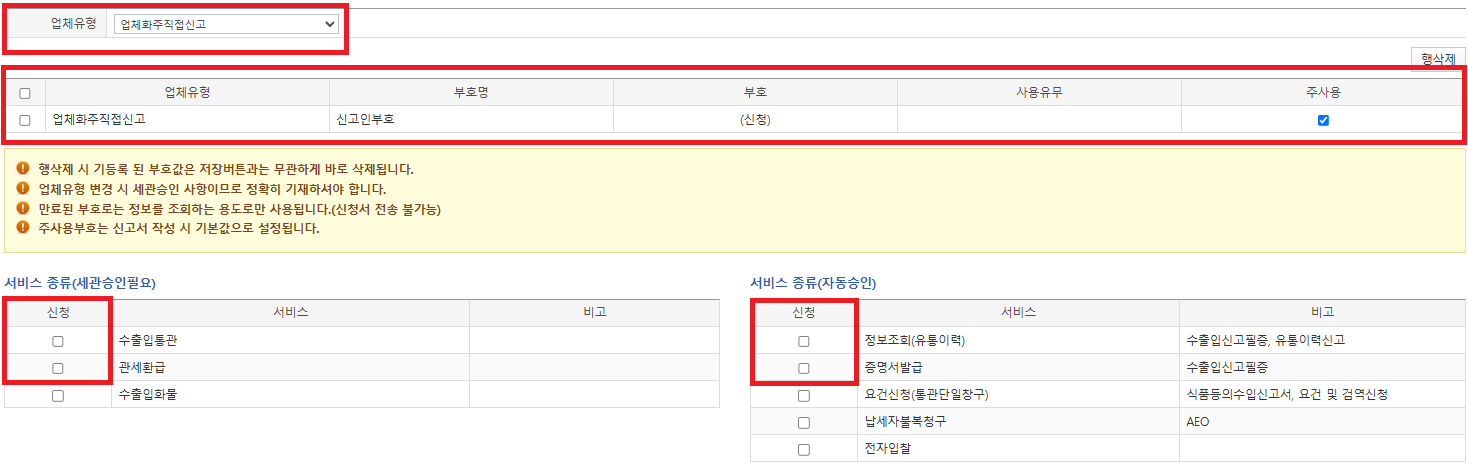
- In the 'Apply for Codes and Services' step, please add company type 'Direct Declaration by Company Shipper' as an additional type under 'Company Type'.
- Since you have already obtained a customs unique code, please verify that 'Trading Company (including public institutions)' has been automatically added under the 'Company Type' tab.
- Under Service Type (Customs Approval Required) at the bottom, select 'Import/Export Customs Clearance, Customs Duty Refund', and under Service Type (Auto-Approved), select 'Information Inquiry (Distribution History), Certificate Issuance'.
STEP 3. Wadiz Funding/Pre-order Studio > Shipping/Refund Management > Download export declaration information
- After the payment process is completed following a successful project, you can download the export declaration information from this menu.
STEP 4. UNI-PASS > File export declaration
- On the UNI-PASS main screen, go to 'Electronic Filing' menu > Draft declaration > Export Customs > Export Declaration and select it.
- Click the numbering button to generate a declaration number, then enter the required information and upload the documents.
- The issued export declaration certificate can be used for shipping and customs clearance procedures.