How do I report VAT sales for global projects?
✔️ Sales from rewards purchased by overseas supporters are subject to zero-rated VAT (0% value-added tax).
✔️ Zero-rated sales amount is calculated as reward quantity × reward price in Korean won.
✔️ Zero-rated sales must be reported in the tax period when the date of shipment occurs.
Sales from rewards purchased by overseas supporters through Wadiz Global Projects are subject to zero-rated VAT (0% value-added tax), so
you can proceed with your VAT report by following the guide below.
However, this guide is for reference only. For accurate reporting, we recommend consulting with a tax professional or the National Tax Service.
Step 1. Check your overseas sales amount
1. Check the zero-rated sales amount
- We calculate it as reward quantity × reward price in Korean won based on the shipment date.
2. Check the project settlement statement
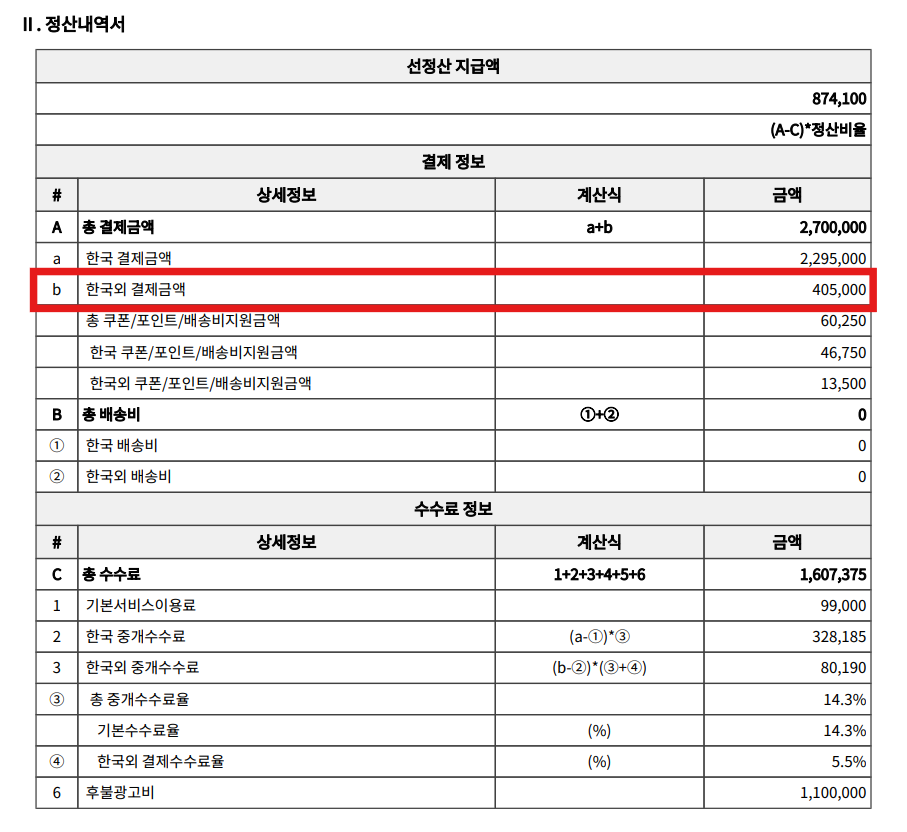
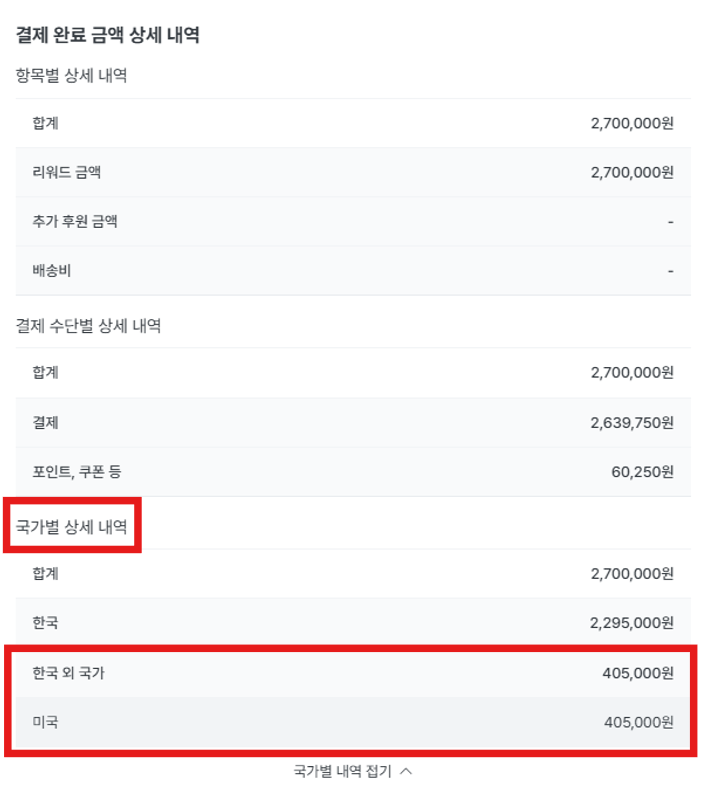
- Please check the non-Korean payment amount (overseas sales amount) in the settlement statement.
- You can view detailed information by country in Maker Studio.
- Please note that if reward shipments are spread across multiple months, the settlement statement amount may differ from the actual amount you need to report.
Step 2. Check the reward type and shipping method, and prepare supporting documents
1. Reward type (intangible/tangible)
- Supporting documents may vary depending on the reward type (intangible/tangible) and shipping method (shipment/EMS).
| Reward | Shipping Method | Sales Supporting Document | Notes |
|---|---|---|---|
| Tangible | Ship or air freight | Export declaration certificate | Proof that the export declaration has been completed with customs |
| EMS/International Courier | EMS receipt/courier shipping label | Sender/recipient, product name, weight, shipping fee, tracking number | |
| Intangible | Email delivery, etc. | Email transmission history | Recipient, delivery time, attached filename included |
2. Notes and Precautions
- For small parcels (EMS/international courier), you need delivery completion confirmation records through shipping label tracking.
- For intangible rewards provided via email (e.g., e-books, service vouchers, etc.), it may be difficult to confirm receipt, so please keep shipping records (email screenshots, link records, etc.) as supporting documents.
Step 3. Zero-rated sales reporting
Report the zero-rated amount in Hometax based on the confirmed overseas sales amount and the sales recognition date of the relevant sales.
1. Transaction type and supply date of export goods
- Wadiz Global Projects are classified as export of domestic goods (direct export), and the supply date is the shipment date of the export goods.
(Reference: Value Added Tax Act Article 21)
| Export Type | Description | Supply Date |
|---|---|---|
| Export of domestic goods | Direct export of Korean goods to overseas | Shipment date of export goods |
| Export by intermediary trading method | Purchasing goods overseas and sending them directly to another overseas country without importing them domestically | Confirmed supply price date of export goods |
| Supply by domestic letter of credit or purchase confirmation | Transactions between domestic businesses, but goods are exported later | Date of delivery of the goods from abroad |
2. Complete the export performance statement
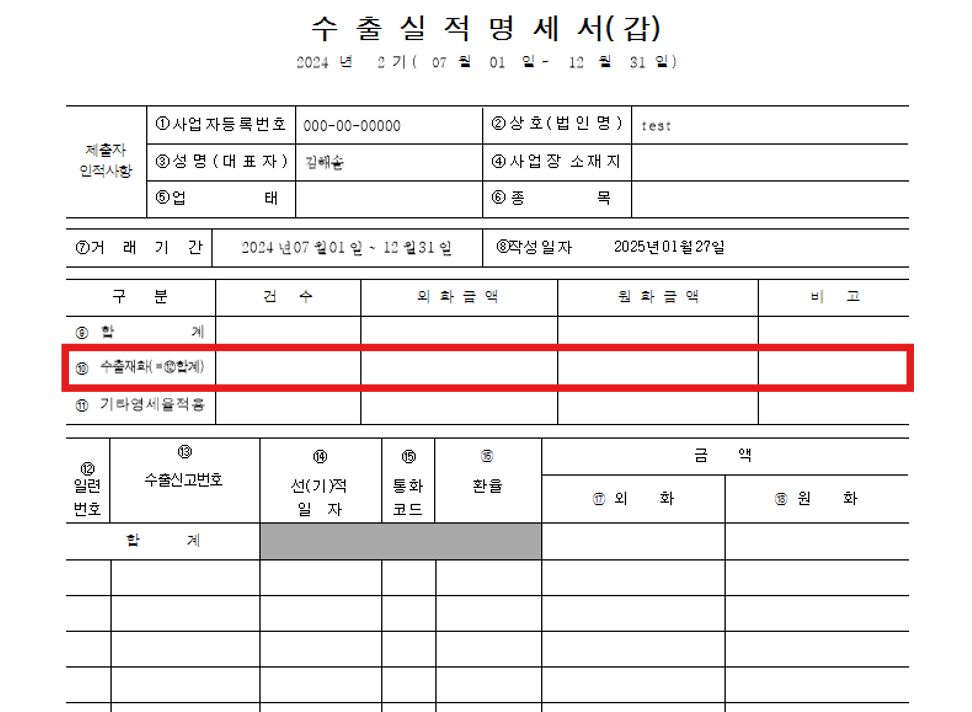
- Wadiz Global Projects are goods declared for export to customs and directly exported to foreign countries, so please enter them in the export goods field.
- The other zero-rated application fields relate to overseas provision of services, intermediary trading, and entrusted processing trade transactions.
- You can check monthly, quarterly, and semi-annual export declaration details through Hometax > Tax Report > VAT Report > Report Help Resources > Export Performance Statement Inquiry menu.
3. Notes and Precautions
- For makers operating multiple projects, please verify the sales report amount by checking the sales amount reported for each project when reporting sales.
- The sales agency data submitted by Wadiz each quarter combines domestic and overseas sales, and for overseas sales, the existing domestic sales standard* (not the shipment date) is currently applied.
- Therefore, when you report your sales, there may be differences in the sales date or amount compared to the data submitted by Wadiz.