Can I check the status of upcoming projects and information about notification subscribers?
In the Maker Studio Upcoming Status menu
you can check notification subscription status, traffic trends, and subscriber information.
- I'm running an upcoming launch and advertising campaign, but is it actually effective?
- Are there actual supporters visiting our project page?
- Which channels are supporters coming from, and who are actually converting to notification subscriptions?
- Who are the people who are genuinely interested in our project?
To provide answers to these questions with clear data, we've added a new feature.
Starting August 26, 2025, you can check related data from three menu views in the Maker Studio Upcoming Status menu: 'Notification Subscription Status', 'Traffic Trends', and 'Subscriber Information'.
Download and analyze notification and traffic data, or use graphs to verify your performance against Wadiz's 2-year data to see how well you're doing.
Upcoming Status Main
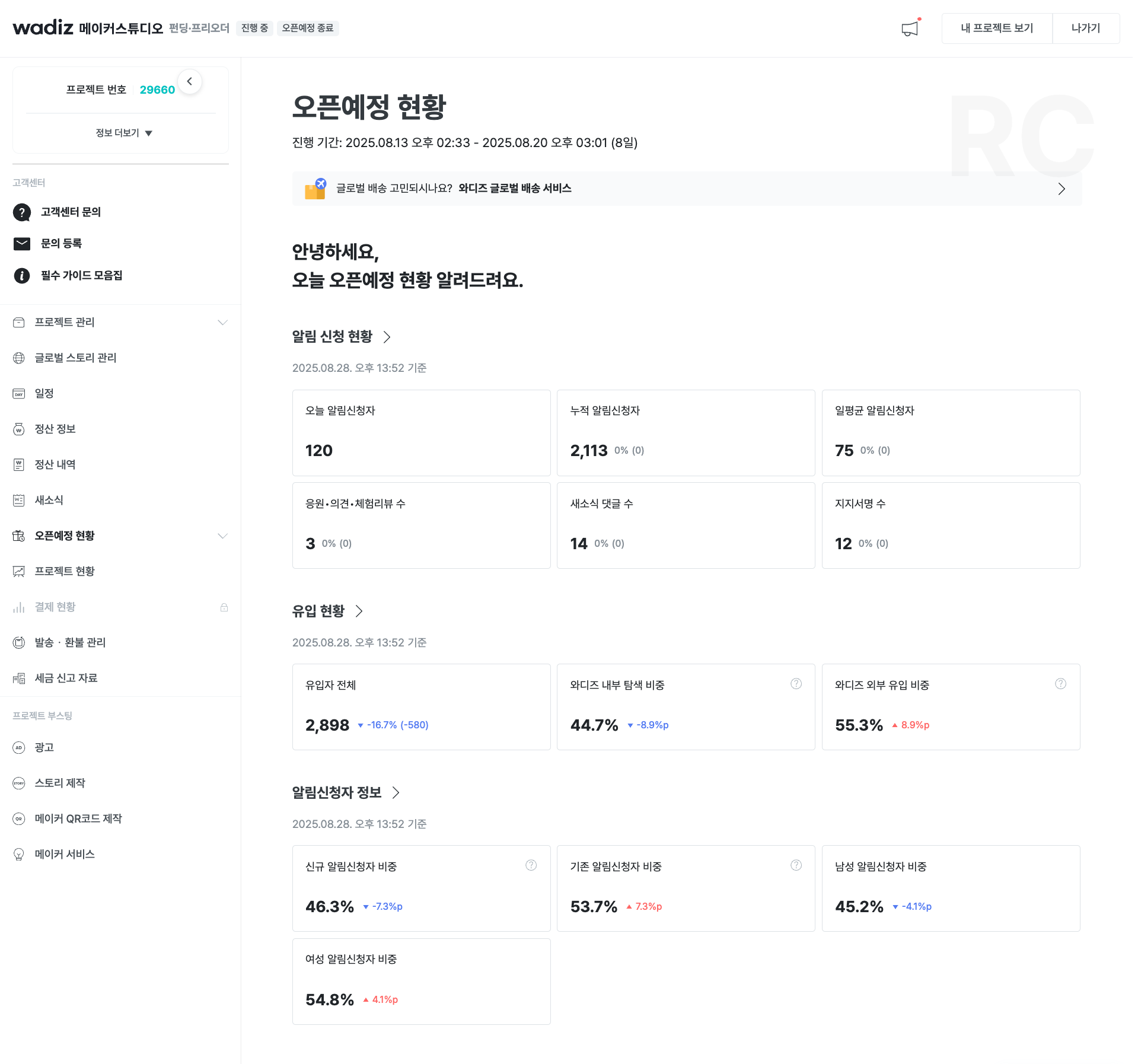
Basic Provided Data
- Notification Subscription Status\n
- Daily Notification Subscriptions: The number of users who subscribed to 'Open Notifications' for your project today (from 12:00 AM to now).
- Cumulative Notification Subscriptions: The total number of all users who have subscribed to notifications from the upcoming launch start date until now.
- Daily Average Notification Subscriptions: The average number of daily notification subscribers during the upcoming launch period.
- Support Messages & Experience Reviews: The total number of support messages and product experience reviews left by supporters.
- Updates Comments: The total number of comments on 'Updates' posted by the maker.
- Support Pledge Participation: The total number of users who participated in 'Support Pledge' to support the project.
- Traffic Trends\n
- Total Visitors: The total number of users (UV) who visited your project page.
- Wadiz Internal Exploration: The proportion of total visitors who came through exploration within Wadiz web/app (search, categories, etc.).
- Wadiz External Traffic: The proportion of users who came through external channels such as search engines or social media outside of Wadiz.
- Subscriber Information\n
- New Subscriber Proportion: An indicator to understand the scale of new customer acquisition.
- Existing Subscriber Proportion: An indicator to measure the engagement of loyal customers.
- Male Subscriber Proportion: Shows the percentage of male subscribers.
- Female Subscriber Proportion: Shows the percentage of female subscribers and helps identify the gender of your primary interested customers.
Notification Subscription Status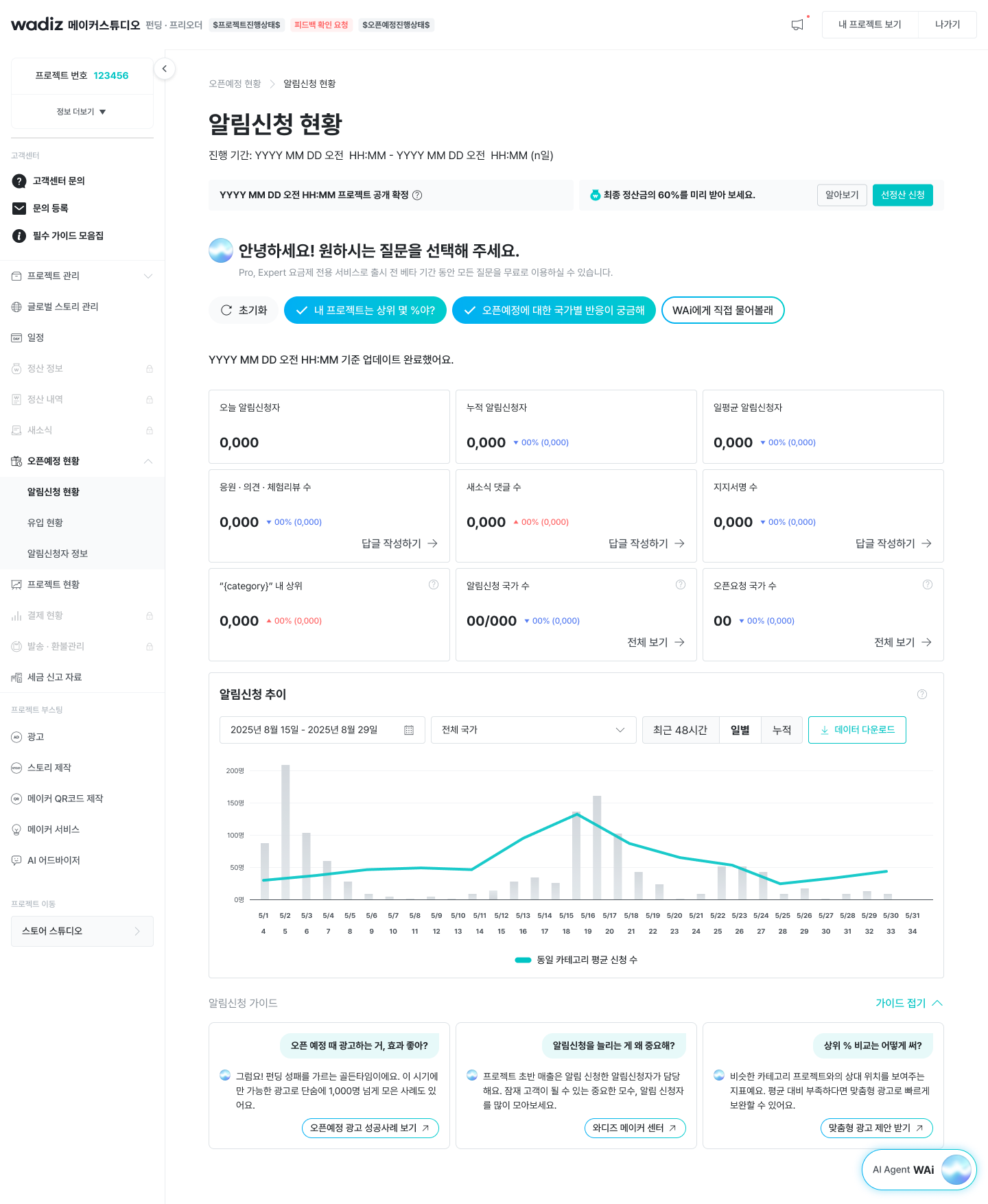
Basic Provided Data
- Today's Notification Subscribers: The number of new notification subscribers who subscribed today.
- Cumulative Notification Subscribers: The total number of notification subscribers accumulated since the upcoming launch started.
- Daily Average Notification Subscribers: The average number of daily notification subscribers to date.
- Support Messages & Experience Reviews: An indicator that shows positive responses from supporters about your project.
- Updates Comments Count: An indicator that shows the level of communication activity between the maker and supporters.
- Support Pledge Count: A direct figure showing the level of support for your project.
- Notification Subscription Trend: You can check the trend of notification subscription occurrences in the last 48 hours, daily, or cumulative units.\n
- You can download bar chart data in table format.
Additional Provided Data (AI Question Chip)
"What's my project's percentile ranking?"
- Performance Comparison Card\n
- A card is created showing what percentile your project ranks within the same category. This is a comparison result based on data accumulated on Wadiz over the last 2 years.
- Line Graph within Bar Chart\n
- A line graph showing the daily (day N) average performance of the same category is added above the existing 'Notification Subscription Trend' bar chart, enabling visual performance comparison.
"I'm curious about reactions to the upcoming launch by country"
- Countries with Notification Subscriptions\n
- A card showing the total number of countries where users who subscribed to notifications for your project are distributed.
- Countries with Open Requests\n
- A card showing the number of countries that have made 'Open Requests' despite being set as non-shipping countries. This allows you to understand potential demand in overseas markets.
Click "Ask WAi Directly"
- The AI agent 'WAi' opens in a separate new window, allowing you to directly ask questions about data or other inquiries.
Traffic Trends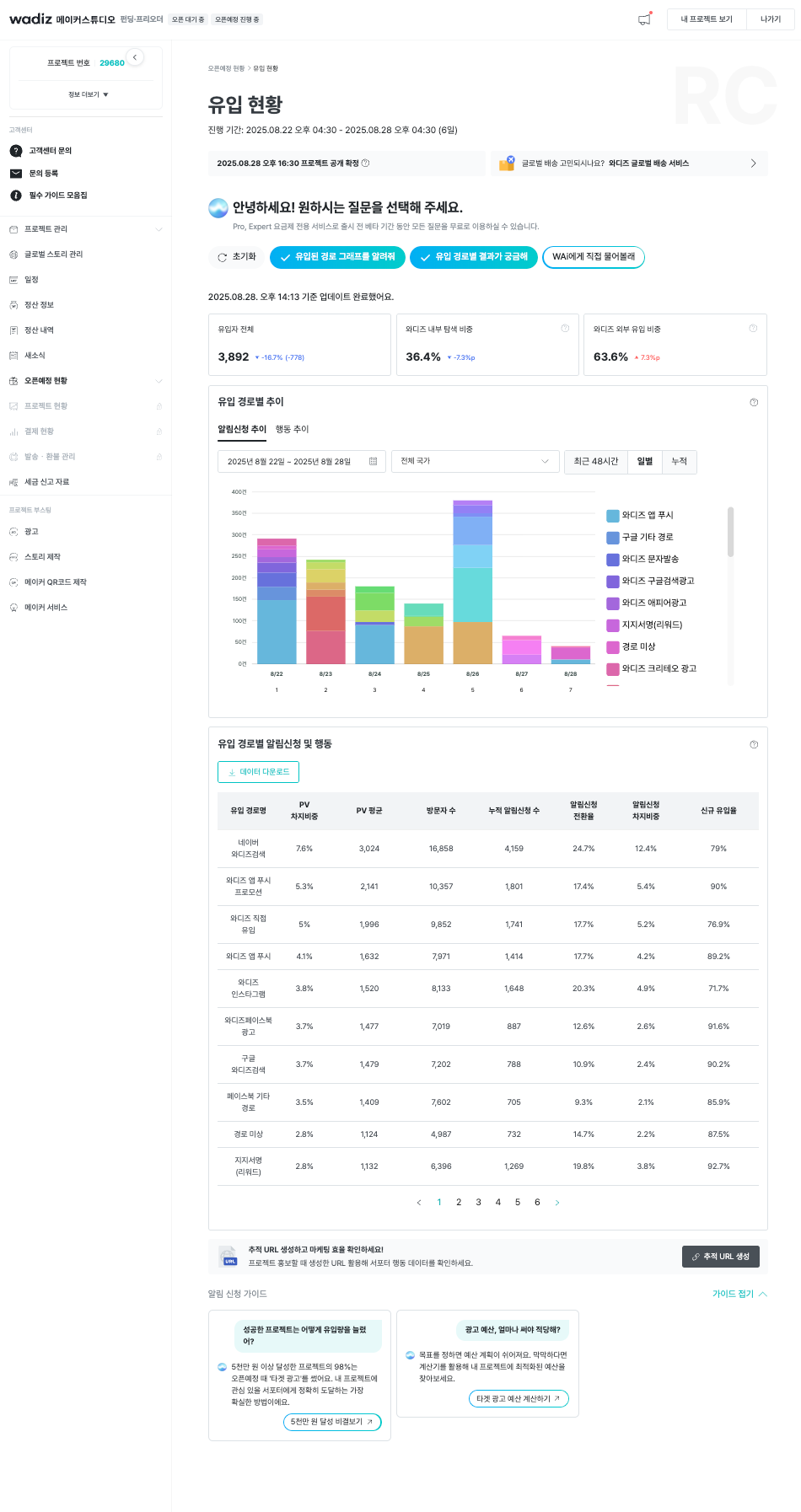
Basic Provided Data
- Total Visitors: Represents the total number of visitors to your project page.
- Wadiz Internal Exploration Proportion: The proportion of traffic coming through internal platform paths. If you have many loyal fans, we recommend actively utilizing your maker page and monitor this proportion well, approaching your customer base directly through updates and communication.
- Wadiz External Exploration Proportion: Shows the proportion of traffic from external advertising or links, allowing you to gauge the effectiveness of your external marketing.
Additional Provided Data (AI Question Chip)
Data provided when clicking "Show me the traffic path graph"
- Traffic Path Trend Graph: Shows which channels (for example: Wadiz Google Search Ads, Naver Wadiz Search, etc.) users came from in a daily cumulative bar graph.
- This graph can be switched between two criteria: 'Notification Subscription Trend' and 'Action (Visit) Trend'.
Data provided when clicking "I want to know traffic path results"
- Traffic Source Performance Table: Provides detailed performance metrics by each traffic source in table format, including PV share proportion, average PV, number of visitors, cumulative notification subscriptions, notification subscription conversion rate, new visitor rate, etc.\n
- You can download data provided in table format.
Click "Ask WAi Directly"
- The AI agent 'WAi' opens in a separate new window, allowing you to directly ask questions about data or other inquiries.
Subscriber Information
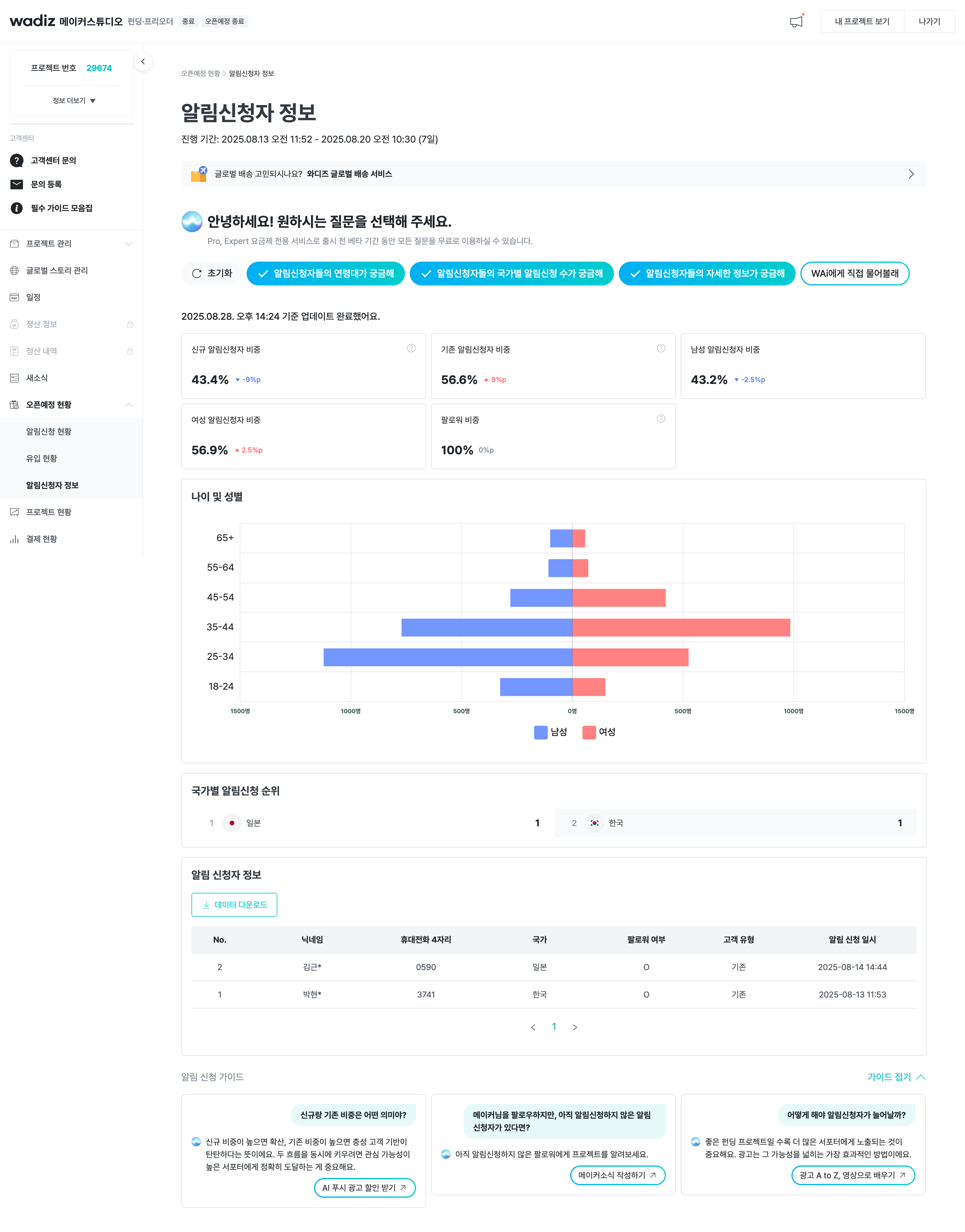
Basic Provided Data
- New Subscriber Proportion: An indicator to understand the scale of new customer acquisition.
- Existing Subscriber Proportion: An indicator to measure the engagement of loyal customers.
- Male Subscriber Proportion: Shows the percentage of male subscribers.
- Female Subscriber Proportion: Shows the percentage of female subscribers and helps identify the gender of your primary interested customers.
Additional Provided Data (AI Question Chip)
Data provided when clicking "I'm curious about age groups of notification subscribers"
- Age and Gender Graph: A population pyramid-style graph is provided that allows you to see the age distribution (for example: 18-24, 25-34, etc.) and gender of notification subscribers at a glance.
- You can check demographic data of users who showed interest.
Data provided when clicking "I'm curious about notification subscriptions by country of subscribers"
- Country Ranking List: Shows which countries' users made the most notification subscriptions in ranking list format.
Data provided when clicking "I want to know detailed information about notification subscribers"
- Follower Proportion Card: A card is generated showing the percentage of followers of the maker among all notification subscribers.
- If you have many followers, we recommend actively using your maker page to send push notifications directly to your fan base or engage in communication by writing updates.
- Notification Subscriber Details Table: A table is provided with detailed information about individual notification subscribers including nickname, last 4 digits of mobile number, country, follower status, customer type (new/existing), and notification subscription date/time.\n
- You can download data provided in table format.
Click "Ask WAi Directly"
- The AI agent 'WAi' opens in a separate new window, allowing you to directly ask questions about data or other inquiries.