Services
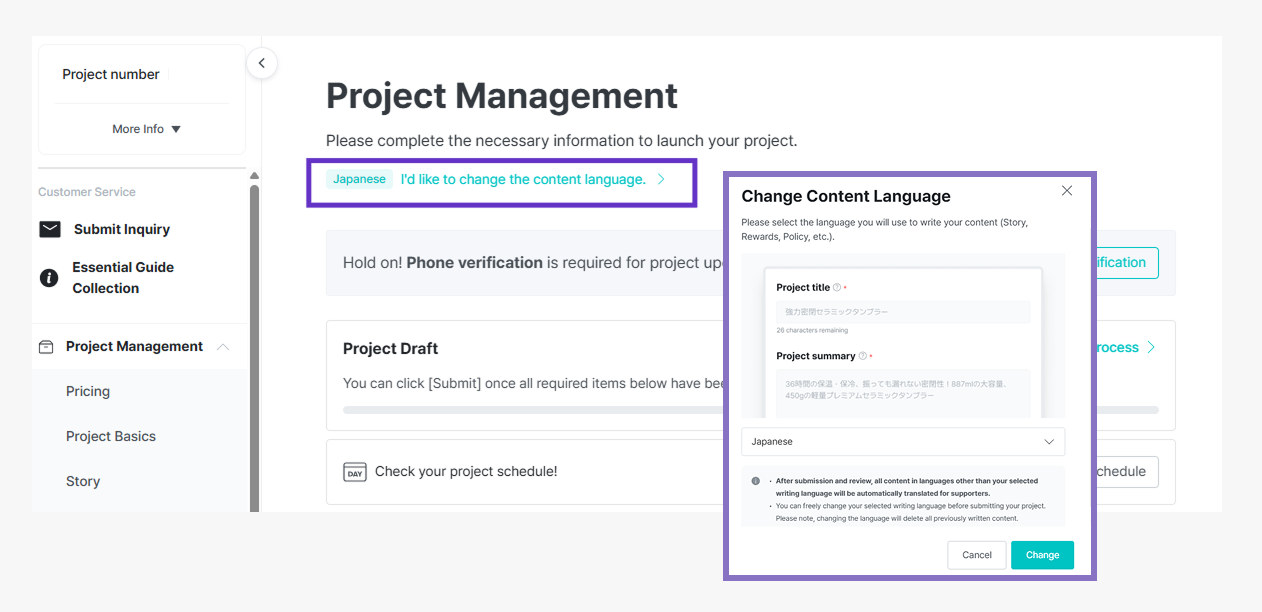
Do you need to write the story only in Korean? (You can write in English, Japanese, or Chinese)
📍 Worldwide Maker
1. You can directly write project stories, rewards, and policies in Korean, English, Japanese, and Chinese.
- You can select the writing language in the 'Maker Studio - Project Management' tab.
2. The AI review you conduct after writing the story is provided based on the language in which you wrote the story.
- ex) If you write a story in Japanese, the AI review results are also provided in Japanese
3. 'Rewards' and 'Policies' in the project management menu can also be written in the selected language.
4. The writing language can be changed until the project is submitted.
5. The story you write will be automatically translated into Korean, English, Japanese, and Chinese by AI.
- Supporters can view the story in a language of their choice among Korean, English, Japanese, and Chinese, regardless of the language the maker wrote in.
6. You can directly manage the AI-translated story in the 'Maker Studio - Global Story Management' menu.
- However, you can only edit the original language version and the English version.
- ex) If you write a story in English: only the English story can be edited, the Korean story cannot be edited
- If you write a story in Korean: Korean and English stories can be edited, Japanese and Chinese stories cannot be edited