Store
How do I charge additional shipping fees for a store?
I'll guide you through how to inform customers when you need to receive additional shipping fees such as shipping to remote areas or individual shipping fees.
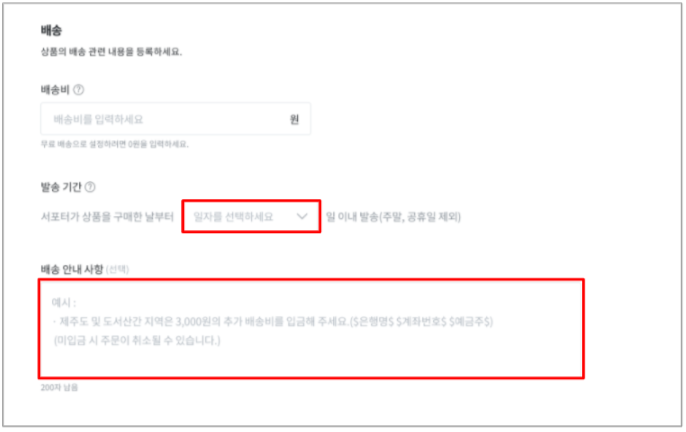
1) In the [Shipping Notice] section at the bottom of the Shipping tab, please provide information about the additional shipping fees.
- (Example) An individual shipping fee of 3,000 won will be added for each quantity purchased. After confirming your order, we will provide payment details separately, and the order may be canceled if payment is not made.
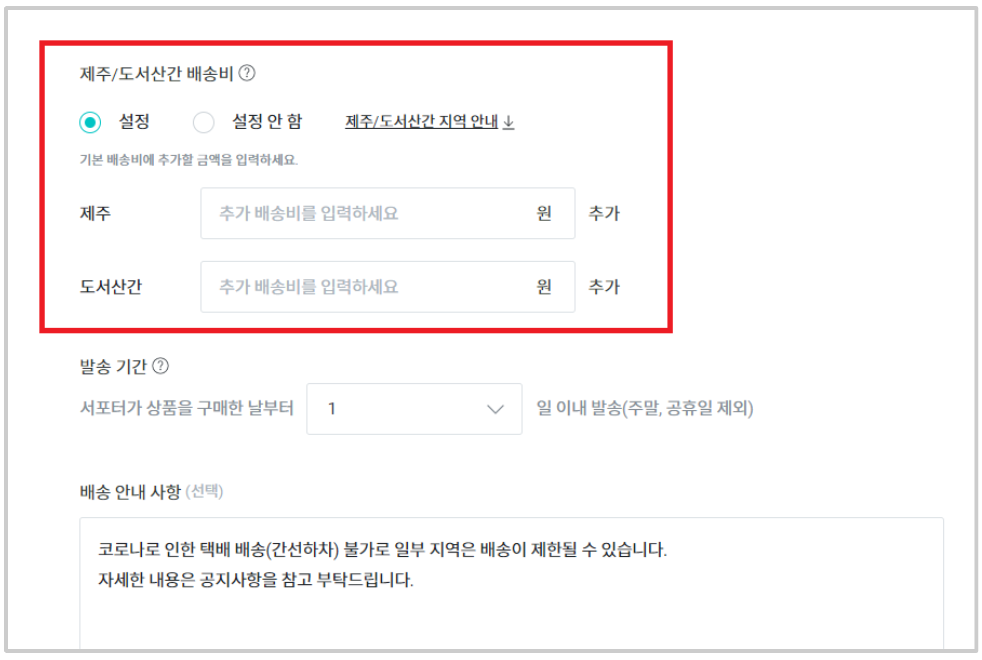
2) Additional shipping fees for Jeju/remote areas can be set in [Maker Studio > Project Management > Product Design Tab].
- (Example) For Jeju/remote areas, an additional 3,000 won will be charged on top of the standard shipping fee.
3) After confirming the additional shipping fees, please proceed with shipping the product.
- Are you unable to ship the product due to additional shipping fee issues?
- Please leave your inquiry at the Wadiz Help Center, and we'll be happy to assist you quickly. (https://helpcenter.wadiz.kr)