How do I fill in the basic information for a Store project?
You can only add new content for fields that are editable.
This is because the content of your completed Funding · Pre-order project is automatically synced between Maker Studio and Store Studio.
- The project title, main image, introduction video · photos, and maker information can be edited by you as the maker. Edit
- Category, project story, and search tags cannot be edited.
Need to edit the Store 'Story'? Please refer to the following guide. |
1) Project Title and Main Image
- Please check the Store project main image / title guide. (Go to Guide)
- Please note that a main image that does not comply with the operating policy may be changed at the discretion of the person in charge.
2) Introduction Video · Photos
You can see this at the very top of the Store detail page. Please choose either a video or photos.
Introduction Video
You can register one URL from YouTube or Vimeo.
Introduction Photos
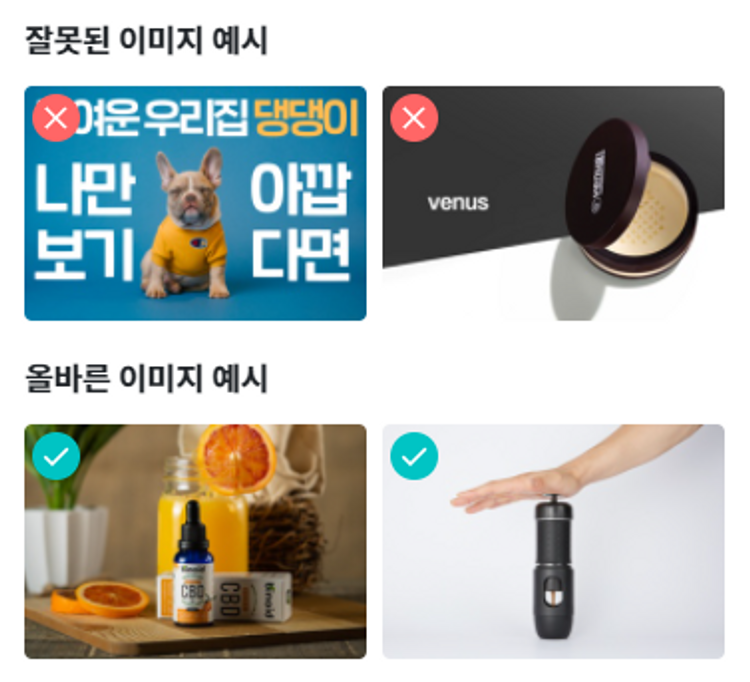
You can register JPEG, JPG, GIF, or PNG files that are at least 630x400 pixels in size and no larger than 2MB.
You can register up to 10 images.
The edges may be cropped, so images without text and with the product centered are recommended.
3) Maker Information
- You can edit your inquiry email, inquiry phone number, KakaoTalk channel, homepage, and SNS.
- The maker name and maker profile image cannot be edited.
4) Category
Wadiz Store projects are divided into a total of 8 categories.
| Food | Fashion · Accessories | Tech · Electronics | Beauty |
| Living · Baby | Travel · Sports | Pets | Hobbies · Classes |
Please note the categories that differ from Funding · Pre-order categories.
- Home · Living + Baby · Kids → Living · Baby
- Travel · Leisure + Sports · Mobility → Travel · Sports
- Characters · Goods + Games · Hobbies + Culture · Artists + Classes · Consulting + Social · Campaign Groups → Hobbies · Classes
5) Project Story
Because the Funding · Pre-order story that resonated with many supporters is imported as-is, you can conveniently create a Store project without any additional writing.
In particular, it honestly shows how previous funding went, allowing you to emphasize the continuity of starting with funding and growing into a Store.
While it is difficult to edit the story of a Store project, if there are any changes from the previously introduced rewards (products or services), you can write them as text in the [Product Setup] tab. The content you write can be viewed at the top of the detail page.
| Just a moment — let us explain the story advertising review process. |
|---|
Project stories that were submitted after July 24, 2020 and went through funding have undergone advertising review. On the other hand, funding projects submitted before that date did not undergo advertising review, so the person in charge may delete, edit, or reject the story in accordance with applicable laws and regulations.
|
Please check before submitting.
Once you submit a Store project and listing is approved, no further edits are possible. Before submitting, please make sure all information has been entered correctly.