What steps are involved in the Advertising Center?
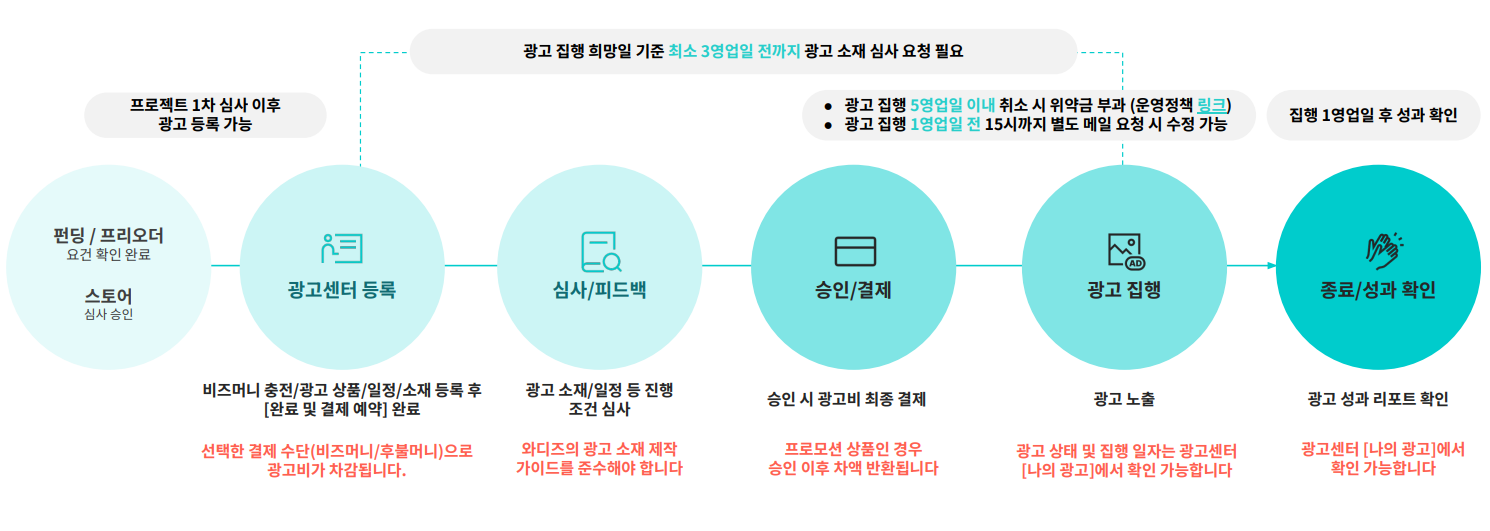
The process order is as follows.
1. Apply for advertising at the Advertising Center.
2. Your advertisement content and schedule will be reviewed.
3. Once approved, you will pay the advertising fee.
4. Your advertisement will be executed.
5. After the advertisement ends, you can check the report on the [My Ads] page after 1 business day passes.
*For more detailed process steps, please check the Advertising Center [Usage Guide].
[ You can understand ad status this way ]
Requested: The state before the advertising manager reviews it, after the maker submits an advertising request
Being Drafted: The state where the maker is re-writing the advertisement after canceling a previous advertising request
Feedback: The state where the advertising manager provided feedback on schedule, products, or content after the application and modifications are needed
Modifying: The state where the maker is reviewing and modifying the advertising manager's feedback
Scheduled: The state where the advertisement is approved and awaiting the actual advertisement execution date
In Progress: The state where the advertisement execution has started and the ad exposure is in progress
Completed: The state where the advertisement execution is finished and ad exposure has ended
Rejected: The state where approval is difficult due to reasons such as schedule, products, or content
Deleted: When a maker directly deletes an advertisement
Canceled: The state where the advertising manager cancelled after the maker requested to cancel the advertisement

|
||
|
|
|
|

|
|

|
||
|
|
||