Store
Can I get a refund for exchange and return shipping costs from the store?
The exchange and return shipping fees set in [Store Maker Studio] are automatically reflected in the refund amount.
1) You can set exchange and return shipping fees.
- In [Store Maker Studio], go to [Project Management] → [Product Design] → [Exchange/Return/A/S] to set exchange and return shipping fees directly.
- Projects being sold in the store are automatically entered with the default shipping cost. You can change it to any amount you want anytime.
2) Depending on the reason for return, shipping fees are automatically deducted from the refund amount.
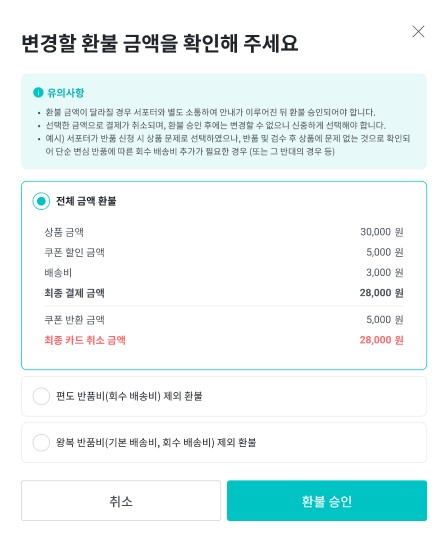
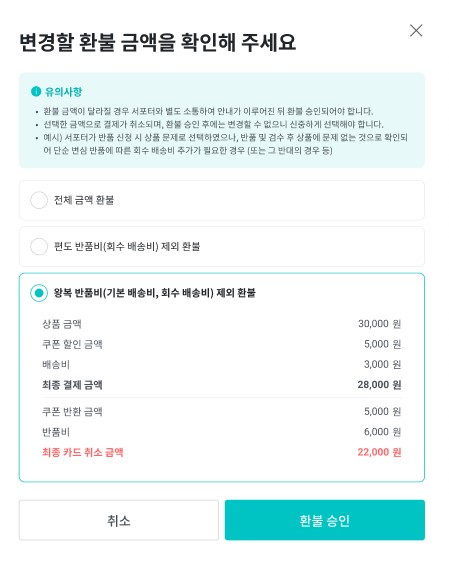
- Depending on the reason for return, you can approve the refund by reflecting exchange and return shipping fees in the refund amount.
- Full refund of the total amount
- One-way return shipping fee (return shipment fee) excluded refund
- Round-trip return shipping fee (default shipping cost, return shipment fee) excluded refund
- Before deducting the refund amount, you must communicate with the supporter to inform them of the amount and then approve the refund.
 |  |
3) Additional product shipping costs other than return fees should be collected separately by communicating with the supporter.
- The exchange/return shipping fees you set in advance are reflected in the refund amount only up to round-trip shipping costs.
- For additional exchange product shipping fees that occur beyond this, you need to collect them separately from the supporter. Along with the additional shipping fee, please provide the supporter with your personal bank account or the payment method you are using.