[Success Maker Online Guide] #1. My funding campaign was successful—what do I do now?
This content is
Episode 1 of the <SUCCESS Maker Online Guide>
series.
Don't forget to take this with you!
- Even after your project succeeds, please continue to communicate with your supporters through News about its progress.
- Once you’ve started shipping, let your supporters know so they’re aware of the shipment updates.
- When sharing tracking numbers or event winners, please be careful not to violate privacy laws.
Congratulations to all the makers whose funding campaigns were successful!
And we know—the real work begins now. You might have thought that once you successfully completed the funding process for your campaign, everything would be smooth sailing, but there’s no shortage of tasks to tackle: from announcing the winners of your giveaways to preparing shipments, sharing shipping details, and requesting satisfaction surveys. There are so many hurdles to overcome that you might even start to wonder if launching a new campaign from scratch would be easier.
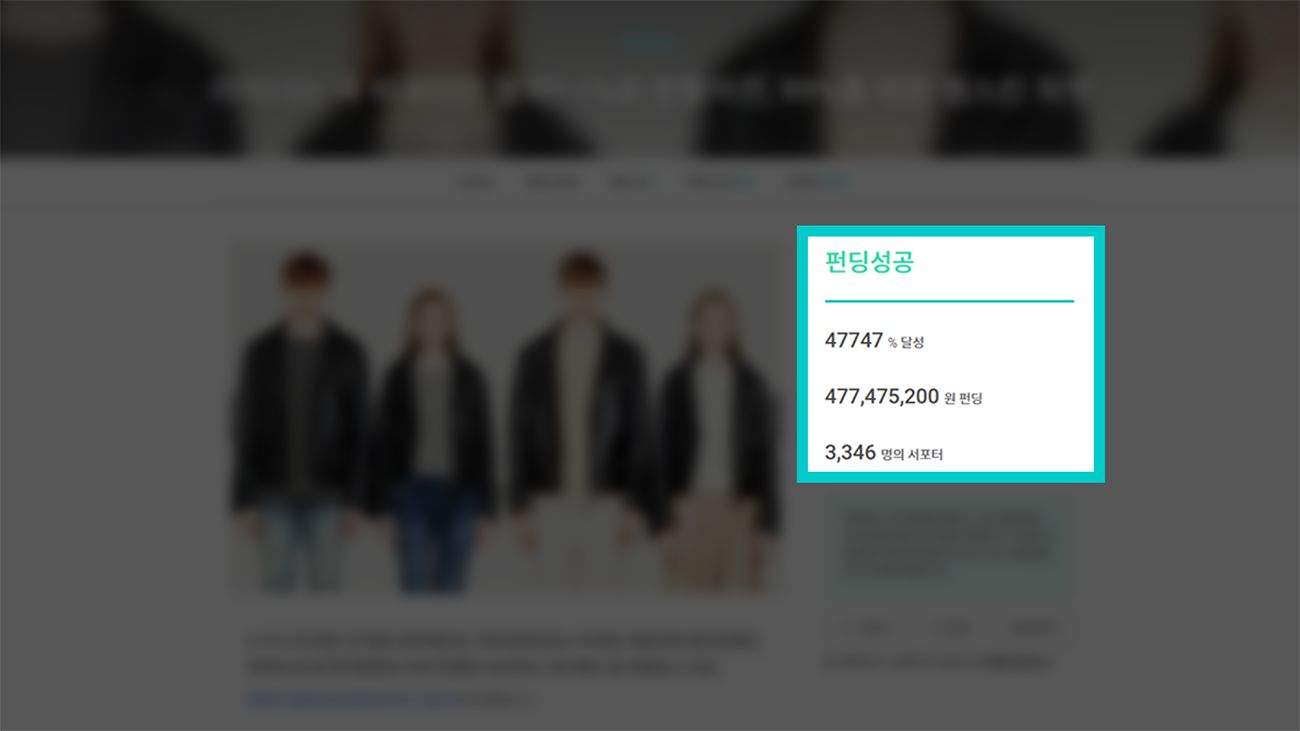 I thought just seeing those four words—“funding success”—would make me happy.
There are plenty of guides on how to prepare for a funding campaign, but haven’t you found it frustrating that there are no guides on what to do “after a successful campaign”? That’s why we’ve put this together. From essential precautions that successful makers must know to insider tips you wouldn’t have discovered without this guide—this online guide, illustrated with various real-life examples, is designed to serve as your roadmap to “true success.”
1. Here’s how to manage your News updates after the campaign ends.
1) News you post after the campaign ends is a double-edged sword.
- If News suddenly stops just because the funding campaign has ended, your supporters will naturally become anxious. A small worry that starts with “Is my Rewards even being made?” can easily escalate into a major suspicion: “Could they have run off with my money?”
- That said, we also do not recommend posting News every single day. DailyNews can lead to supporter fatigue, and that fatigue will eventually turn into dissatisfaction toward the maker.
So, the bottom line is that you should upload essential News only when it’s truly necessary. What kinds of News fall into this category?
2) If your funding campaign is successful, be sure to upload these News items.
- Thank-You Message for Successful Funding and Payment Process Guide
When?The next business day after the fundingends as a “success” (i.e., the first payment date)
What should it include? A notification that the funding was successful, along with payment schedules, methods, and important notes
Why? To increase the payment success rate.
Even if your funding campaign is successful, you may face difficulties in mass-producing or shipping Rewards if supporters don’t actually complete their payments. Therefore, to ensure supporters can successfully make payments according to the scheduled timeline, please provide guidance on the upcoming payment schedule and how to update payment information in case of a failed transaction.
If your News is filled with nothing but payment-related information from the very beginning, supporters may not appreciate it, so it’s essential to start each News update with a message thanking them for the successful funding.
For more detailed guidance, please refer to the guide on writing News posts about project closure and payment instructions.
- Share the status of Rewards preparation
When? After the funding period ends ~ Before Rewards are shipped
What should be included?Information on the progress of Rewards shipment preparations and the packaging details at the time of shipment
Why? To reassure your supporters.
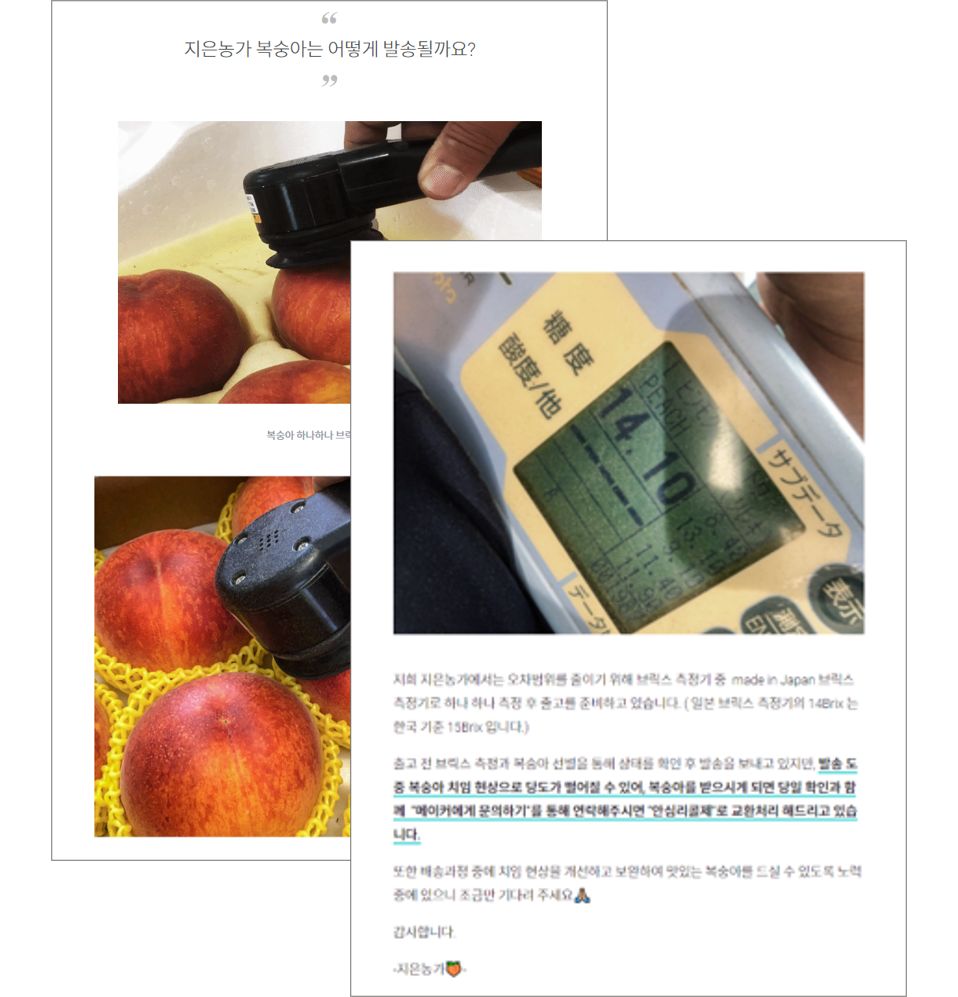 2020 Peach Master’s Sweet Crush: Hwangdo and Crisp & Sweet Baekdo (+Ansim-ri Cola) News
Until supporters receive News that their rewards have been shipped, every day is a waiting game for them. Please share the status of your shipping preparations before dispatch so that supporters can rest assured that everything is proceeding smoothly according to the schedule outlined in your Story. Especially if external factors that could affect rewards—such as heat waves, monsoon rains, or heavy snowfall— that could affect the Rewards, please feel free to provide an update on the packaging conditions the maker has preparedto prevent them from being damaged or spoiled.
- A Collection of Frequently Asked Questions About Rewards and Shipping
When? Rewards are currently being shipped
What’s the content?Answers to questions frequently asked by those who have already received their Rewards
Why? Please try to minimize similar inquiries as much as possible.
Due to the nature of crowdfunding, where shipments are often sent sequentially, supporters who are relatively lower on the shipping list may feel a mix of anticipation and anxiety as they read satisfaction ratings and reviews from other supporters who have already received their Rewards. While anticipation is positive, anxiety is a negative factor that the maker must address. Therefore, it’s a good idea to take some time during the shipping process to publish a News update that answers frequently asked questions all at once. This can help reduce similar inquiries and effectively support your supporters.
Is the shipment of Rewards delayed due to unavoidable circumstances?
In such cases, you must respond via News faster than ever. Since supporters have already waited as long as they could—through the lengthy funding period, the payment period, and the maker’s Rewards preparation period— hiding the fact that shipping is delayed will only result in worsening public sentiment.
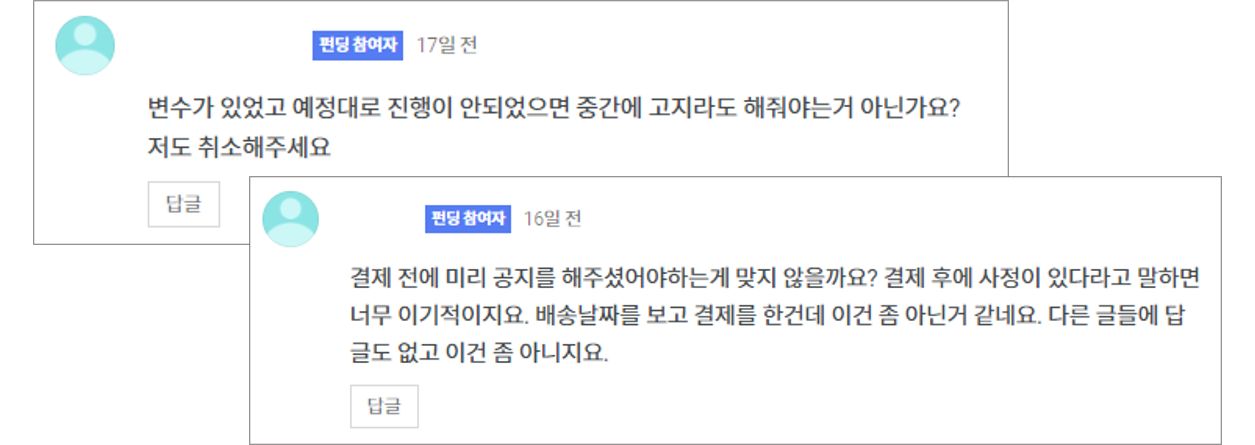 Reactions when you notify supporters of a shipping delay after payment. It’s certainly hard to find messages of cheer saying, “I’ll wait,” isn’t it?
However, not a single maker intends for shipping delays to happen. So, how can you earn your supporters’ generous understanding and receive their cheers in the form of “We’ll wait”? The answer lies in News.
- Start with an apology.
A shipping delay essentially means you’ve broken a promise to your supporters. Regardless of the maker’s intentions, the fact remains that you were unable to keep your promise to your supporters, so it’s best to start your News with an apology.
- Please explain the reason for the shipping delay in detail.
The level of detail in your explanation will determine the public sentiment.In addition to explaining the reason for thedelay in text, including photos or videos can help your supporters understand the situation better. If you explain in detail the efforts you’ve made in advance to resolve this issue, supporters may be more open to understanding, thinking, “You’ve gone to all this trouble and still couldn’t resolve it… Well, I guess I’ll just have to wait a little longer.”
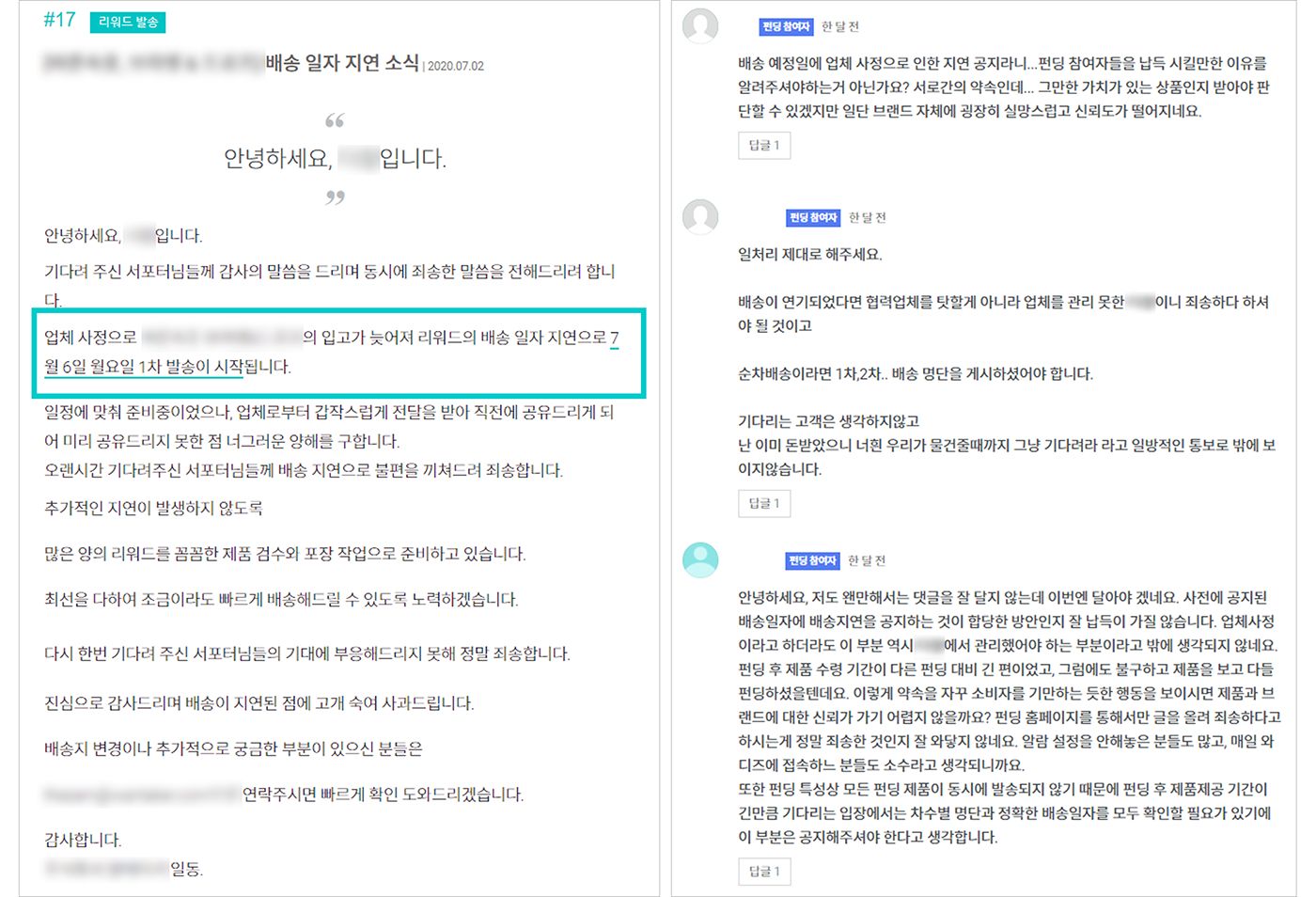 If you don’t explain the specific reason, supporters’ comments will never be positive.
- Please share the revised schedule and contact information.
No matter how detailed your explanation is, you can’t simply ask supporters to “wait until the issue is resolved.” Please specify an exact date—such as “Month Day”—when shipping is expected to resume, and include a note in your News update explaining where supporters should direct any questions until that date.
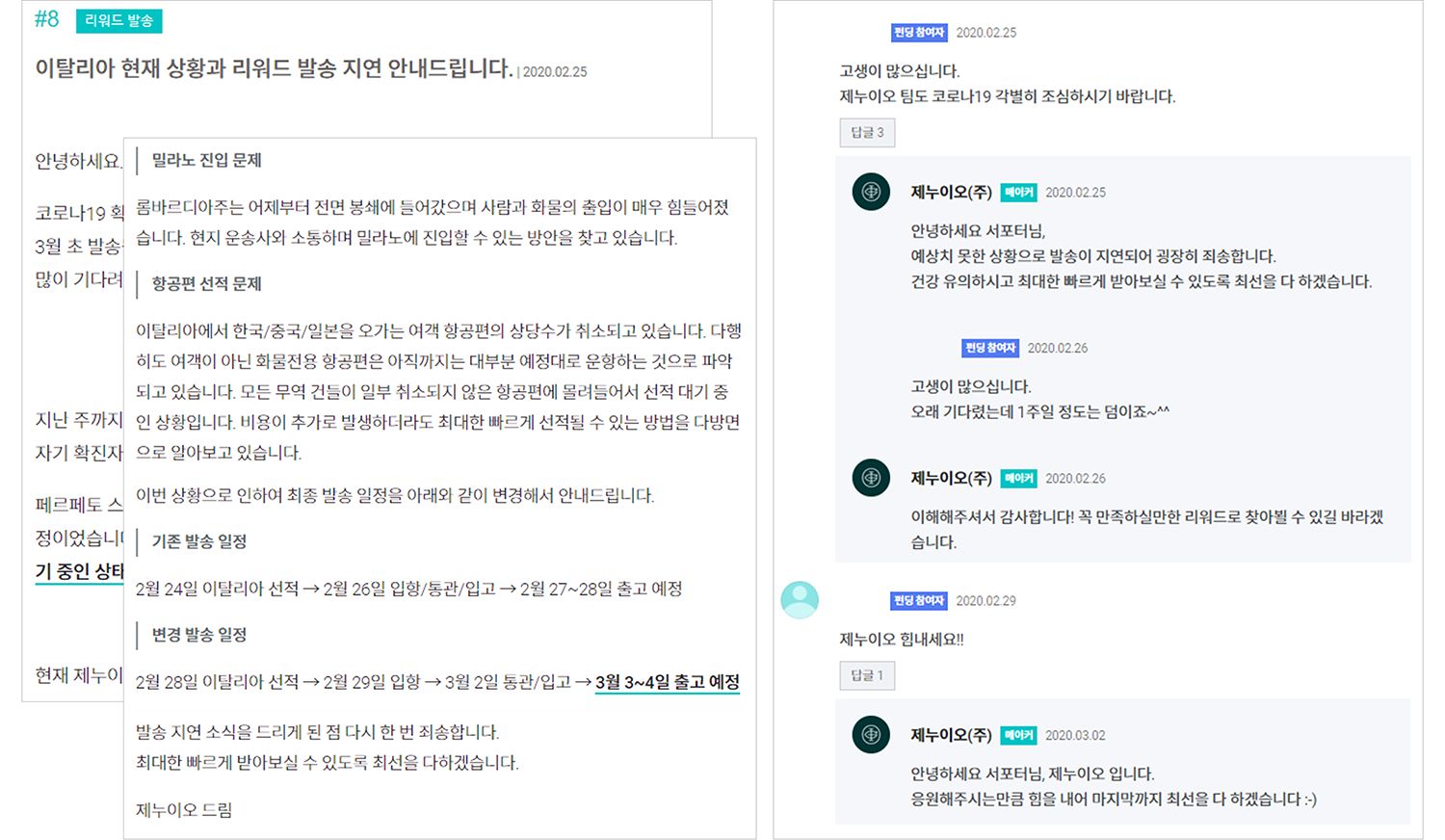 Since specific reasons and the revised schedule are provided, the comments on the News are much more positive, aren’t they?
The Perfection of Italian Luxury Sneakers for Just Over 100,000 Won | Perpetuo News
- You can find more examples of News posts for various issues in other Maker Tips.
2. Notifying Supporters About Rewards Shipments
Even if the Rewards have been shipped, it’s all for nothing if you don’t let them know! If you don’t notify your supporters when you ship the Rewards, they won’t know that shipping has begun. So, please use the two methods below to share the exciting news of the shipment with your supporters!
1) The first way to announce the shipment: Change the shipping status
Log in to the “Maker Studio” for the project you need to notify, then go to the [Funding & Shipping Management] tab. You’ll see a screen like the one below.
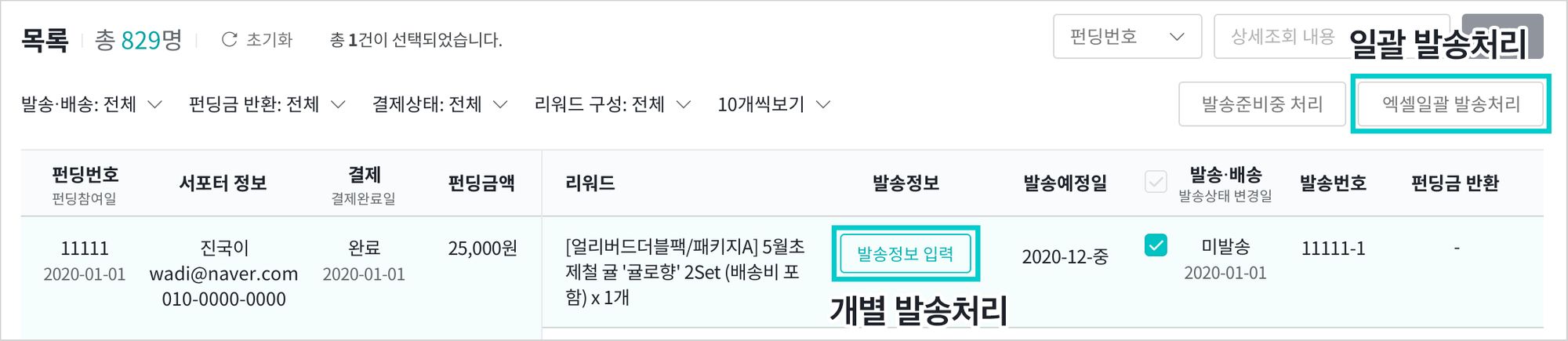
If the number of shipped Rewards is small, click “Process Individually”; if you have completed all shipments or the number of shipped Rewards is large, click “Process in Bulk” to update the shipping status.
When you update the shipping status,
a notification will be sent immediately to your supporters!
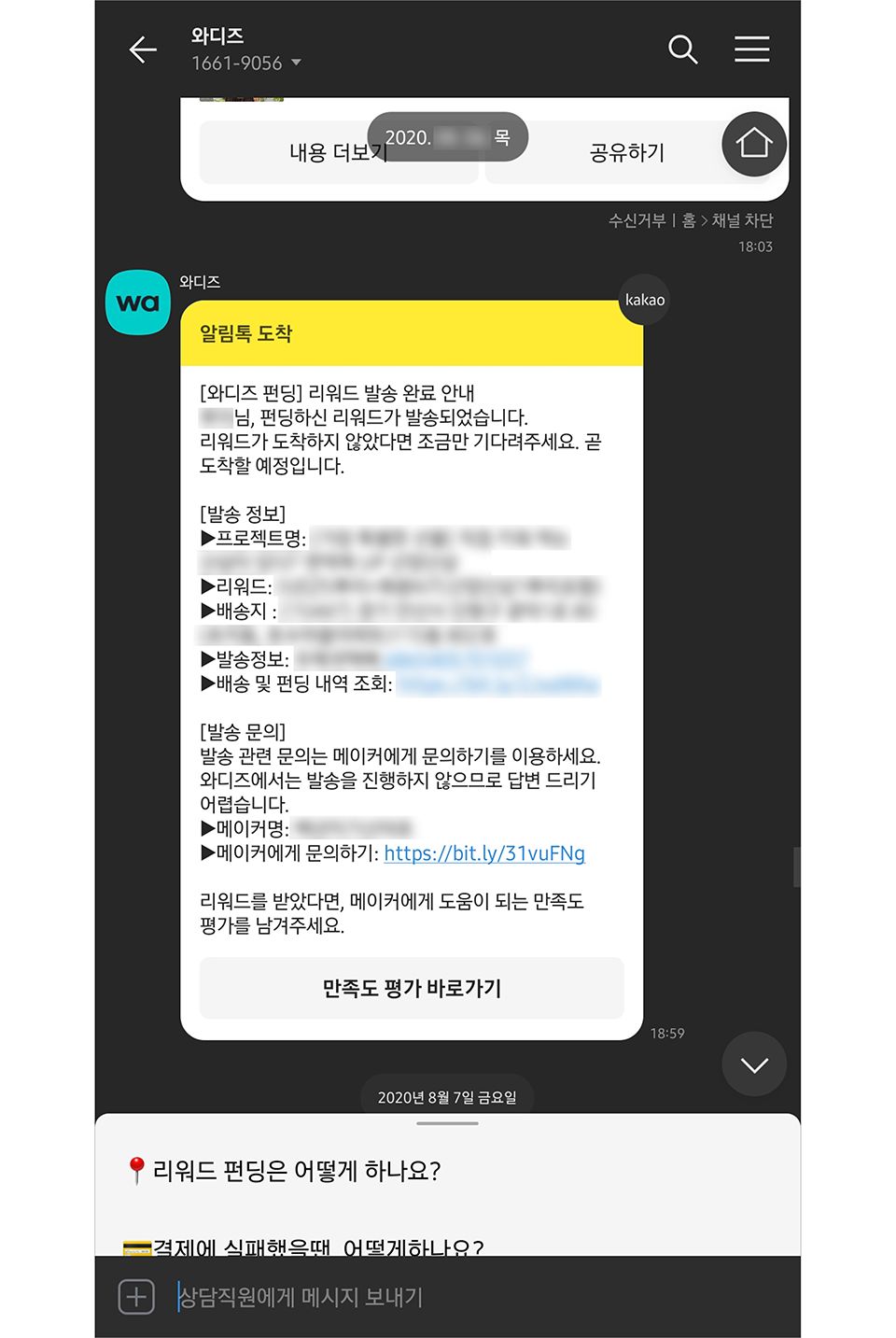 This is how the shipment is processed.
Therefore, please double-check to ensure you haven’t entered any incorrect information. Note that if the packages have not yet been handed over to the courier (i.e., they are still in “Scheduled” status), the shipping status will not change. You must complete this process only after all packages have been handed over to the courier.
2) The Second Way to Notify Supporters: Sending a News Update
Even if you’ve updated the shipping status, supporters might miss the notification message. Therefore, after updating the shipping status, it’s a good idea to send a News update stating, “We’ve completed the [number]th sequential shipment today.” From the supporters’ perspective, no matter how hard the maker works to ship the items, their biggest concern is, “So when will mine arrive?”
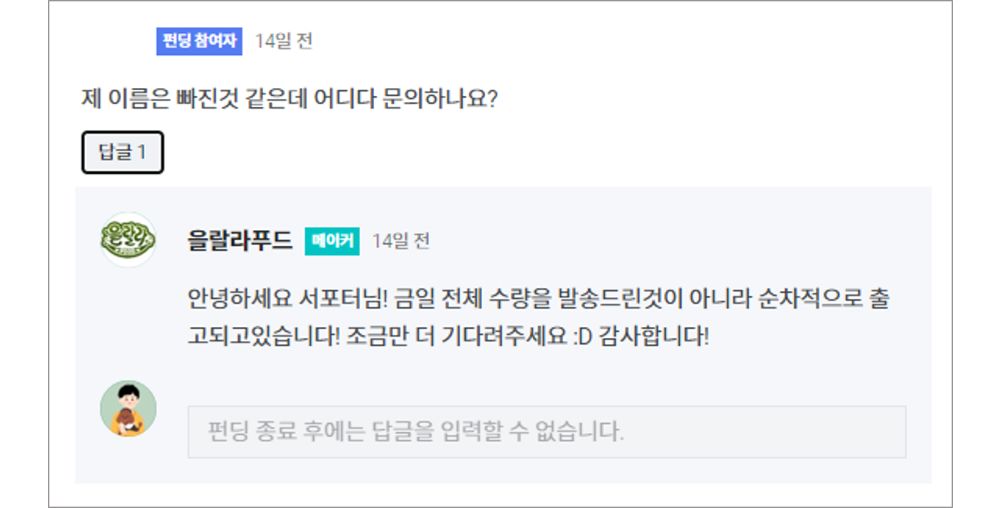 If you want to confidently say, “Please wait a little longer!”, you’ll need to share daily updates on the shipping progress, right?
If supporters aren’t aware that shipments are being processed sequentially as announced in your Story, you’ll see a corresponding increase in inquiries—whether through “Contact the Maker” or requests on your personal platform—from supporters asking for their tracking numbers. To prevent your already limited staff and time from being unnecessarily drained, why not ask supporters to wait just a little longer until they receive a notification message, explaining that shipments are being processed sequentially every day? This way, supporters will think, “Since shipments are being sent out like this, mine should arrive soon,” and be more willing to wait a little longer.
3. Essential Guide to Preventing Personal Information Leaks
Did you “accidentally” disclose a supporter’s contact information or address while trying to share only the tracking number?
Disclosing supporters’ personal information is not permitted under any circumstances .
If personal information is exposed, you as the maker may face administrative penalties, such as fines or administrative sanctions, in accordance withthe [Personal Information Protection Act] andthe [Act on Promotion of Information and Communications Network Utilization and Information Protection, etc.]. Even if you were unaware of the Personal Information Protection Act, or if you intended to save the information temporarily but accidentally uploaded it, or for any other reason, such actions are not permitted under the law.
1) So, how can you prevent the exposure of personal information?
- When sharing tracking numbers via News, please mask all personal information.
All information related to supporters’ personal data—such as their real names, contact information, and email addresses—must be masked. If there is even the slightest possibility of identifying a supporter, this constitutes a disclosure of personal information; therefore, please check multiple times before uploading to ensure that no information has been left unmasked.
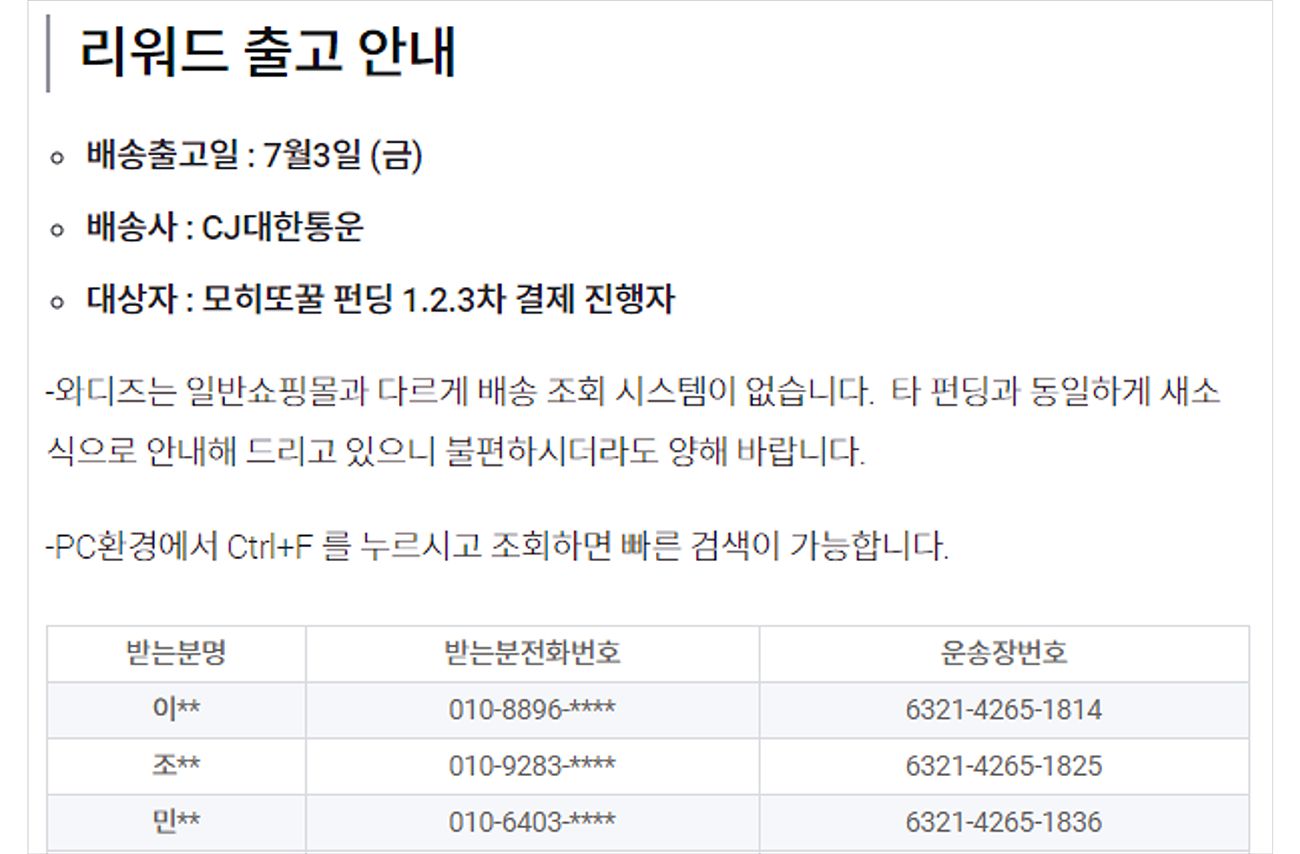 Example of Proper Masking
Fancy a drink in the Maldives? Enjoy a mojito at home this summer! [Walkerbee Tips] News
- You must apply the same masking process when announcing event winners.
All personal information that could reveal the identities of event winners must be masked, just as you would when sharing a tracking number. Please be aware that the announcement of winners is posted in the “News” section, which is accessible to everyone.
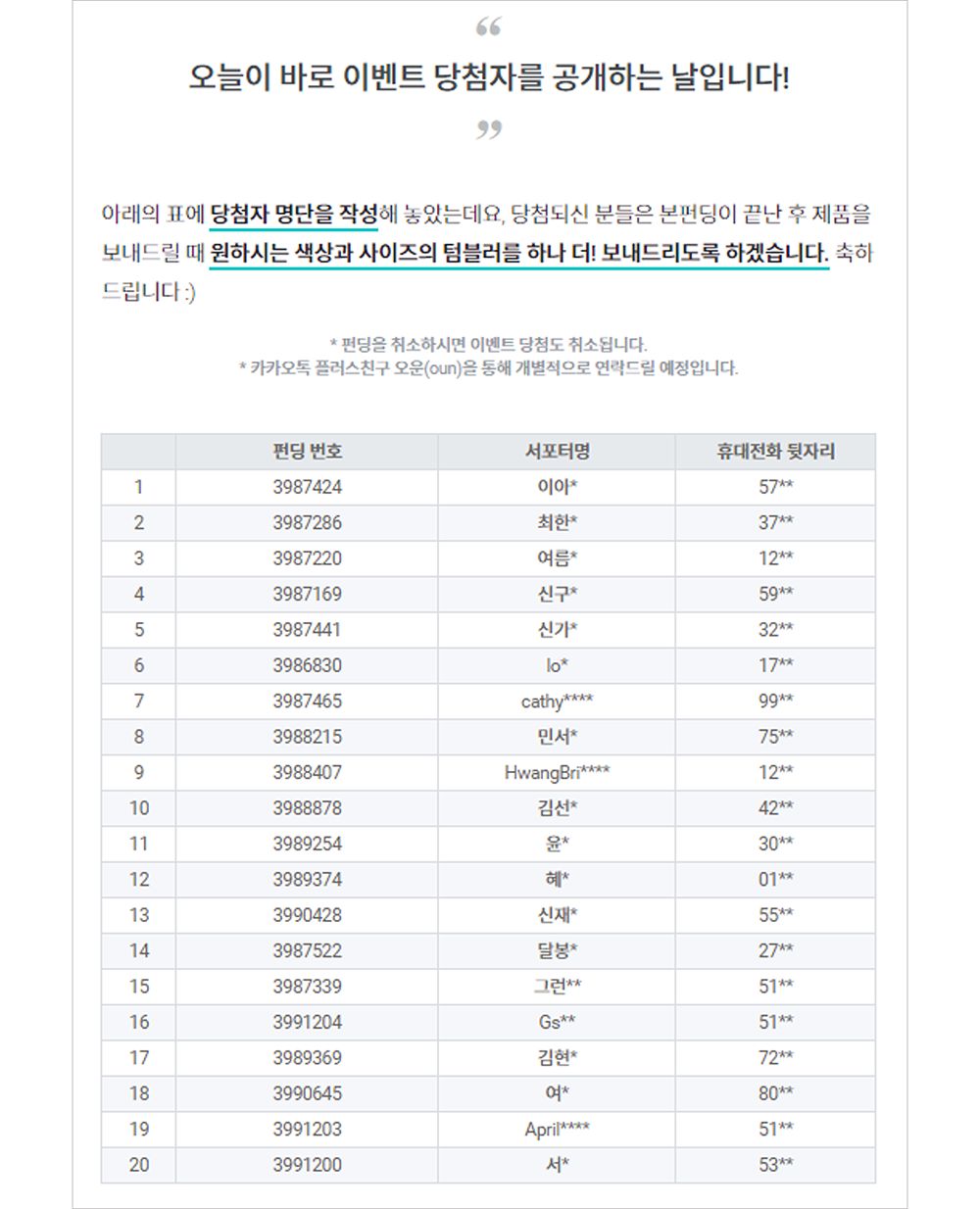 Example of personal information masking for event winners
We’ve opened up that neglected floor! A truly thorough clean | Oun Dual-Cap Tumbler News
We will provide
.
- Please mask the supporters’ real names like this.
- If there are three or more characters
Display the first two characters and mask the rest
- If there are two characters or fewer
Display the first character and then mask the rest
- If there are three or more characters
- Please mask supporters’ email addresses as follows.
- Email addresses with two or more characters
The first three characters (excluding the domain) are displayed, then masked
- Email addresses with 2 characters or fewer
The first character (excluding the domain) is displayed, followed by masking
- Email addresses with two or more characters
- Please mask supporters’ phone numbers like this.
- Cell phone number
Expose two digits per block, excluding the carrier identifier, then mask the rest
- Landline number
Expose the first two digits of each block (excluding the area code), then mask the rest
- Cell phone number
2) You must also take these measures to prevent personal information exposure.
- When you need a supporter’s personal information, you must never request it via comments on the Community or in the “News” section.
There are often situations where we can only respond to a supporter’s inquiry after verifying their personal information. In such cases, you must not request a supporter’s personal information in a public space accessible to everyone, and this rule is not limited to comments on the Community or News posts. Please be sure to remember that this also applies to the maker’s social media accounts, and you must verify personal information through a private channel accessible only to the maker and the supporter.
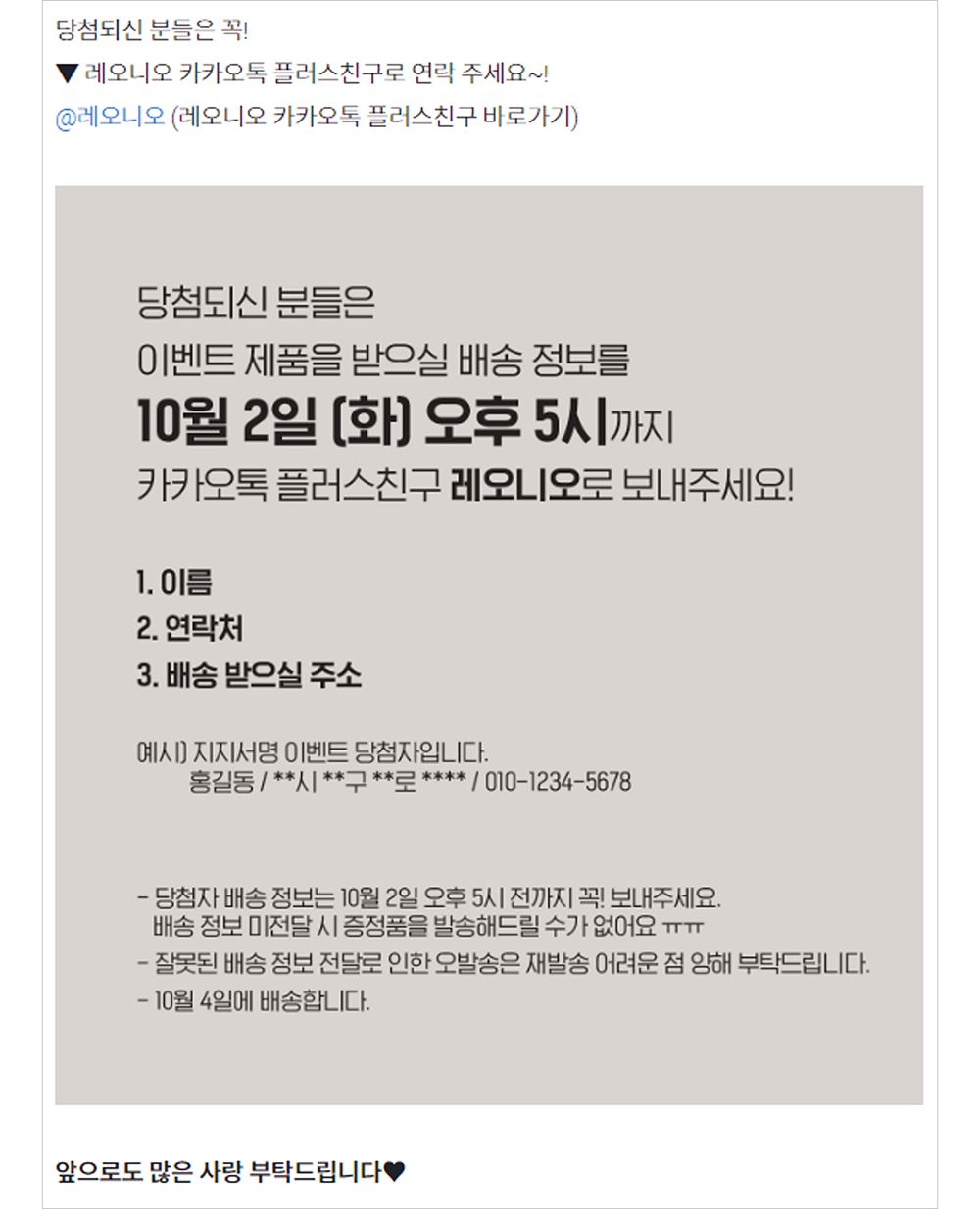 Case where information required for shipping gifts of pledge of support was requested to be sent to a restricted area
[5,000 Reviews] Clear, Hydrated Skin—Confidence in Your Bare Face! Chopima Ampoule & Mask Pack News
- Any personal information collected must be destroyed in its entirety as soon as it has served its intended purpose.
It does not matter whether the personal information was collected to respond to a supporter’s inquiry or verified by the studio to ship Rewards. All personal information must be destroyed immediately after it has been used for its intended purpose, and simply retaining it without destroying it could lead to problems later on.
From post-campaign communication to shipping of Rewards—handled seamlessly
 Since the funding campaign was a success, this should be a breeze!
Actually, there’s an easier way to wrap up this entire process: simply put yourself in your supporters’ shoes.
- If you’re a supporter who has waited through the long funding period, wouldn’t you be worried about whether the shipments are being prepared properly?
- We began shipping sequentially yesterday, so those who didn’t receive their packages yesterday might be wondering when theirs will arrive.
- With so many places making headlines lately over data breaches, aren’t you worried that it might happen to you?
If you take a step back from your role as a “maker” and consider the supporters’ perspective, the tasks you need to complete after a successful funding campaign will become crystal clear. Isn’t it only when you become a maker who can consider the supporters’ perspective that you truly become a “successful maker”?
 I prepared this with the hope that you’ll become a “truly successful” maker.
Once you’ve finished shipping all the rewards, it’s time to listen to your supporters’ feedback. After all, this funding campaign isn’t the end of your business. As you move toward a new beginning rather than an end, we’ll show you how to listen to your supporters’ voices so you can achieve even greater success through continuous growth. Check it out in the next installment!
[Success Maker Online Guide] Series
- [Success Maker Online Guide] #1. My funding campaign was successful—what do I do next?
- [Success Maker Online Guide] #2. I’ve Finished Shipping—What’s Next?