Create Your Own Price Competitiveness: Issue Booster Coupons
Now a booster coupon by means of a function
Please issue the coupon yourself!
📝 Four lines summarized
- Right now, the maker can issue coupons directly at the advertising center.
- Feel free to set the discount method, amount, and period to create benefits suitable for the project.
- When coupons and advertisements are used together, notification applications, payment conversion, and sales can be explosive at the same time.
- If you issue a booster coupon, Wadiz will provide free marketing benefits to your coupon interested supporters.
👉 If you want to boost my project performance right now, start issuing booster coupons!
🎟️What is a booster coupon?
This is a discount coupon that the maker can set up and operate autonomously to boost the project's transition to payment.
Only the actual amount of coupons used by supporters will be deducted when settling the project.
You can set the conditions below yourself.
- Discount method: Select a flat rate or flat rate
- Discount amount: Set to desired amount/ratio
- Period of issuance: Period during which supporters can download coupons
- Expiration date: the actual period available to supporters
Tip! Booster coupons are scheduled to open/Initially, new customer inflows have expanded,
It is particularly effective in boosting sales in the stagnant funding section and boosting at the end of the closing D-3.
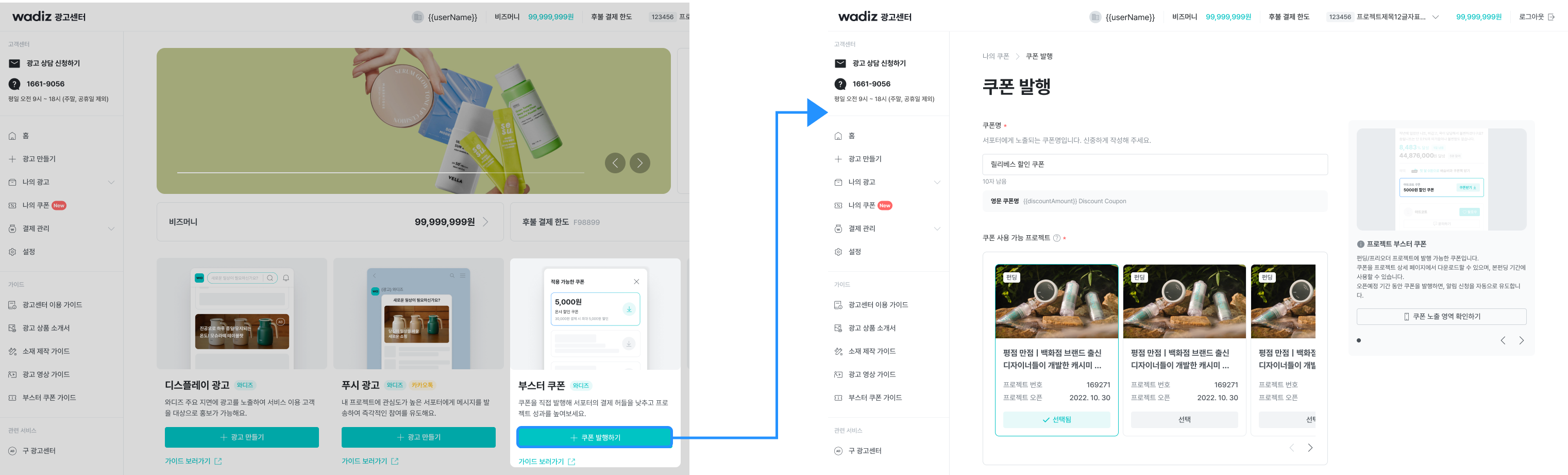
1. The maker can publish it directly at the advertising center.
- Access the advertising center → [issue coupons].
- Set the discount method (flat/flat rate), discount amount, minimum payment amount, issuance limit, issuance period/expiration date.
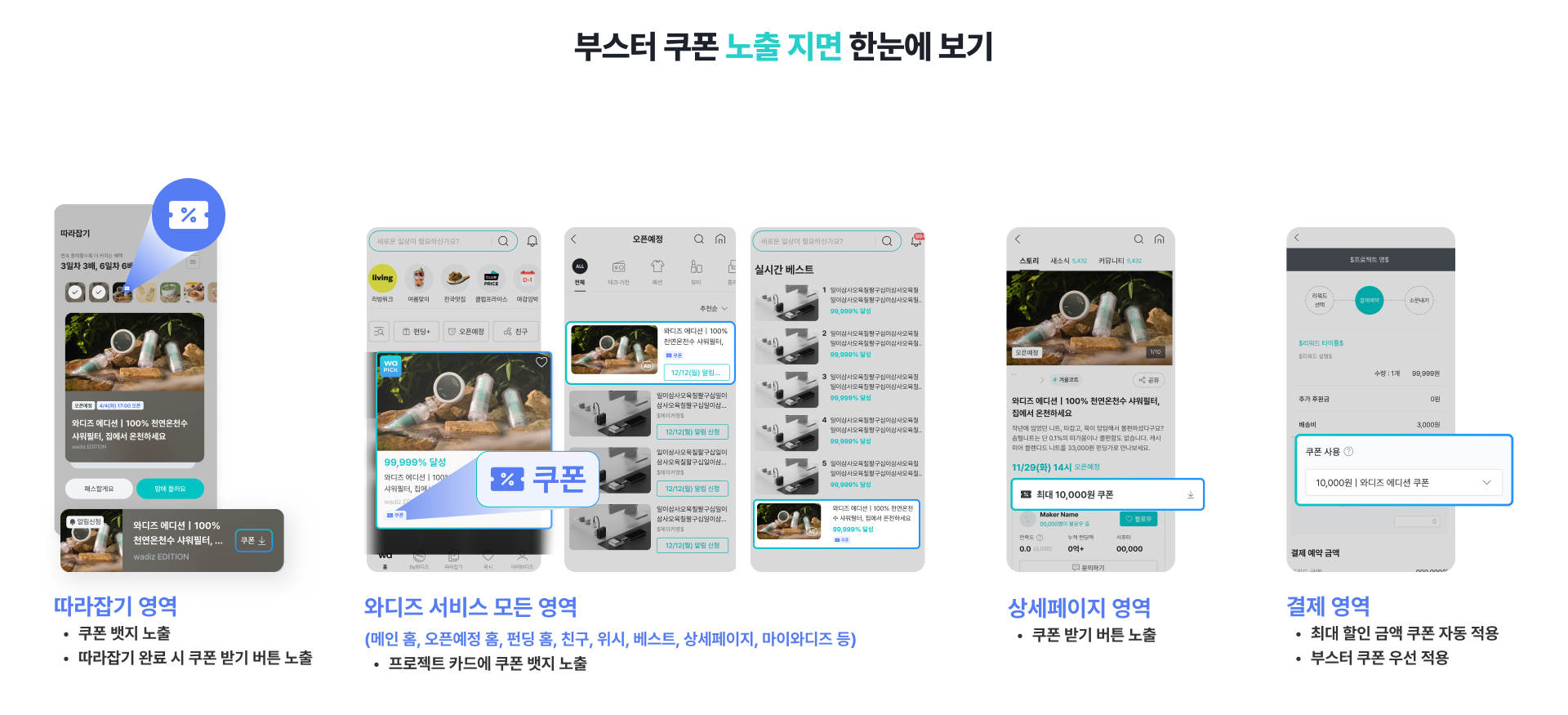
2. The coupons issued are exposed to all Wadiz service areas.
- Coupons are naturally exposed throughout the customer journey, from Wadiz exploration to notification application and payment.
- During the coupon issuance period, it is exposed in the form of a coupon badge and a coupon download button.
- If you set the issuance limit, the coupon badge/burton will also disappear when the coupon quantity runs out!
Tip! Combined with display ads, mobile main home, scheduled to open, funding home, best, and more
You can top-expose the coupon benefits of the project on key pages.
3. Only makers who issue booster coupons will receive 'free' marketing benefits.
If you issue a coupon, Wadiz will provide free, self-guided, and strong support.
Benefits ① Automatically expose the main home 'Wadiz Coupon ZIP' collection
The project where the booster coupon was issued is
"Always receiving high attention at Wadiz Main Home"Wadiz Coupon ZIP' It is automatically exposed to the collection page.
- Automatic exposure without application
- Naturally leading to new supporters' inflow and transition to payments
In other words, you can get free promotions on the Wadiz Main Home just by issuing coupons.
Benefits ② Free shipping of 'App Push/Text/Kakaotalk' to customers interested in coupons
Some of the booster coupon issuance projects are randomly extracted
We support sending additional promotions through app push, text, and KakaoTalk to Wadiz's coupon high involvement customers.
- Shipping terms: Download coupon within 1 day + Outstanding customer
- Shipping channel: App push 80% / Text and KakaoTalk 20%
- No separate shipping costs
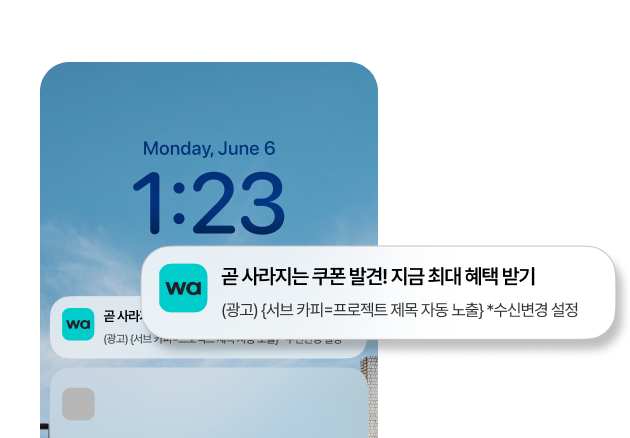 App push shipping example image
Go to issue coupons right now
➡️[Advertising center]
4. Matters to be noted
- Booster coupons cannot be used in duplicate with other coupons such as special exhibitions.
- Funding/preoder projects can be issued coupons after approval of the first review.
- The store cannot issue coupons.
✅How to issue booster coupons
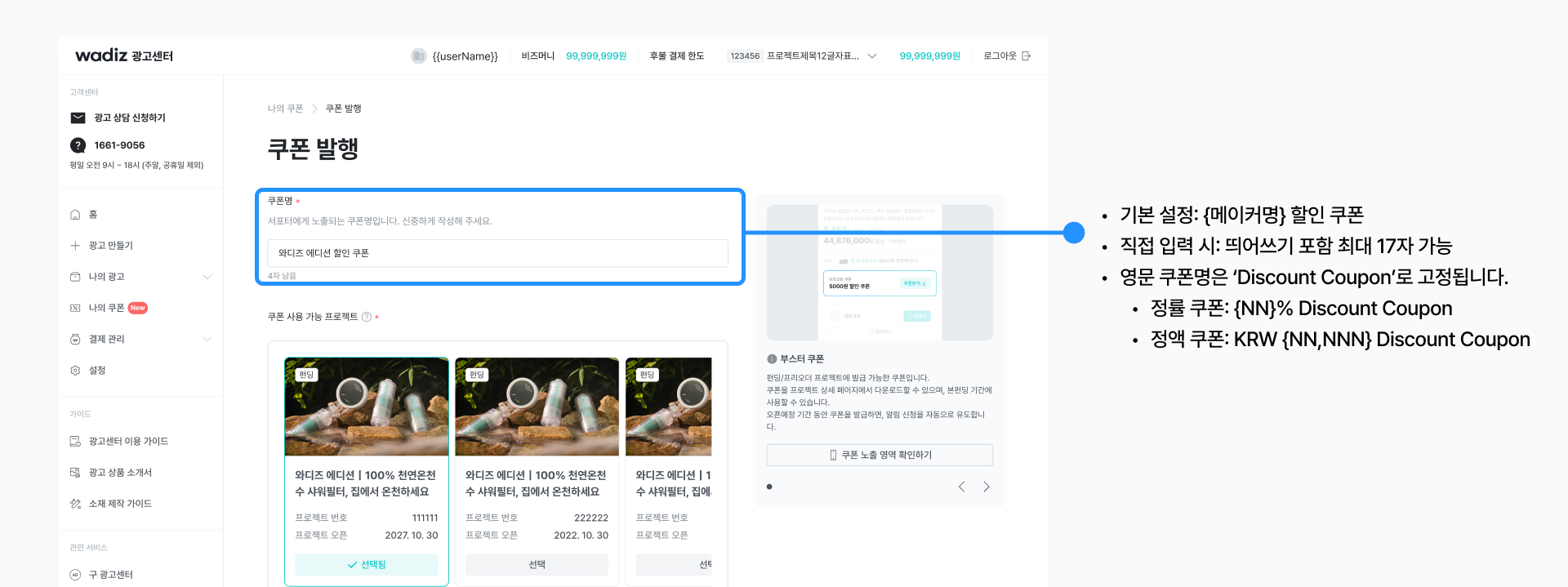
1. Creating a Coupon Name
- Coupons are generated on a project-by-project basis, and coupon names can be created directly.
- The coupon name is the coupon name exposed to the supporter, so please write it carefully.
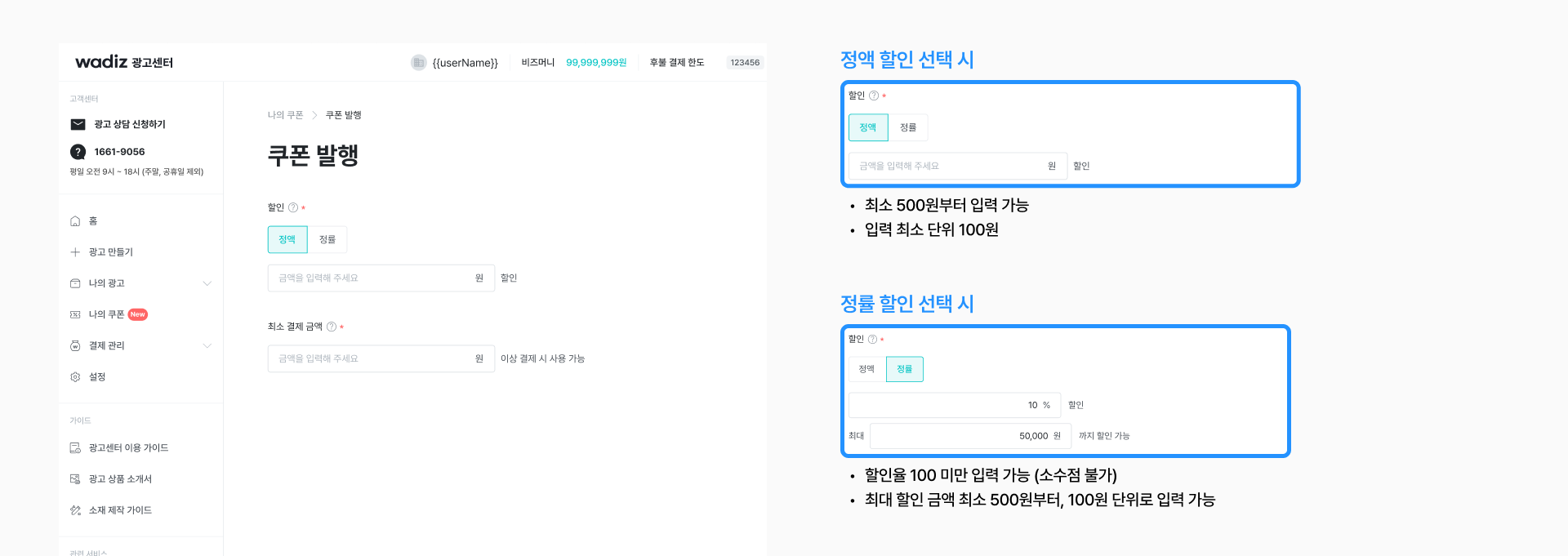
2. Setting Up Coupon Discounts
- Set a flat rate (KRW) or flat rate (%) discount method and minimum payment amount.
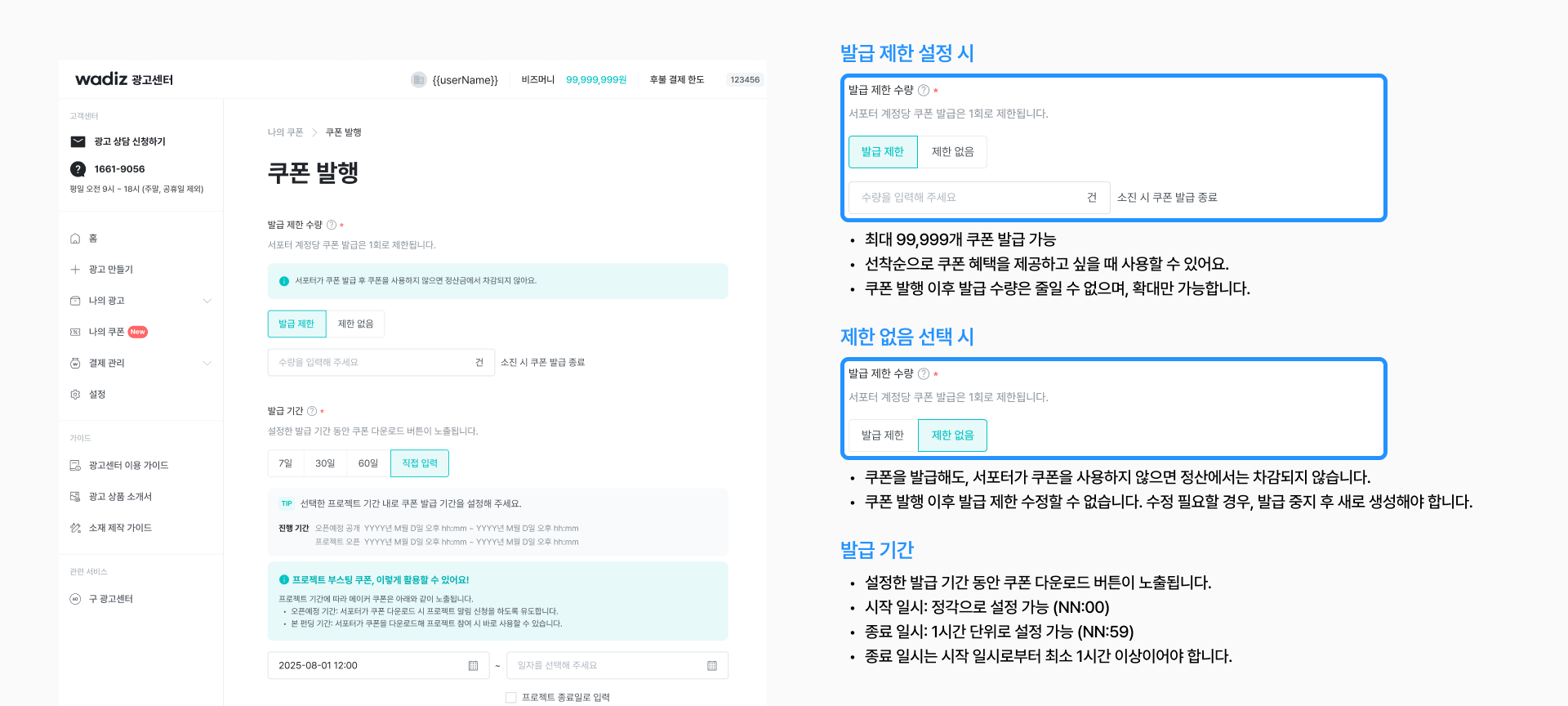
3. Setting the issuance limit quantity & issuance period
- Set the coupon downloadable period and the issuance limit.
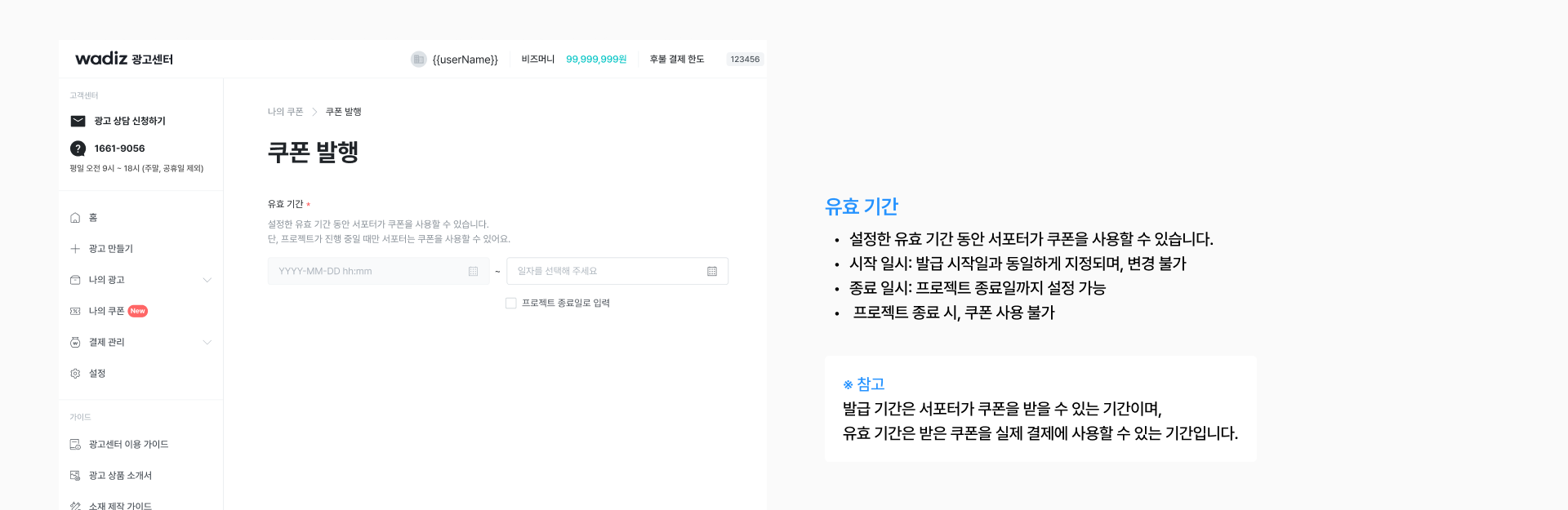
4. Setting the expiration date
- Set the validity period for supporters to use coupons.
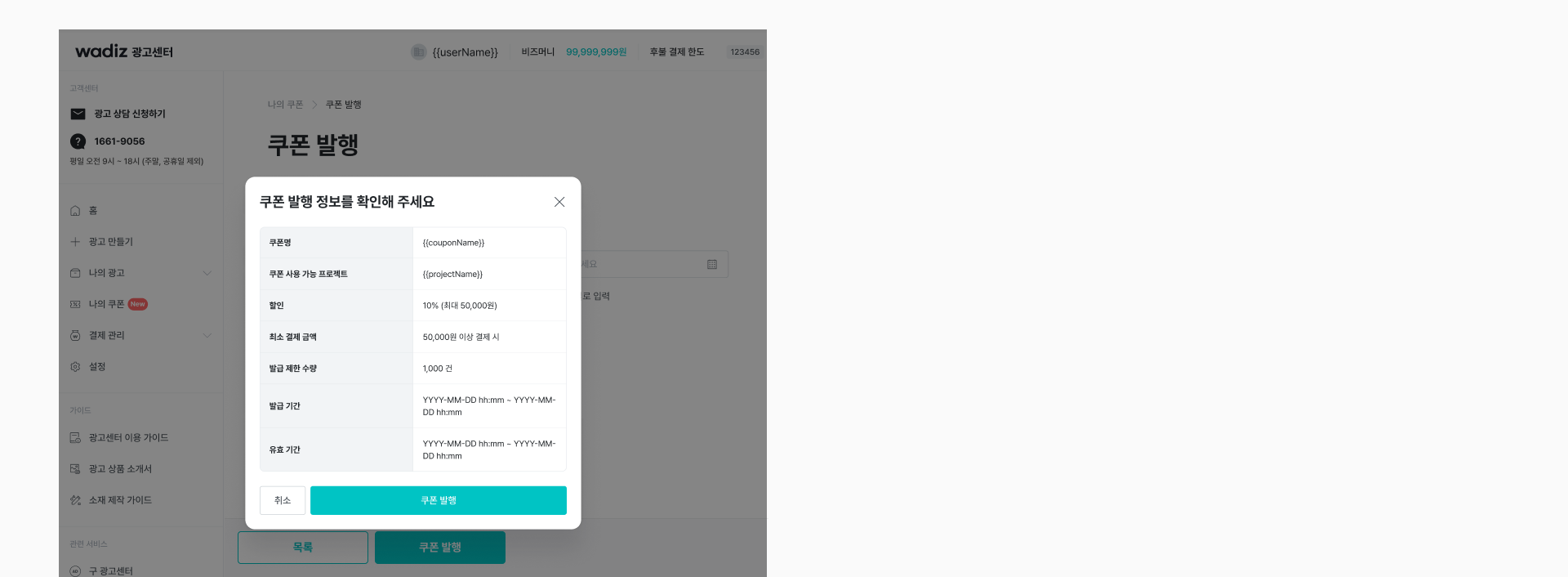
4. To complete issuing coupons
- Please check the coupon information you set and press the [Coupon Issue] button.
Go to issue coupons right now
➡️[Advertising center]
✅How to check and modify booster coupons
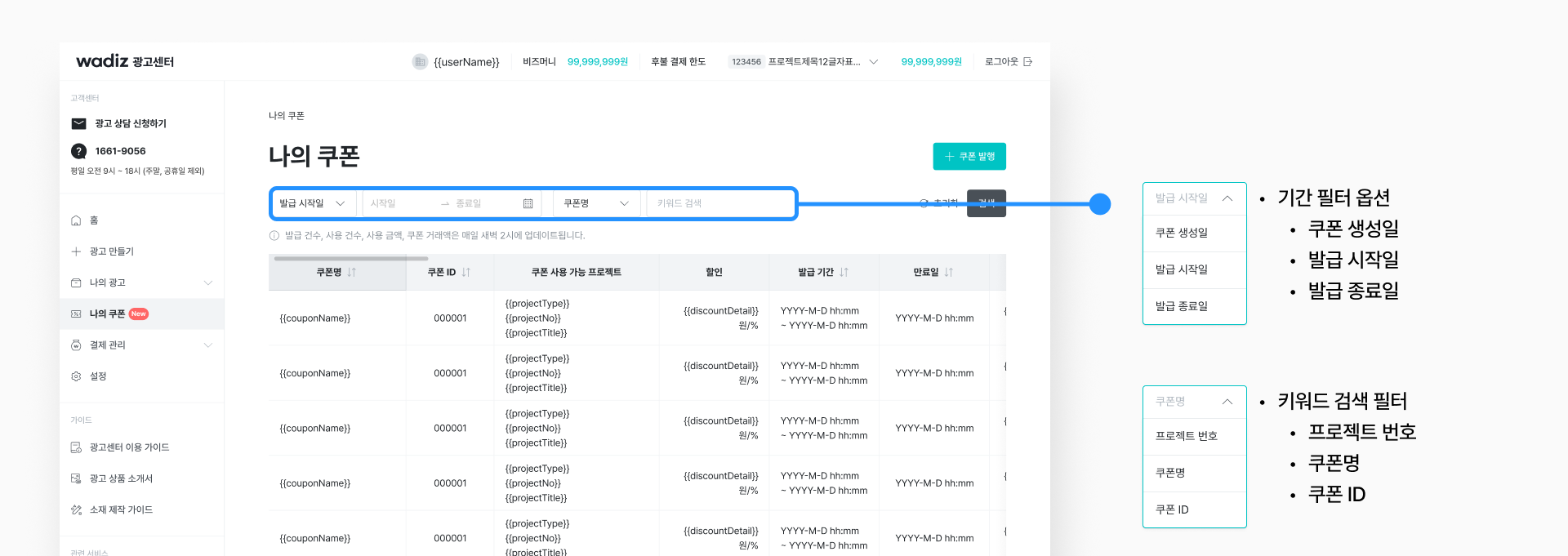
1. Check Coupons
- Please look it up at the Advertising Center - [My Coupon]. The number of issues, number of uses, amount of use, and coupon transactions are updated at 2 a.m. every day.
2. Modify Coupons
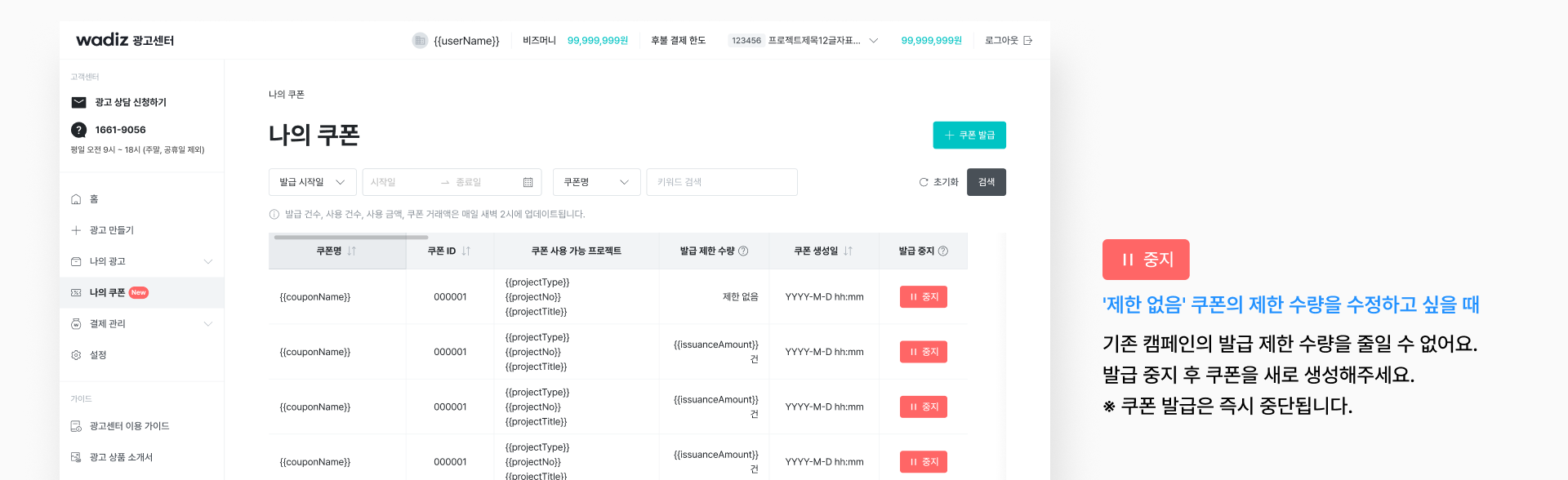
- After the coupon issuance start date, the issuance limit cannot be reduced, but only expanded.
- If you want to modify the limited quantity of the 'no limit' coupon, please stop the coupon and create a new one.
✅Booster Coupon Settlement Method
1. Check the coupon usage amount
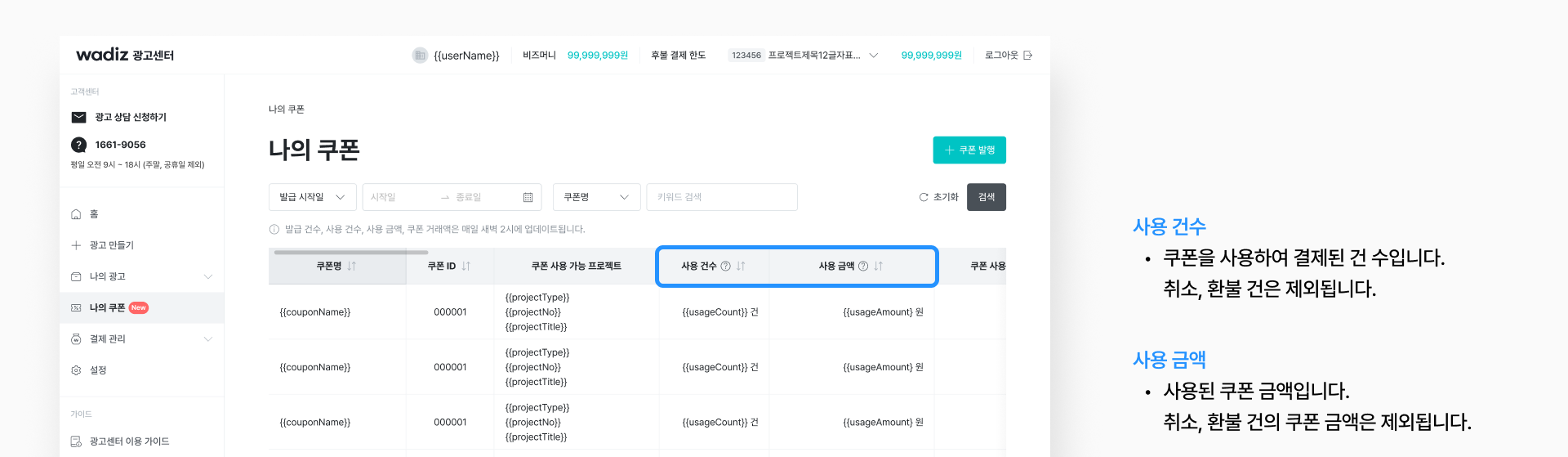
- You can check the number of uses and the amount of each coupon issued by the Advertising Center - [My Coupon].
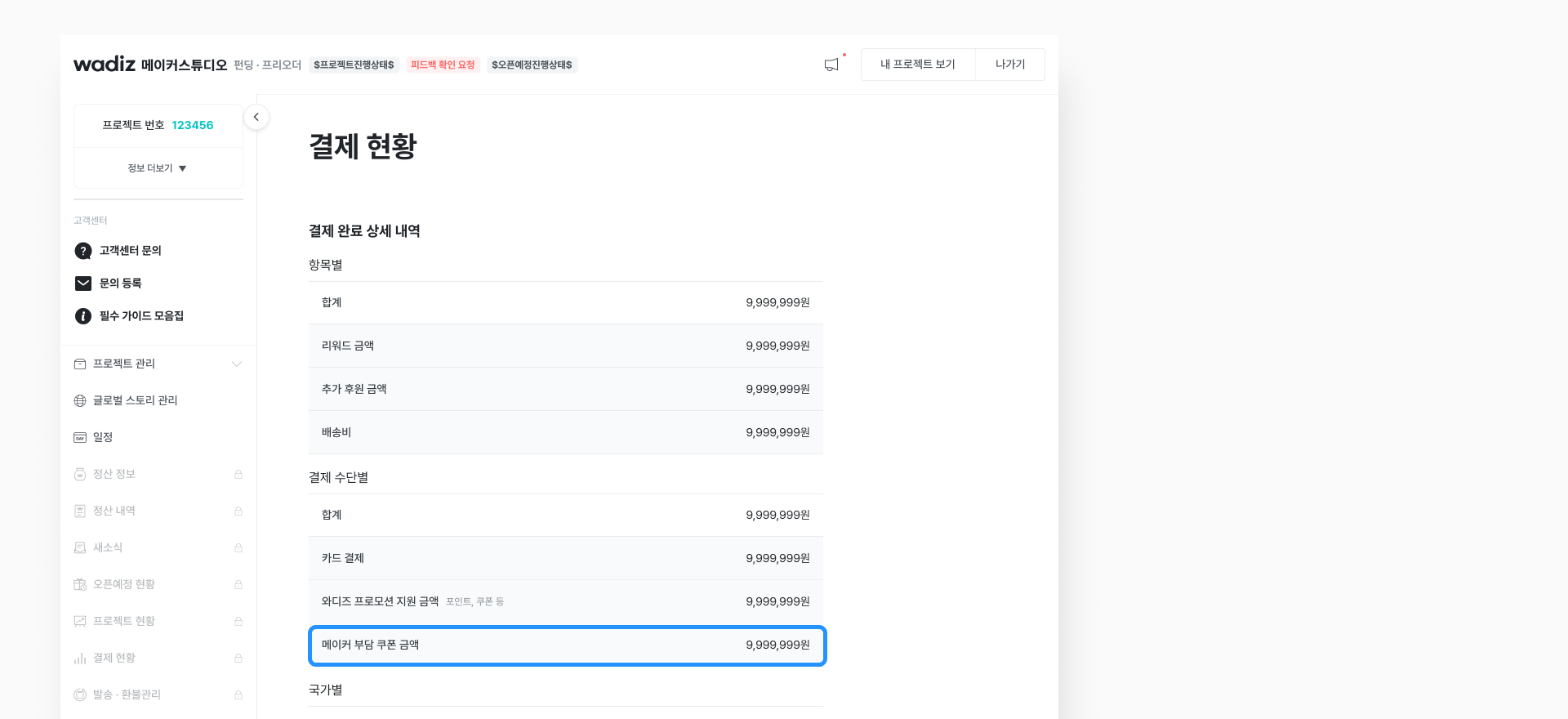
- You can check the total amount of coupons issued by Maker Studio - [Payment Status].
2. The amount of coupon used is deducted when settling the project.
- You can look up the 'maker-paying coupon amount' in the settlement statement.
- Coupons are not subject to provision of goods/services and therefore no tax invoice is issued.
💬 Frequently asked questions
| Sortation | content |
|---|---|
|
To issue coupons |
Q. Can I make multiple coupons in one project? A. Yes, it's possible. You can issue multiple coupons within one project. However, it is recommended that the discount method be fixed in one way. In other words, you should choose and use only one of the flat rate (%) discount or the flat rate (amount) discount, and please avoid mixing the two methods. |
| Q. Can coupons be applied to multiple projects? A. No, I'm not. Coupons must be issued separately for each project, and one coupon cannot be applied to multiple projects at the same time. |
|
| Q. When can I start making coupons? A. Coupons can be issued after the project is approved for the first review (requirement confirmation). Coupons can be issued even at the scheduled opening stage. |
|
| Q. Is there a separate fee for issuing coupons? A. No, it's not. There is no additional fee for using the coupon. Only the coupon amount used by the supporter will be deducted when settling the project. |
|
| Q. What is the difference between the coupon issuance period and the expiration date? A. The issuance period refers to the period during which you can receive a coupon. The coupon must be downloaded by the supporter within this period for use. The expiration date refers to the period during which the issued coupon can actually be used. Therefore, the issuance period and the expiration date may differ. For example, the issuance period can be set to the first week of funding, and the validity period can be set until just before the funding deadline. This allows you to distribute coupons only for a limited period of time, but to operate the coupons you receive until the end of funding. |
|
| Q. Can I use booster coupons in duplicate with Wadiz coupons such as special exhibitions? A. No, I'm not. Wadiz coupons and coupons issued by the maker cannot be used in duplicate. Supporters can choose and use only one of the two. |
|
| Q. When will the coupon expiration notification be sent? A. A coupon expiration notification message will be sent automatically at 8 a.m. on the day of the expiration date set. |
|
| Q. Do I have to set the issuance limit? A. It's not mandatory. However, if you want to provide first-come, first-served benefits or manage your budget, it is recommended that you set the 'issue limit quantity'. |
|
| Q. Is there a disadvantage in the settlement if there is no issuance limit? A. I don't have any. Coupons are only deducted from the actual amount used at the time of settlement, so you won't be charged for issuance alone. |
|
| Q. What is the minimum/maximum issuance period? A. It can be set at least 1 hour, and the end date must be within the end date of the project. |
|
|
Modify Coupons
|
Q. Can I change the conditions even after I start issuing coupons? A. For coupons that have been issued, only the limited number of issuance can be increased, and the rest of the conditions cannot be modified. If you want to change the details such as the discount method, discount amount, and minimum payment amount, you need to stop the existing coupon and create a new one. |
| Q. Can I reduce the issuance limit after I start issuing coupons? A. No, I'm not. Coupons that have already been issued cannot reduce the limited quantity. If necessary, you should stop the existing coupon and issue a new one. |
|
| Q. Can I increase the issuance limit? A. Yes, it's possible. Even if it is a coupon already issued, the quantity can be expanded additionally |
|
| Q. I set it to 'no limit' at first, but can I put a limit on the quantity later? A. It's impossible. Coupons set to 'No Limits' cannot change the issuance limit later. If you want to place restrictions, you need to stop the existing coupon and issue a new one. |
|
|
Settlement of Coupons
|
Q. How will it be settled if I issue a coupon? A. After the project is completed, the coupon usage amount is deducted from the actual payment completion amount and is settled. |
| Q. Is a tax invoice issued for the coupon exhaustion amount? A. No, I'm not. Coupons are not subject to the issuance of tax invoices because they are not actually sold goods or services. |
|
| Q. Where can I find the amount of coupons used? A. You can check the details of each coupon at the Advertising Center - [My Coupon]. Even if multiple coupons have been issued for the project, the Maker Studio - [Payment Status] and the statement of settlement will show the total amount used in the 'Maker Payable Coupons' item. |
📘1000% Booster Coupon Use Guide
How successful makers increased their sales by 10 times with just one coupon,
Check it out right now.
Now, with the most attractive price and timing for supporters
Are you ready to introduce your project?
Issue discount coupons right now.