Funding & Pre-order
I've sent the reward. How do I process the reward 'shipment'?
Please change the shipping status in the Maker Studio [ Shipping· Refund Management ] tab.
Have you shipped the reward you promised to your supporters? In the Maker Studio [Shipping·Refund Management] menu, enter the shipping information, and change the reward shipping status to 'Shipment Complete' to complete the shipping process.
※ Please make sure to process the shipment after sending the reward.
- If the shipping process is not completed, the final settlement amount will not be paid.
- If the shipment is not processed by the scheduled reward delivery date, refund requests may be submitted.
- If the shipment is not processed within 11 months from the project end date, payments for unshipped items may be reversed.
※ You can choose the shipping processing method depending on the quantity.
- Individual Shipping Processing : Enter the shipping information for each funding number one by one. This method is suitable when the number of reward shipments is small.
- Bulk Shipping Processing : Enter shipping information for up to 300 items at once. Download and use an Excel file. (▶Go to Bulk Shipping Processing Guide)
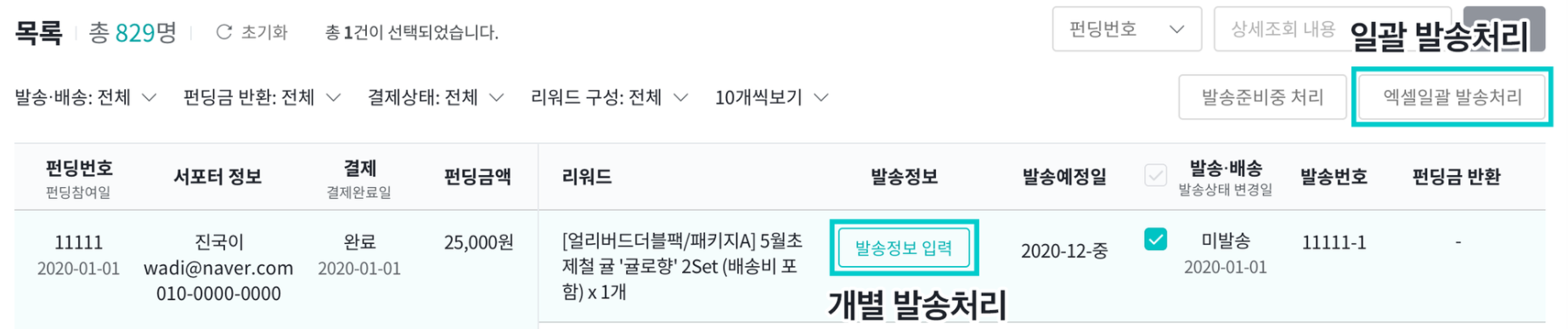 |
< Individual Shipping Processing Method >
This method is suitable when the number of reward shipments is small. Enter the reward shipping information (such as courier tracking numbers) one by one and save.
① Click [Enter Shipping Information].
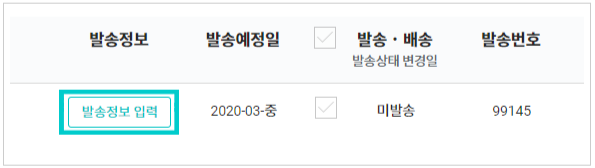
② Enter the shipping method, courier company, and tracking number.
- Select the method used for reward delivery: courier, freight delivery, or direct handover.
- After entering all required information, click the [Complete] button.
- Please enter accurate information according to the shipping method you used. If the shipping method is not entered correctly, the settlement process may be delayed or supporter inquiries may increase.
| Courier |
|
| Direct Handover |
|
③ Please check the shipping processing history.
- Once saved, the shipping status change date will be displayed in the supporter list, and you can check the current delivery status (In Transit, Confirming Receipt, Delivery Complete).