[Mastering Settlement] #2. Pre-order Edition
This content is part of
"Mastering Settlement"
series. pre-order.
Be sure to take this with you!
- Among the three types of pre-orders, “Domestic Exclusive” projectsfollowthe same process as funding: preliminary settlement → final settlement. (Learn More)
- Forthe other pre-order types—“Special Bundles” and “Limited Editions”—settlementis processedall at once; however, if you need an interim settlement, you can apply for the interim settlement service. (Learn More)
- We’ve compiled a list of frequently asked questions about settlements.
The settlement process differs between funding and pre-orders
It’s the final stage of your project—and perhaps the most exciting one. Congratulations to all makers who have reached the “settlement” stage!
If you’ve successfully concluded your project, you’re likely already familiar with the difference between wadiz’s “Funding” and “Pre-order” services. Since the settlement process varies depending on the service type, let’s review the basics once more before we begin.
- funding:
- Projects that introduce products or services that have never been distributed before
- Fundraising projects to support individual donation and sponsorship activities
- pre-order: Includes the following three types. (Encore and global projects are also included here.)
- Domestic Exclusive
Projects that feature products and services exclusively on wadiz until 7 days after the completion of all Rewards shipments - Special Bundles
Projects offering special bundles or price discounts available exclusively on wadiz during the campaign period - Limited Edition
Projects featuring products or services available in limited quantities that will not be produced again in the future, regardless of the project’s duration
- Domestic Exclusive
In this post, we’ll explore the settlement process for “Special Bundles” and “Limited Edition” projects, which are pre-order project types.
If your project is a funding or “Domestic Exclusive” project, please refer to the article below.
> [Mastering Settlements] #1. Funding Edition
*If you’re using the Global service, the settlement timing may vary, so please refer to the link below
➡️How does settlement differ for global projects?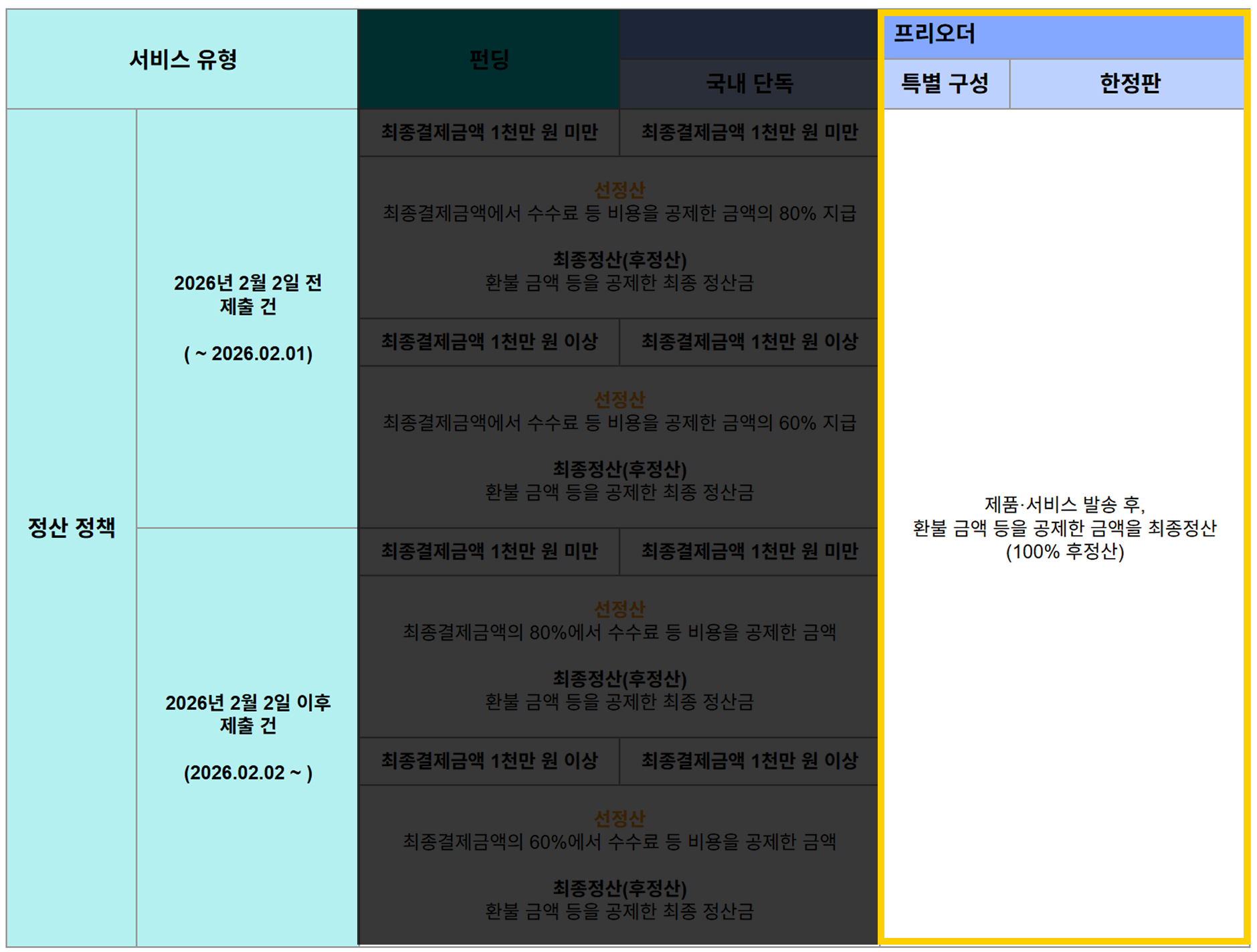
1. Settlement Process for “Special Editions” and “Limited Edition” pre-orders
1) Get an overview of the settlement process!
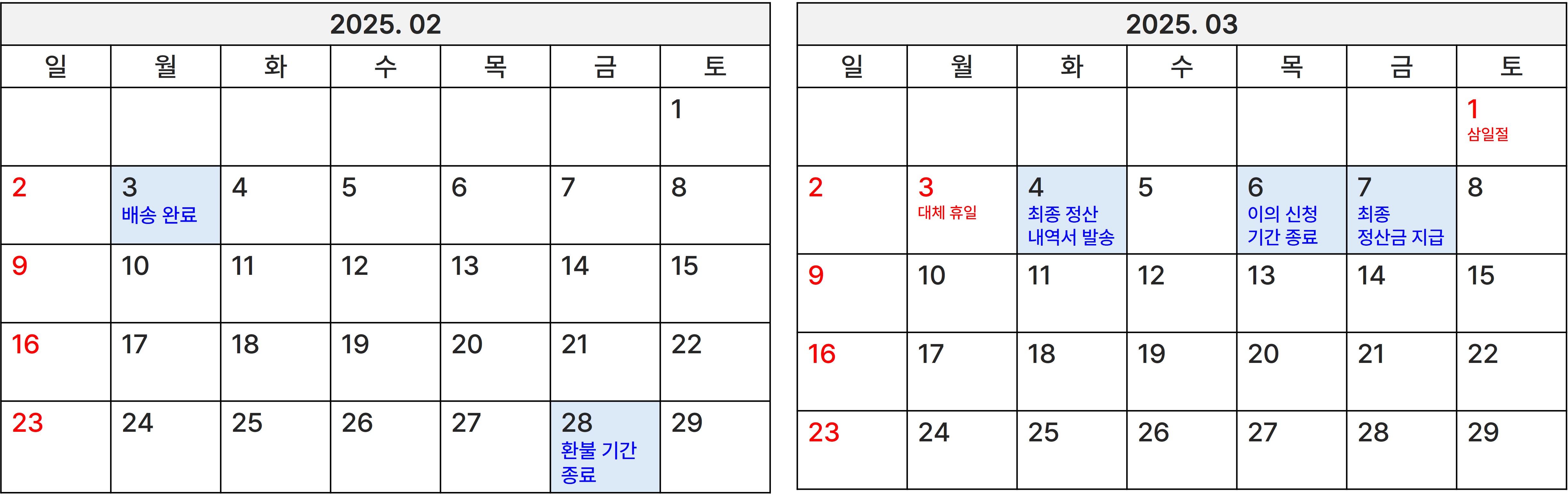
Once the project ends, two payment attempts will be made over a 2-day period.
- In this case, the final amount successfully charged is referred to as the “settlement amount,”
- and the “settlement amount” is calculated as the total of this amount minus wadiz’s commission and any refund amounts.
- The refund period ends 25 days after the last shipment date, and we will send you the final settlement statement within one business day thereafter.
If the settlement date is approaching, please check your email frequently.

(Example image)
- If you’d like to receive a portion of your settlement amount in advance—as with “Funding” or “Pre-order (Domestic Only)” projects—you can apply for the advance settlement service.
The advance settlement service allows you to receive 60% of the settlement amount in advance (20% for projects in the “Classes” and “eBooks” categories submitted before September 1, 2024) for projects that have been approved after application. (Learn more) - The two business days following the issuance of the settlement statement are the period for filing objections. If you believe there is an error in your final settlement statement, you can file an appeal during this period by sending an email to the address below.
- Dispute Submission Email:info@wadiz.kr
- Dispute Submission Email:info@wadiz.kr
- If there are no issues with the statement and you do not file an objection, the final settlement amount will be paid within 5 business days on Mondays, Wednesdays, or Fridays. (However, payment may be held if issues such as project cancellation arise.)
Once the settlement amount is paid, we’ll send a notification message to the maker’s mobile phone.
- If you haven’t received an AlimTalk notification, please check your email inbox. We will contact you individually if there are any issues with your settlement request or required documents.
2) Be sure to file your tax return!
When you receive settlement funds, you are generally required to file and pay taxes in accordance with relevant laws and regulations, such as the Corporate Tax Act, the Income Tax Act, and the Value-Added Tax Act. However, since the applicable laws and regulations vary depending on the type of representative and the nature of the project, we are unable to provide precise guidance. Therefore, please consult with a tax officer or a professional tax accountant before paying your taxes.
2. Essential Requirement for Settlement: Entering Shipping Information
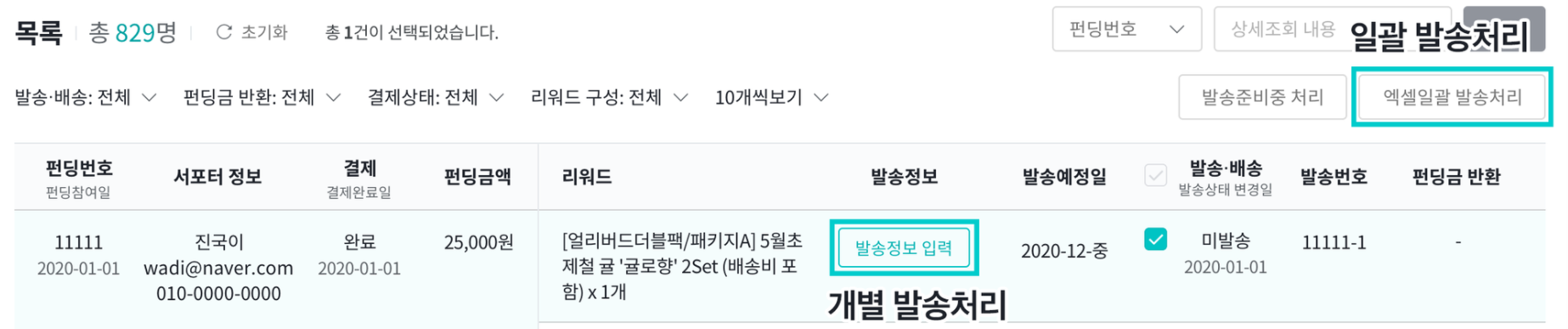
If you have shipped the rewards, please enter the shipping information in Maker Studio by following the steps below. For any project, you must enter the shipping information before proceeding to the next step.
- Maker Studio > Shipping & Refund Management tab > Bulk Excel Upload or Enter Shipping Information
▶Note: I’ve sent the Rewards. How do I process the shipment?
3. Tax Invoice Issuance Date
The final settlement amount is paid after deducting wadiz’s commission in addition to any refund amounts. Since only the portion of the final settlement amount corresponding to wadiz’s commission constitutes wadiz’s revenue, we issue a tax invoice to the maker to serve as proof.
wadiz’s service fees are broadly divided into three categories: intermediary fees, value-added tax, and card payment (PG) processing fees. Since these service fees differ in nature, the dates on which tax invoices are issued also vary. wadiz issues tax invoices three business days after the fee confirmation date.
So, let’s take a look at when the confirmation dates for each fee are.
- Intermediary Fees & Additional Fees (Basic Commission, launching soon, PD Consulting, etc.)
Fees are finalized on the last day of the month in which the purchase was confirmed. Tax invoices are issued by the 10th of the following month after consolidating all confirmed purchases for that month. - Card Payment (PG, etc.) Processing Fees
Finalized on the final settlement payment date
A quick note! You should not issue tax invoices to wadiz. If you’re curious about the reason, please check out the following article.
> How should I handle tax invoice issuance?
Please report this revenue as “Other Revenue” (excluding amounts for which regular receipts were issued).
- Revenue Recognition (Confirmation) Date:When both Rewardsdelivery and refunds are fully completed
- Revenue Recognition Criteria: Totalcompleted payments – refunded payments
- Revenue Documentation:
Please refer to the final settlement statement and
Please refer to the Rewards information/participation records available via Maker Studio > Shipping & Refund Management > “Download Participant Information.”
4. Frequently Asked Questions
1) Refunds
- Do I need to amend the tax invoice after issuing a refund?
Yes, since your sales have decreased, you must either amend your sales report or revise the tax invoice. During this process, the intermediary fee will not be refunded in accordance with the agreement, but the payment processing fee will be refunded to the maker.
- Is it possible to refund only a portion of the funds raised for individual Rewards?
Yes, it is possible. However, for funding projects, supporters cannot request a refund if there are non-refundable reasons that were previously announced. For more details, please refer tothe wadiz Service Refund Policy (link).
2) Fees and Settlements
- Is a platform fee charged on donations as well?
Since donations are also funds raised from supporters through the wadiz platform, a commission is applied.
- How is the amount subject to the intermediary fee calculated?
It is calculated by multiplying (the final payment amount minus the total shipping costs) by the commission rate.
- What is the base amount for credit card processing fees?
It is calculated by multiplying (Final payment amount – Amount paid with points & coupons) by the credit card processing fee rate (3%, VAT excluded).
In the event of a refund, we will refund the payment processing fee for the canceled credit card portion of the refund, excluding the amount paid with points and coupons.
- It seems a different fee rate was applied than the one I was informed of
The fee rates listed under the “Fees & Settlement Management” tab in Maker Studio do not include VAT. When settling accounts, the fee rate including VAT is applied, and you can view the fee rate including VAT on your settlement statement.
3) Changing Maker Information
- I want to change the bank account for receiving settlement funds
Please send your account information (bank, account holder, account number) and a copy of your bankbook to info@wadiz.kr로.
(You can only change the account to one belonging to the same maker—i.e., the same legal entity or the same representative/sole proprietor. It is not possible to set a third party’s account as the settlement account.)
- Change of Business Representative and Business Name
- For corporate makers, please submit must submit one copy of the Certificate of Corporate Registration detailing the changes, an official letter, and a copy of the updated bank account statement.
- Sole proprietor makers must a Business Registration Certificate showing the new business name and a copy of the updated bank account statement
to info@wadiz.kr로.
The business name/corporate name and the account holder’s name must match.
-
<Mastering Settlements> Series
- [Mastering Settlements] #1. Funding
- [Mastering Settlements] #2. Pre-orders