An exchange/return (refund) request has been submitted from the store. What should I do?
In [Store Maker Studio], you can view exchange·return (refund) requests and approve, hold, or reject them.
1) Checking exchange·return (refund) requests
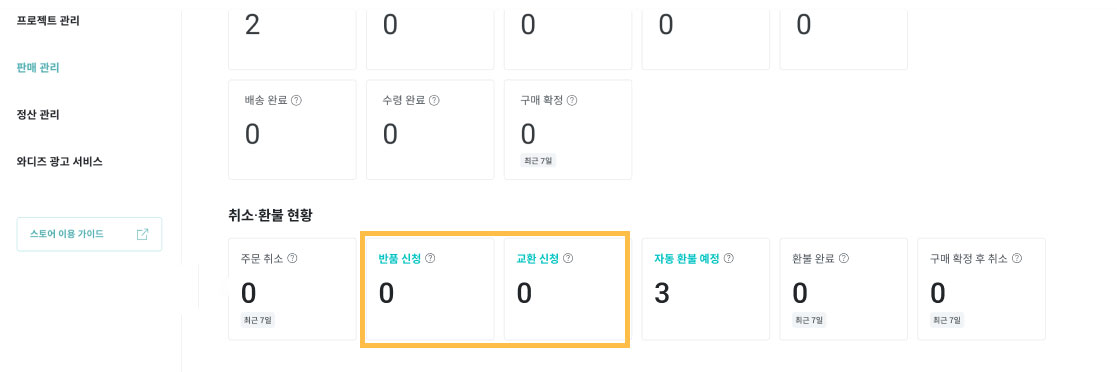
When an exchange request is submitted, you can view it in the [Sales Management] menu of [Store Maker Studio].

If you do not process the exchange·return within 7 business days from the date the supporter requests it, an automatic refund will be applied. Please check and respond to exchange·return requests promptly.
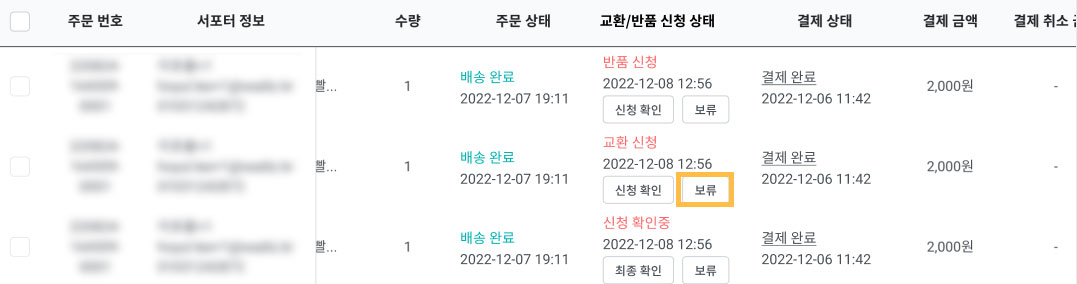
- When the status changes to automatic refund pending, you can use the [Hold] button. Use this only when you need more time to inspect the exchange·return.
- After selecting [Hold] and entering the reason for holding the process, the automatic refund approval period will be extended from 7 business days to 10 business days.

2) Immediate processing OR processing after return inspection
You can choose how you want to process the exchange.
- Immediate processing: Approve or reject the exchange·refund quickly without going through a return retrieval process.
- If you approve anexchange with immediate processing you must resend the exchange product directly to the supporter right away.
- Processing after return inspection: After retrieving the product, approve or reject the exchange·refund.
- The supporter can send the return package directly to you or request that you retrieve it.
- You must separately communicate with the supporter to receive any additional shipping fees required for reshipping the exchange product after the return. Along with the additional shipping fee, please provide the supporter with your personal bank account or the payment method you use.
3) Approve OR Reject
After verifying the reason for the supporter's exchange·refund (return) request and the returned product, you can approve or reject the exchange.
- Approve:
- Refund: When you approve a return through [Store Maker Studio], the exchange·return shipping fee set based on the return reason will be reflected in the refund amount.
- Exchange: After retrieving the product, select [Approve Exchange] and enter the reshipping information (tracking number).
- Reject:
- If a supporter requests a return that you want to deny, you can reject the exchange request. Please enter the reason for rejecting the exchange through Maker Studio. When you reject the exchange, the supporter's purchase history will change to ‘Purchase Confirmed’ status.
- If an exchange is not possible, you can process a refund. Before proceeding with the refund, communicate directly with the supporter to confirm their refund intention, and provide guidance on the refund method (package delivery, shipping fees, etc.).